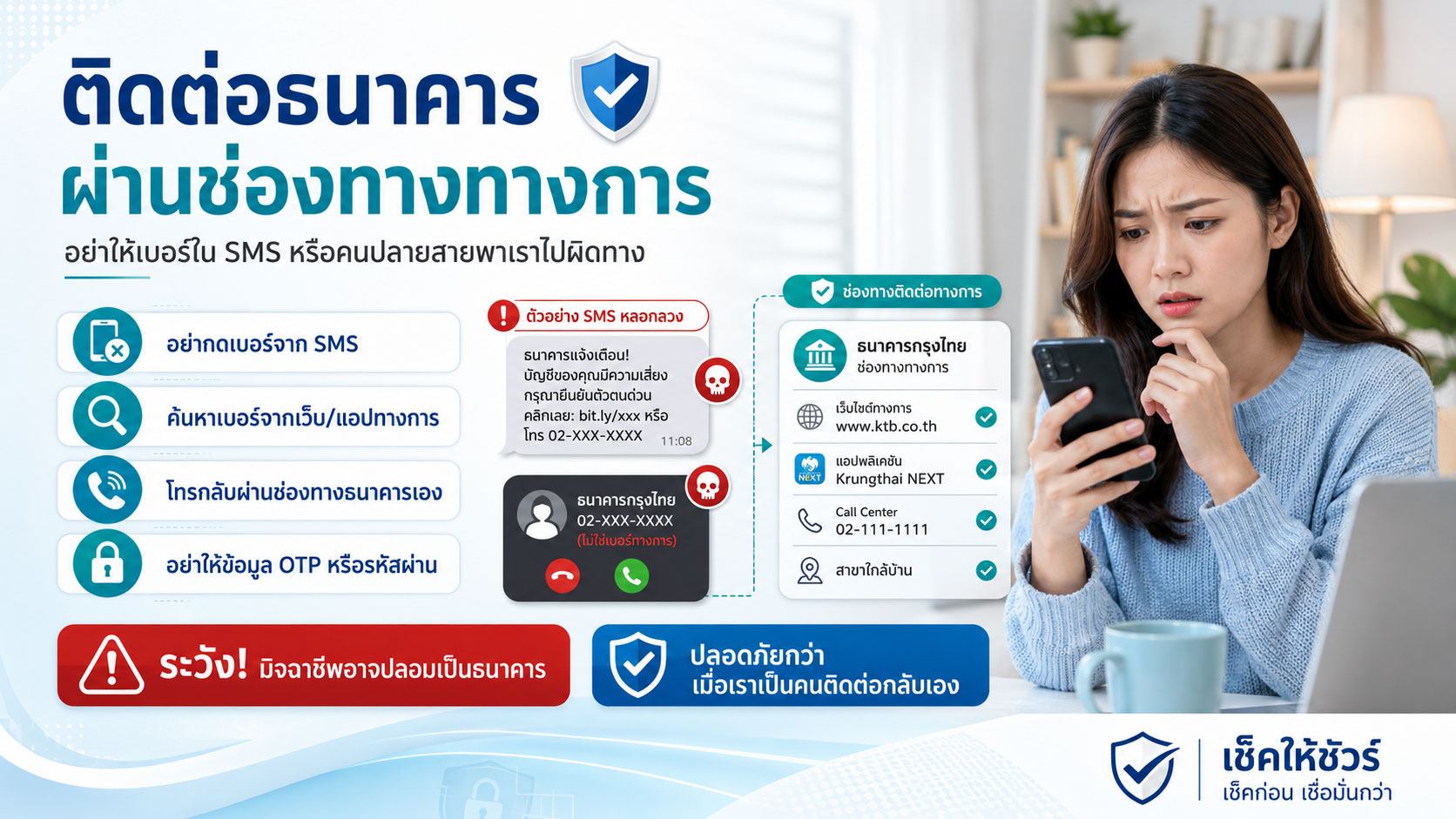
เมื่อมีเรื่องเกี่ยวกับเงินเกิดขึ้นแบบกะทันหัน สิ่งแรกที่หลายคนรู้สึกคือ “ต้องรีบแก้”
ได้รับ SMS ว่าบัญชีมีปัญหา
มีคนโทรมาบอกว่าบัตรถูกใช้ผิดปกติ
มีข้อความแจ้งว่าต้องยืนยันตัวตน
มีลิงก์ให้กดเพื่อแก้ไขรายการ
หรือเพิ่งรู้ตัวว่าอาจโอนเงินให้มิจฉาชีพไปแล้ว
ในช่วงเวลานั้น ความกลัวมักมาก่อนเหตุผล
เรากลัวเงินหาย
กลัวบัญชีถูกระงับ
กลัวมีคนเอาข้อมูลไปใช้
กลัวพลาดเวลาสำคัญ
และกลัวว่าถ้าไม่รีบทำตาม อาจเสียหายมากกว่าเดิม
แต่ในสถานการณ์เกี่ยวกับบัญชีธนาคาร สิ่งที่สำคัญมากคือ
อย่ารีบติดต่อกลับตามเบอร์หรือลิงก์ที่อีกฝ่ายส่งมา
ให้หยุดก่อน แล้วติดต่อธนาคารผ่านช่องทางทางการด้วยตัวเอง
เพราะบางครั้ง เบอร์ที่อยู่ใน SMS ลิงก์ที่แนบมา หรือคนที่โทรเข้ามา อาจไม่ได้เป็นธนาคารจริง
ช่องทางทางการคืออะไร
ช่องทางทางการ หมายถึงช่องทางที่เราตรวจสอบได้ว่าเป็นของธนาคารจริง ไม่ใช่ช่องทางที่มิจฉาชีพส่งมาให้เราใช้
เช่น
แอปธนาคารที่ติดตั้งจาก App Store หรือ Google Play Store อย่างเป็นทางการ
เบอร์ Call Center ที่อยู่บนเว็บไซต์ทางการของธนาคาร
เบอร์หลังบัตรเดบิตหรือบัตรเครดิต
เว็บไซต์ธนาคารที่พิมพ์เข้าเองหรือเปิดจากแหล่งที่เชื่อถือได้
สาขาธนาคาร
บัญชีโซเชียลทางการของธนาคารที่มีเครื่องหมายยืนยันและตรวจสอบจากเว็บไซต์ธนาคารได้
สิ่งสำคัญคือ อย่าใช้ช่องทางที่มากับข้อความน่าสงสัยโดยตรง
ถ้า SMS บอกว่า “บัญชีมีปัญหา โทรเบอร์นี้”
อย่าเพิ่งโทรเบอร์นั้น
ถ้ามีลิงก์บอกให้กดเพื่อยืนยันตัวตน
อย่าเพิ่งกดลิงก์นั้น
ถ้ามีคนโทรมาแล้วบอกให้เพิ่ม LINE เจ้าหน้าที่
อย่าเพิ่งเพิ่ม
ถ้าอีกฝ่ายบอกให้ดาวน์โหลดแอปเพื่อให้เจ้าหน้าที่ช่วยตรวจสอบ
อย่าเพิ่งทำ
ให้ปิดข้อความ วางสาย และเปิดช่องทางทางการของธนาคารด้วยตัวเอง
นี่คือจุดเล็กๆ ที่อาจช่วยตัดวงจรการหลอกได้ตั้งแต่ต้น
ทำไมต้องติดต่อธนาคารเอง ไม่ใช่รอให้ “เจ้าหน้าที่” ติดต่อมา
มิจฉาชีพจำนวนมากไม่ได้หลอกด้วยการขู่เพียงอย่างเดียว
แต่หลอกด้วยการทำให้ดูเหมือนช่วยเหลือ
เขาอาจพูดว่า
“เราตรวจพบรายการผิดปกติ”
“เราช่วยระงับบัญชีให้ได้”
“กรุณายืนยันตัวตนกับเจ้าหน้าที่”
“ต้องทำตามขั้นตอนนี้ภายใน 10 นาที”
“ห้ามวางสาย ไม่อย่างนั้นระบบจะดำเนินการไม่สำเร็จ”
“เดี๋ยวเราจะโอนสายให้ฝ่ายความปลอดภัย”
คำพูดเหล่านี้ทำให้คนฟังรู้สึกว่า ถ้าไม่ทำตามทันทีอาจเกิดปัญหา
แต่ธนาคารจริงควรเปิดโอกาสให้ลูกค้าตรวจสอบย้อนกลับผ่านช่องทางทางการได้
ถ้าคนปลายสายเป็นเจ้าหน้าที่จริง เขาควรเข้าใจว่าคุณต้องการวางสายแล้วโทรกลับไปยัง Call Center ทางการของธนาคาร
แต่ถ้าอีกฝ่ายพยายามห้ามวางสาย เร่งให้ทำรายการ หรือบอกว่า “ถ้าวางสายจะช่วยไม่ได้” ให้ถือเป็นสัญญาณอันตราย
เพราะคนที่ไม่อยากให้คุณตรวจสอบ มักมีเหตุผลที่ไม่อยากให้คุณออกจากการควบคุมของเขา
อย่าเชื่อเบอร์โทรเพียงเพราะดูเหมือนเบอร์ธนาคาร
บางครั้งมิจฉาชีพอาจใช้เบอร์ที่ดูน่าเชื่อถือ หรือใช้ชื่อผู้โทรที่ทำให้เข้าใจว่าเป็นหน่วยงานจริง
บางคนอาจเห็นชื่อธนาคารบนหน้าจอแล้วรีบรับสาย
บางคนอาจเห็นเบอร์โทรที่คล้าย Call Center แล้วคิดว่าน่าจะจริง
บางคนอาจได้รับ SMS ในชื่อผู้ส่งที่ดูเหมือนองค์กรจริง
แต่ในโลกดิจิทัล การแสดงชื่อผู้ส่งหรือเบอร์โทรอาจถูกปลอมแปลงหรือทำให้ดูน่าเชื่อถือได้ในบางรูปแบบ
ดังนั้น อย่าใช้แค่ชื่อที่แสดงบนหน้าจอเป็นหลักฐาน
สิ่งที่ปลอดภัยกว่าคือ โทรกลับไปยังเบอร์ที่คุณค้นจากช่องทางทางการเอง
ไม่ใช่เบอร์ที่อยู่ใน SMS
ไม่ใช่เบอร์ที่คนปลายสายบอก
ไม่ใช่เบอร์ที่ส่งมาในแชท
และไม่ใช่เบอร์ที่อยู่บนเว็บไซต์แปลกๆ ที่กดมาจากลิงก์
ถ้าคุณต้องโทรหาธนาคาร ให้เริ่มจากเว็บไซต์ทางการ แอปธนาคาร หรือหลังบัตรของคุณเองเสมอ
ถ้าได้รับ SMS หรือข้อความที่อ้างว่าเป็นธนาคาร ควรทำอย่างไร
ถ้าได้รับข้อความที่อ้างว่าเป็นธนาคาร ให้เริ่มจากไม่กดลิงก์
อ่านข้อความอย่างมีสติ และสังเกตว่ามีการเร่งให้ทำทันทีหรือไม่
ถ้าข้อความบอกว่าบัญชีมีปัญหา ให้เปิดแอปธนาคารด้วยตัวเองเพื่อตรวจสอบ
ถ้าข้อความบอกว่ามีรายการผิดปกติ ให้ดูประวัติธุรกรรมในแอปหรือโทร Call Center ทางการ
ถ้าข้อความบอกให้กรอกรหัสผ่าน PIN หรือ OTP ผ่านลิงก์ ให้หยุดทันที
ถ้าข้อความแนบเบอร์โทร ให้ยังไม่ควรโทรเบอร์นั้นจนกว่าจะตรวจสอบจากแหล่งทางการ
ถ้าไม่แน่ใจ ให้ติดต่อธนาคารผ่านช่องทางที่คุณหาเอง ไม่ใช่ช่องทางที่ข้อความนั้นให้มา
หลักง่ายๆ คือ
ข้อความที่ทำให้ตกใจ ไม่ควรเป็นช่องทางที่เราทำตามทันที
ควรเป็นเพียงสัญญาณให้เราไปตรวจสอบผ่านช่องทางทางการ
ธนาคารจริงไม่ควรขอ OTP หรือรหัสผ่านจากคุณ
สิ่งที่ควรจำให้แม่นคือ ข้อมูลบางอย่างไม่ควรบอกใคร
ไม่ว่าจะเป็นคนที่อ้างว่าเป็นเจ้าหน้าที่ธนาคาร
ตำรวจ
หน่วยงานรัฐ
ฝ่ายความปลอดภัย
ฝ่ายตรวจสอบธุรกรรม
หรือฝ่ายช่วยเหลือลูกค้า
ข้อมูลที่ไม่ควรบอก ได้แก่
รหัสผ่าน Internet Banking หรือ Mobile Banking
PIN
OTP
เลขหลังบัตร หรือ CVV
รหัสยืนยันที่ส่งมาทาง SMS
ข้อมูลสำหรับเข้าระบบ
รหัสปลดล็อกมือถือ
หรือข้อมูลใดๆ ที่ใช้ยืนยันการทำธุรกรรม
ถ้ามีคนขอ OTP หรือบอกให้คุณอ่านรหัสที่ได้รับให้ฟัง ให้ถือว่าอันตรายทันที
OTP ไม่ใช่รหัสสำหรับ “ยืนยันกับเจ้าหน้าที่”
แต่เป็นรหัสที่มักใช้ยืนยันการทำรายการบางอย่าง
ถ้าคุณให้ OTP กับคนอื่น คุณอาจไม่ได้กำลังยืนยันตัวตนเพื่อความปลอดภัย
แต่อาจกำลังเปิดทางให้เขาทำรายการแทนคุณ
ถ้าสงสัยว่าถูกหลอกให้โอนเงิน ควรติดต่อธนาคารอย่างไร
ถ้าคุณรู้ตัวว่าอาจโอนเงินให้มิจฉาชีพไปแล้ว สิ่งแรกคือหยุดโอนเพิ่ม
อย่ากลับไปคุยต่อเพราะอีกฝ่ายบอกว่าจะช่วยคืนเงิน
อย่าโอนเพิ่มเพื่อปลดล็อกยอดเดิม
อย่าเชื่อคำว่า “ขั้นตอนสุดท้าย”
และอย่ารอให้มั่นใจ 100% ก่อนขอความช่วยเหลือ
ให้รีบติดต่อธนาคารของคุณผ่านช่องทางทางการ
แจ้งว่าอาจถูกหลอกให้โอนเงิน
แจ้งวัน เวลา จำนวนเงิน และบัญชีปลายทาง
เตรียมสลิปโอนเงิน
เก็บหลักฐานแชท ลิงก์ เบอร์โทร และชื่อบัญชีที่เกี่ยวข้อง
สอบถามขั้นตอนที่ธนาคารสามารถช่วยดำเนินการได้
และทำตามคำแนะนำของธนาคารโดยเร็ว
หากมีหลายรายการโอน ให้รวบรวมให้ครบที่สุด
ถึงแม้จะไม่สามารถรับประกันว่าจะได้เงินคืนทุกกรณี แต่การแจ้งเร็วอาจช่วยให้มีโอกาสจำกัดความเสียหายและดำเนินการต่อได้เป็นระบบมากขึ้น
ถ้ามีคนโทรมาอ้างว่าเป็นธนาคาร ควรถามและทำอย่างไร
ถ้ามีคนโทรมาอ้างว่าเป็นธนาคารและพูดถึงปัญหาบัญชี ให้ตั้งหลักก่อน
อย่ารีบให้ข้อมูล
อย่าอ่าน OTP
อย่ากดลิงก์ที่เขาส่งระหว่างคุย
อย่าติดตั้งแอปตามคำแนะนำ
อย่าโอนเงินไปบัญชีใดเพื่อ “ตรวจสอบ” หรือ “รักษาความปลอดภัย”
และอย่าอยู่ในสายต่อเพียงเพราะเขาบอกว่าห้ามวาง
คุณสามารถตอบสั้นๆ ว่า
“ขอบคุณค่ะ/ครับ เดี๋ยวฉันจะติดต่อธนาคารผ่าน Call Center ทางการเอง”
จากนั้นวางสาย แล้วโทรไปยังเบอร์ทางการที่คุณหาเอง
หากเป็นเรื่องจริง ธนาคารควรสามารถตรวจสอบได้ผ่านระบบของตนเอง
หากเป็นเรื่องหลอก การวางสายคือการตัดไม่ให้มิจฉาชีพควบคุมจังหวะของคุณต่อ
อย่าให้ความรีบทำให้เราใช้ช่องทางผิด
มิจฉาชีพมักใช้เวลาเป็นเครื่องมือ
เขาจะทำให้เรารู้สึกว่า
ต้องรีบ
ห้ามวางสาย
ห้ามบอกใคร
ต้องกดตอนนี้
ต้องยืนยันภายในเวลาที่กำหนด
ถ้าช้า เงินจะหาย
ถ้าช้า บัญชีจะถูกปิด
ถ้าช้า จะช่วยไม่ทัน
แต่เรื่องเงินต้องยิ่งช้าอย่างมีสติ
ไม่ได้หมายความว่าปล่อยเวลาไปเรื่อยๆ
แต่หมายถึงอย่าให้ความรีบของมิจฉาชีพบังคับให้เราใช้ช่องทางที่เขาเป็นคนเตรียมไว้
ให้รีบในแบบที่ถูกต้อง
รีบหยุดโอน
รีบไม่กดลิงก์
รีบวางสายจากคนที่น่าสงสัย
รีบเปิดแอปธนาคารเอง
รีบโทร Call Center ทางการ
รีบเก็บหลักฐาน
และรีบแจ้งธนาคารผ่านช่องทางที่ตรวจสอบได้
ช่องทางที่ควรใช้เมื่อมีเรื่องเร่งด่วนเกี่ยวกับบัญชี
เมื่อมีเหตุการณ์เกี่ยวกับบัญชีธนาคาร คุณควรเลือกช่องทางที่ยืนยันได้ เช่น
Mobile Banking app ที่ติดตั้งจาก Store ทางการ
Internet Banking ผ่านโดเมนทางการที่พิมพ์เอง
Call Center จากเว็บไซต์ทางการหรือหลังบัตร
สาขาธนาคาร
ช่องทางแจ้งเหตุฉุกเฉินที่ธนาคารประกาศไว้บนเว็บไซต์หรือแอปทางการ
บัญชีโซเชียลทางการของธนาคารที่ตรวจสอบได้จากเว็บไซต์ธนาคาร
อย่าใช้ช่องทางที่มาจากลิงก์ใน SMS หรือแชทโดยตรง
เพราะถึงแม้ข้อความจะดูเหมือนธนาคาร แต่ปลายทางอาจไม่ใช่ธนาคาร
ถ้าเผลอให้ข้อมูลไปแล้ว ควรทำอะไรต่อ
ถ้าคุณเผลอกรอกข้อมูลในลิงก์ปลอม หรือบอกข้อมูลให้คนที่อ้างว่าเป็นธนาคาร ให้รีบดำเนินการทันที
ติดต่อธนาคารผ่านช่องทางทางการ
แจ้งว่าข้อมูลใดถูกเปิดเผยไป เช่น รหัสผ่าน เลขบัตร OTP หรือข้อมูลบัญชี
ขอคำแนะนำเรื่องการระงับบริการ เปลี่ยนรหัสผ่าน อายัดบัตร หรือตรวจสอบธุรกรรม
เปลี่ยนรหัสผ่านที่เกี่ยวข้อง
ตรวจสอบรายการเคลื่อนไหวในบัญชี
เก็บหลักฐานข้อความ ลิงก์ เว็บไซต์ เบอร์โทร และเวลาที่เกิดเหตุ
หากมีธุรกรรมผิดปกติ ให้แจ้งธนาคารและดำเนินการตามช่องทางที่เกี่ยวข้องโดยเร็ว
อย่ากลัวที่จะติดต่อธนาคารเพราะรู้สึกอาย
การแจ้งเร็วสำคัญกว่าการนั่งโทษตัวเอง
ติดต่อธนาคารทางการแล้ว ควรจดอะไรไว้บ้าง
เมื่อคุณติดต่อธนาคารแล้ว ควรจดข้อมูลไว้เพื่อใช้ติดตามเรื่อง
วันที่และเวลาที่ติดต่อ
ช่องทางที่ติดต่อ เช่น Call Center, แอป, สาขา
ชื่อหรือรหัสพนักงาน หากมี
หมายเลขอ้างอิง case หรือ ticket
คำแนะนำที่ธนาคารให้
รายการที่ต้องดำเนินการต่อ
เอกสารหรือหลักฐานที่ต้องเตรียม
การจดข้อมูลเหล่านี้ช่วยให้คุณไม่ต้องเริ่มเล่าใหม่ทุกครั้ง และช่วยให้การติดตามเรื่องเป็นระบบมากขึ้น
ในช่วงที่เครียด เราอาจจำรายละเอียดได้ไม่ครบ การจดไว้จึงช่วยลดความสับสนได้มาก
ประโยคที่ควรจำ: อย่าใช้ช่องทางที่มิจฉาชีพเตรียมไว้ให้ตรวจสอบมิจฉาชีพ
นี่คือหลักที่ควรจำให้ขึ้นใจ
ถ้าคุณสงสัยว่าข้อความอาจปลอม
อย่าใช้ลิงก์ในข้อความนั้นเพื่อตรวจสอบ
ถ้าคุณสงสัยว่าคนโทรอาจเป็นมิจฉาชีพ
อย่าใช้เบอร์ที่เขาให้มาเพื่อตรวจสอบ
ถ้าคุณสงสัยว่าเว็บอาจเป็นเว็บธนาคารปลอม
อย่ากรอกข้อมูลเพื่อดูว่าจะเกิดอะไรขึ้น
ถ้าคุณสงสัยว่าแอปอาจไม่ปลอดภัย
อย่าติดตั้งเพื่อลองใช้งานก่อน
การตรวจสอบต้องเกิดจากช่องทางที่คุณเลือกเอง และยืนยันได้ว่าเป็นของธนาคารจริง
ไม่ใช่ช่องทางที่คนที่คุณสงสัยเป็นผู้ส่งมาให้
สรุป: เมื่อต้องคุยกับธนาคาร ให้กลับไปหาธนาคารจริงเสมอ
ในโลกออนไลน์ มิจฉาชีพสามารถทำให้หลายอย่างดูเหมือนจริงได้
SMS อาจดูเหมือนธนาคาร
เบอร์โทรอาจดูน่าเชื่อถือ
เว็บไซต์อาจทำเหมือนของจริง
คนปลายสายอาจพูดเหมือนเจ้าหน้าที่
และข้อความอาจทำให้เรารู้สึกว่าต้องรีบทำตาม
แต่สิ่งที่ช่วยป้องกันได้คือการกลับไปหาช่องทางทางการของธนาคารทุกครั้ง
อย่ากดลิงก์จาก SMS ที่อ้างว่าเป็นธนาคาร
อย่าโทรกลับเบอร์ที่อยู่ในข้อความน่าสงสัย
อย่าให้ OTP หรือรหัสผ่านกับใคร
อย่าติดตั้งแอปตามคำแนะนำของคนปลายสาย
อย่าโอนเงินเพื่อ “ตรวจสอบ” หรือ “รักษาความปลอดภัย”
และอย่าเชื่อว่าความเร่งด่วนคือหลักฐานว่าเรื่องนั้นจริง
ถ้าไม่แน่ใจ ให้หยุดก่อน
เปิดแอปธนาคารเอง
โทร Call Center จากเบอร์ทางการ
หรือไปที่สาขาธนาคาร
เพราะเมื่อเป็นเรื่องเงิน ช่องทางที่ใช้ติดต่อสำคัญพอๆ กับสิ่งที่เราต้องการถาม
ติดต่อให้ถูกช่องทาง อาจช่วยให้คุณออกจากสถานการณ์เสี่ยงได้เร็วกว่า และปลอดภัยกว่ามาก
Contact Your Bank Through Official Channels: Do Not Let an SMS Number or Caller Lead You the Wrong Way
When something sudden happens involving money, many people’s first reaction is, “I need to fix this quickly.”
You receive an SMS saying your account has a problem.
Someone calls and says your card was used suspiciously.
A message says you must verify your identity.
A link asks you to fix a transaction.
Or you realize you may have transferred money to a scammer.
In that moment, fear often comes before reason.
We fear losing money.
We fear our account being suspended.
We fear someone using our information.
We fear missing an important deadline.
And we fear that if we do not act quickly, the damage may become worse.
But when the situation involves your bank account, one thing is very important:
Do not rush to contact the number or link provided by the other person.
Pause first, then contact your bank through official channels yourself.
Because sometimes, the phone number in the SMS, the link attached to the message, or the person calling you may not be your real bank.
What Are Official Channels?
Official channels are contact points that you can verify as truly belonging to the bank — not channels that a suspicious person or message sends you to use.
Examples include:
The official banking app installed from the App Store or Google Play Store
The call center number listed on the bank’s official website
The phone number printed on the back of your debit or credit card
The official bank website that you type in yourself or access from a trusted source
A bank branch
The bank’s official social media account, especially one that can be verified through the bank’s official website
The important point is this:
Do not use the channel that comes directly from a suspicious message.
If an SMS says, “Your account has a problem. Call this number,”
do not call that number immediately.
If a link asks you to verify your identity,
do not click that link immediately.
If someone calls and tells you to add a LINE account of a bank officer,
do not add it immediately.
If the person tells you to download an app so an officer can help check your account,
do not do it.
Close the message, end the call, and open the bank’s official channel yourself.
This small action may help break the scammer’s control from the very beginning.
Why You Should Contact the Bank Yourself Instead of Waiting for an “Officer” to Guide You
Many scammers do not only use threats.
They pretend to help.
They may say:
“We detected an unusual transaction.”
“We can help suspend your account.”
“Please verify your identity with an officer.”
“You must complete this process within 10 minutes.”
“Do not hang up, or the system will not complete the process.”
“We will transfer you to the security department.”
These words are designed to make you feel that if you do not follow their instructions immediately, something bad may happen.
But a real bank should allow customers to verify the situation through official channels.
If the person on the phone is truly a bank officer, they should understand if you want to hang up and call the official bank call center yourself.
But if the caller tries to stop you from hanging up, rushes you to take action, or says, “If you hang up, we cannot help you,” treat it as a serious warning sign.
People who do not want you to verify independently often have a reason for keeping you under their control.
Do Not Trust a Phone Number Just Because It Looks Like a Bank Number
Sometimes scammers may use phone numbers that look trustworthy, or caller names that make the call appear to come from a real organization.
Some people may see a bank name on the screen and answer quickly.
Some may see a number similar to a call center and assume it is real.
Some may receive an SMS showing a sender name that looks like a real organization.
But in the digital world, sender names and phone numbers can sometimes be manipulated or made to look trustworthy.
So do not rely only on the name shown on your screen.
The safer approach is to call back using a number you found from official sources yourself.
Not the number in the SMS.
Not the number the caller tells you.
Not the number sent in a chat.
And not the number shown on a strange website you reached from a link.
If you need to call your bank, start from the official website, official app, or the back of your own card.
What to Do If You Receive an SMS or Message Claiming to Be from a Bank
If you receive a message claiming to be from a bank, start by not clicking the link.
Read the message calmly and check whether it is pushing you to act immediately.
If the message says your account has a problem, open your banking app yourself to check.
If the message says there is an unusual transaction, check your transaction history in the app or call the official call center.
If the message asks you to enter your password, PIN, or OTP through a link, stop immediately.
If the message includes a phone number, do not call it until you verify it through an official source.
If you are unsure, contact the bank through a channel you found yourself, not through the channel provided in the message.
A simple rule is:
A message that makes you panic should not be a channel you follow immediately.
It should only be a signal for you to verify through official channels.
A Real Bank Should Not Ask for Your OTP or Password
One thing you should remember clearly is that some information should never be shared with anyone.
Not with someone claiming to be a bank officer.
Not with someone claiming to be the police.
Not with someone claiming to be from a government agency.
Not with someone claiming to be from a security department.
Not with someone claiming to be from a transaction investigation team.
And not with someone claiming to be customer support.
Information you should not share includes:
Internet Banking or Mobile Banking passwords
PINs
OTPs
The security code on the back of your card, or CVV
Verification codes sent by SMS
Login information
Your phone unlock code
Any code or information used to confirm a transaction
If someone asks for your OTP, or asks you to read out a code you received, treat it as dangerous immediately.
An OTP is not a code for “confirming with an officer.”
It is often a code used to confirm an actual transaction or account action.
If you give an OTP to someone else, you may not be verifying yourself for safety.
You may be giving them a way to perform an action on your behalf.
If You Suspect You Have Transferred Money to a Scammer, How Should You Contact the Bank?
If you realize you may have transferred money to a scammer, the first step is to stop transferring more.
Do not continue talking because the other person says they can help return your money.
Do not transfer more to unlock the previous amount.
Do not believe the phrase “this is the final step.”
And do not wait until you are 100% sure before asking for help.
Contact your bank quickly through official channels.
Tell the bank that you may have been tricked into transferring money.
Provide the date, time, amount, and destination account.
Prepare your transfer slip.
Save chat messages, links, phone numbers, and account names involved.
Ask what steps the bank can assist with.
And follow the bank’s instructions as soon as possible.
If there were multiple transfers, collect the details as completely as you can.
Even though there is no guarantee that money can be recovered in every case, reporting quickly may help limit damage and allow the next steps to happen more systematically.
If Someone Calls Claiming to Be from a Bank, What Should You Ask or Do?
If someone calls claiming to be from a bank and talks about an account problem, pause first.
Do not rush to provide information.
Do not read out an OTP.
Do not click any link they send during the call.
Do not install an app based on their instructions.
Do not transfer money to any account for “checking,” “verification,” or “security.”
And do not stay on the line simply because they say you must not hang up.
You can answer briefly:
“Thank you. I will contact the bank through the official call center myself.”
Then hang up and call the official number you find yourself.
If the issue is real, the bank should be able to verify it through its own system.
If it is a scam, hanging up stops the scammer from controlling your next move.
Do Not Let Urgency Push You Into the Wrong Channel
Scammers often use time as a tool.
They make you feel that:
You must hurry.
You must not hang up.
You must not tell anyone.
You must click now.
You must verify within a limited time.
If you are slow, the money will disappear.
If you are slow, the account will be closed.
If you are slow, they will not be able to help.
But when money is involved, you need to slow down with awareness.
That does not mean doing nothing.
It means not letting the scammer’s urgency force you to use the channel they prepared.
Act quickly in the right way.
Quickly stop transferring money.
Quickly avoid clicking links.
Quickly hang up from suspicious callers.
Quickly open your banking app yourself.
Quickly call the official bank call center.
Quickly save evidence.
And quickly report the situation through verified channels.
Channels You Should Use for Urgent Bank Account Issues
When something happens involving your bank account, use channels you can verify, such as:
Mobile Banking app installed from the official store
Internet Banking through the official domain you type yourself
Call center number from the official website or the back of your card
A bank branch
Emergency reporting channels announced on the bank’s official website or app
Official bank social media accounts that can be verified from the bank’s website
Do not use channels that come directly from SMS or chat links.
Even if the message looks like it comes from the bank, the destination may not be the bank.
What to Do If You Already Shared Information
If you already entered information into a fake link, or gave information to someone claiming to be from a bank, act immediately.
Contact your bank through official channels.
Tell the bank what information was exposed, such as your password, card number, OTP, or account details.
Ask for guidance on suspending services, changing passwords, freezing cards, or checking transactions.
Change related passwords.
Check your account activity.
Save evidence such as messages, links, websites, phone numbers, and the time of the incident.
If there is any suspicious transaction, report it to your bank and proceed through the proper channels as quickly as possible.
Do not avoid contacting the bank because you feel embarrassed.
Reporting quickly is more important than blaming yourself.
After Contacting the Official Bank Channel, What Should You Record?
After you contact the bank, write down the details so you can follow up later.
Date and time of contact
Channel used, such as call center, app, or branch
Staff name or staff ID, if available
Case number or ticket reference
Advice provided by the bank
Next actions you need to take
Documents or evidence you need to prepare
Writing these details down helps you avoid starting from the beginning every time you follow up.
When you are stressed, you may not remember every detail clearly. Notes can reduce confusion later.
A Sentence to Remember: Do Not Use the Channel Prepared by the Scammer to Check Whether It Is a Scam
This is a key rule to remember.
If you suspect a message may be fake,
do not use the link in that message to verify it.
If you suspect a caller may be a scammer,
do not use the number they provide to verify them.
If you suspect a website may be a fake bank website,
do not enter your information just to see what happens.
If you suspect an app may be unsafe,
do not install it just to try it.
Verification must happen through a channel you choose yourself and can confirm belongs to the real bank.
Not through a channel sent by the person you already suspect.
Conclusion: When You Need to Talk to Your Bank, Always Return to the Real Bank
In the online world, scammers can make many things look real.
An SMS may look like it came from a bank.
A phone number may look trustworthy.
A website may look almost identical to the real one.
A caller may sound like a bank officer.
And a message may make you feel that you must act immediately.
But one thing can help protect you:
Always return to the bank’s official channels.
Do not click SMS links claiming to be from your bank.
Do not call back numbers from suspicious messages.
Do not give OTPs or passwords to anyone.
Do not install apps based on a caller’s instructions.
Do not transfer money for “verification” or “security.”
And do not believe that urgency proves the situation is real.
If you are unsure, pause first.
Open your banking app yourself.
Call the official call center.
Or visit a bank branch.
When money is involved, the channel you use to contact the bank is just as important as the question you want to ask.
Using the right channel may help you get out of a risky situation faster and much more safely.

Leave a Reply
You must be logged in to post a comment.