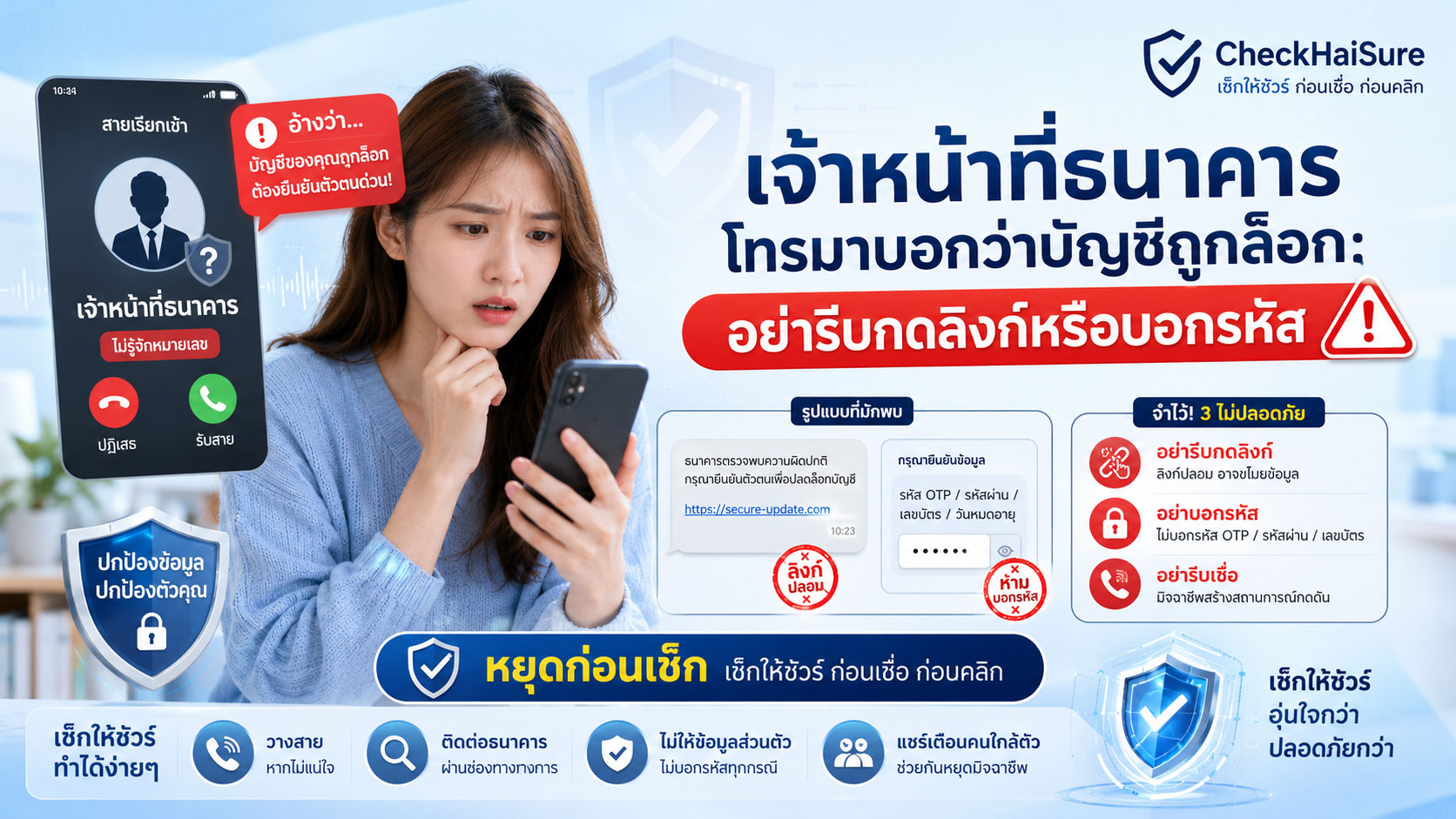
“บัญชีของคุณถูกล็อกชั่วคราว”
“พบธุรกรรมผิดปกติในบัญชีของคุณ”
“มีคนพยายามเข้าใช้งาน Mobile Banking”
“กรุณากดยืนยันตัวตน ไม่เช่นนั้นบัญชีจะถูกระงับ”
“ขอ OTP เพื่อปลดล็อกบัญชีให้ค่ะ”
ถ้าได้รับสายหรือข้อความแบบนี้ หลายคนอาจตกใจทันที
เพราะบัญชีธนาคารไม่ใช่เรื่องเล็ก
ในบัญชีนั้นอาจมีเงินเดือน
เงินเก็บ
เงินหมุนเวียนธุรกิจ
เงินที่เตรียมจ่ายค่าใช้จ่าย
หรือเงินที่ครอบครัวต้องใช้ในชีวิตประจำวัน
แค่ได้ยินว่าบัญชีถูกล็อก บัญชีมีปัญหา หรือเงินอาจไม่ปลอดภัย คนจำนวนมากก็เริ่มรีบทำตามคำแนะนำของคนที่อ้างว่าเป็นเจ้าหน้าที่
นี่คือจุดที่มิจฉาชีพใช้เล่นงาน
เขาไม่ได้เริ่มจากการขอเงินตรงๆ เสมอไป
บางครั้งเขาเริ่มจากการทำให้เรากลัวว่า “บัญชีจะใช้ไม่ได้”
ทำให้เรากลัวว่า “เงินจะหาย”
ทำให้เรากลัวว่า “ถ้าไม่ทำตอนนี้จะเสียหาย”
แล้วค่อยพาเราไปกดลิงก์ บอกรหัส อ่าน OTP ติดตั้งแอป หรือเปิดแอปธนาคารตามคำสั่ง
จำไว้ว่า
บัญชีมีปัญหาจริง ให้เราโทรหาธนาคารเอง ไม่ใช่ให้คนในสายพาเราไปกดลิงก์
ทำไมคำว่า “บัญชีถูกล็อก” ถึงทำให้คนรีบทำตาม
เพราะคำนี้กระทบความรู้สึกเรื่องความปลอดภัยโดยตรง
ถ้าบัญชีถูกล็อก เราอาจโอนเงินไม่ได้
รับเงินไม่ได้
จ่ายค่างวดไม่ได้
จ่ายบิลไม่ได้
ใช้แอปธนาคารไม่ได้
หรือกลัวว่าเงินในบัญชีจะไม่ปลอดภัย
มิจฉาชีพจึงใช้คำนี้เพื่อทำให้เรารีบ
ยิ่งถ้าเขาพูดด้วยน้ำเสียงจริงจัง มีข้อมูลบางส่วนของเรา หรือบอกชื่อธนาคารที่เราใช้อยู่จริง เราอาจยิ่งเชื่อเร็วขึ้น
แต่สิ่งที่ต้องเข้าใจคือ ข้อมูลบางอย่างอาจรั่วไหลหรือถูกเดาได้
ชื่อ เบอร์โทร อีเมล หรือธนาคารที่เราใช้ อาจถูกนำมาใช้ทำให้สายหลอกดูน่าเชื่อถือขึ้น
การที่เขารู้ข้อมูลบางส่วน ไม่ได้แปลว่าเขาเป็นเจ้าหน้าที่จริง
กลโกงมักเริ่มจากความหวังว่าจะ “ช่วยปลดล็อกให้”
คนปลายสายอาจไม่ได้พูดเหมือนมาขู่ตั้งแต่แรก
บางครั้งเขาพูดเหมือนกำลังช่วยเรา
“ไม่ต้องกังวลนะคะ เดี๋ยวเจ้าหน้าที่ช่วยปลดล็อกให้”
“ทำตามขั้นตอนนี้ บัญชีจะกลับมาใช้ได้ทันที”
“ขอเช็กข้อมูลเพื่อความปลอดภัย”
“ระบบส่งรหัสไปแล้ว รบกวนอ่านรหัสให้เจ้าหน้าที่ฟัง”
“กดลิงก์นี้เพื่อยืนยันตัวตน”
คำพูดเหล่านี้ทำให้เรารู้สึกว่า ถ้าทำตามแล้วปัญหาจะจบ
แต่ความจริงอาจตรงกันข้าม
ลิงก์ที่เขาส่งมาอาจเป็นเว็บปลอม
OTP ที่เขาขออาจใช้ยืนยันธุรกรรม
รหัสที่เขาขออาจเปิดทางให้เข้าบัญชี
แอปที่เขาให้ติดตั้งอาจควบคุมมือถือ
และขั้นตอนที่เขาบอกให้กด อาจไม่ใช่การปลดล็อกบัญชี แต่เป็นการทำให้เงินออกจากบัญชี
อย่ากดลิงก์จาก SMS หรือแชทเพราะคนปลายสายบอกว่าเป็นธนาคาร
บางครั้งมิจฉาชีพจะโทรมาก่อน แล้วส่ง SMS หรือข้อความแชทตามมา
ข้อความอาจดูเหมือนมาจากธนาคาร
มีโลโก้
มีชื่อธนาคาร
มีคำว่า security
มีคำว่า verify
มีคำว่า unlock
มีคำว่า update
หรือมีข้อความเร่งให้ดำเนินการภายในเวลาที่กำหนด
แต่ลิงก์ในข้อความอาจพาไปหน้าเว็บไซต์ปลอมที่หน้าตาคล้ายธนาคารจริง
เมื่อเรากรอกข้อมูล เช่น เลขบัตรประชาชน เบอร์โทร Username Password หรือ OTP ข้อมูลนั้นอาจตกไปอยู่ในมือมิจฉาชีพทันที
สิ่งที่ควรทำคือ อย่ากดลิงก์จากคนปลายสาย
ถ้าต้องการตรวจสอบบัญชี ให้เข้าแอปธนาคารหรือเว็บไซต์ทางการด้วยตัวเอง
อย่าใช้ลิงก์ที่มีคนส่งมาเพื่อ “ช่วยอำนวยความสะดวก”
เพราะความสะดวกนั้นอาจเป็นทางลัดไปสู่เว็บปลอม
OTP ไม่ใช่รหัสสำหรับบอกเจ้าหน้าที่
นี่คือเรื่องสำคัญมาก
OTP คือรหัสยืนยันการทำรายการหรือการเข้าถึงบางอย่าง
ไม่ควรบอกใคร ไม่ว่าคนนั้นจะอ้างว่าเป็นธนาคาร ตำรวจ เจ้าหน้าที่รัฐ ฝ่ายความปลอดภัย หรือฝ่ายตรวจสอบธุรกรรม
มิจฉาชีพอาจพูดให้ดูเหมือนปลอดภัย เช่น
“ไม่ได้เอาไปทำรายการค่ะ แค่ใช้ยืนยันตัวตน”
“รหัสนี้ใช้ปลดล็อกระบบเท่านั้น”
“ถ้าไม่แจ้ง OTP บัญชีจะถูกระงับ”
“เจ้าหน้าที่ต้องใช้รหัสเพื่อยืนยันว่าเป็นเจ้าของบัญชีจริง”
“อ่านให้ฟังเฉยๆ เดี๋ยวระบบดำเนินการให้”
อย่าเชื่อ
ถ้ามีคนขอ OTP จากคุณ ให้ถือว่าอันตรายทันที
เพราะรหัสที่คุณอ่านออกไป อาจเป็นกุญแจที่ทำให้เขาเข้าไปทำรายการแทนคุณได้
จำไว้ว่า
OTP คือกุญแจ ไม่ใช่ข้อมูลสำหรับบอกเจ้าหน้าที่
อย่าเปิดแอปธนาคารแล้วกดตามคำสั่งคนปลายสาย
อีกวิธีหนึ่งที่พบบ่อยคือ มิจฉาชีพไม่ขอรหัสตรงๆ แต่ให้เราเปิดแอปธนาคารแล้วกดตาม
เขาอาจบอกว่า
“เข้าเมนูนี้เพื่อปลดล็อกบัญชี”
“กดเพื่อยืนยันว่าไม่ใช่ธุรกรรมของคุณ”
“กดอนุมัติเพื่อยกเลิกรายการ”
“กดตามขั้นตอนเพื่อคืนความปลอดภัยให้บัญชี”
“ระบบจะไม่ตัดเงิน แค่ตรวจสอบเท่านั้น”
แต่ในสถานการณ์จริง คนที่กำลังกลัวและถูกเร่ง อาจไม่ได้อ่านหน้าจอให้ครบ
มิจฉาชีพอาจใช้คำพูดชี้นำให้เรากดอนุมัติรายการบางอย่างโดยไม่รู้ตัว
หรือทำให้เราคิดว่ากำลังกดยกเลิก ทั้งที่จริงกำลังกดยืนยัน
ดังนั้น หากคนปลายสายให้เปิดแอปธนาคารและกดตาม ให้หยุดทันที
อย่าทำธุรกรรมทางการเงินในขณะที่ยังอยู่ในสายกับคนที่คุณยังตรวจสอบไม่ได้
ระวังคำว่า “ฝ่ายความปลอดภัย” หรือ “ศูนย์ป้องกันการทุจริต”
บางครั้งมิจฉาชีพไม่ได้บอกว่าเป็นพนักงานธนาคารทั่วไป
แต่อ้างว่าเป็นหน่วยงานที่ฟังดูน่าเชื่อถือกว่า เช่น
ฝ่ายความปลอดภัยของธนาคาร
ฝ่ายตรวจสอบธุรกรรม
ศูนย์ป้องกันการทุจริต
ฝ่ายระงับบัญชี
เจ้าหน้าที่ความปลอดภัยระบบ Mobile Banking
หรือทีมช่วยเหลือกรณีบัญชีถูกแฮ็ก
ชื่อเหล่านี้ทำให้คนรู้สึกว่าเป็นเรื่องเร่งด่วนและจริงจัง
แต่ไม่ว่าจะใช้ชื่อฝ่ายไหน หลักการยังเหมือนเดิม
ถ้าเขาขอ OTP ให้หยุด
ถ้าเขาส่งลิงก์ให้กด ให้หยุด
ถ้าเขาให้ติดตั้งแอป ให้หยุด
ถ้าเขาให้แชร์หน้าจอ ให้หยุด
ถ้าเขาให้เปิดแอปธนาคารแล้วกดตาม ให้หยุด
ถ้าเขาให้โอนเงินไปบัญชีปลอดภัย ให้หยุดทันที
ตำแหน่งที่ฟังดูน่าเชื่อถือ ไม่ได้ทำให้คำสั่งที่อันตรายกลายเป็นเรื่องปลอดภัย
“บัญชีปลอดภัย” ไม่ใช่คำที่ควรเชื่อจากคนปลายสาย
บางครั้งมิจฉาชีพจะบอกว่า บัญชีของคุณเสี่ยงถูกแฮ็ก หรือมีธุรกรรมผิดปกติ จึงต้องย้ายเงินไปก่อน
เขาอาจใช้คำว่า
บัญชีปลอดภัย
บัญชีกลาง
บัญชีพักเงิน
บัญชีตรวจสอบ
บัญชีธนาคารสำรอง
หรือบัญชีของเจ้าหน้าที่ที่ใช้ป้องกันความเสียหาย
ฟังดูเหมือนเป็นการช่วยรักษาเงิน
แต่ถ้าบัญชีนั้นถูกบอกมาจากคนปลายสาย ให้สงสัยไว้ก่อนว่าอาจเป็นบัญชีของมิจฉาชีพหรือบัญชีม้า
เงินที่ปลอดภัยที่สุดไม่ใช่เงินที่ถูกโอนไปตามคำสั่งคนแปลกหน้า
แต่คือเงินที่ยังอยู่ในบัญชีของเรา จนกว่าเราจะตรวจสอบกับธนาคารผ่านช่องทางทางการด้วยตัวเอง
ถ้ากลัวว่าบัญชีมีปัญหาจริง ให้หยุดใช้บัญชีชั่วคราว วางสาย และติดต่อธนาคารเอง
ไม่ใช่รีบโอนเงินออกไปเพราะคนในสายบอกว่า “ช่วยอยู่”
สัญญาณเตือนว่าอาจเป็นธนาคารปลอม
ถ้ามีคนโทรมาอ้างว่าเป็นธนาคาร แล้วมีพฤติกรรมเหล่านี้ ให้ระวังมาก
บอกว่าบัญชีถูกล็อกหรือกำลังจะถูกระงับ
อ้างว่าพบธุรกรรมผิดปกติ แต่ไม่ให้คุณตรวจสอบเอง
เร่งให้ทำรายการทันที
ส่งลิงก์ให้กดเพื่อปลดล็อก
ขอ Username หรือ Password
ขอ OTP หรือรหัสยืนยัน
ขอเลขบัตรประชาชนเต็ม
ขอข้อมูลบัตรเครดิตหรือบัตรเดบิต
ขอให้เปิดแอปธนาคาร
ขอให้แชร์หน้าจอ
ให้ติดตั้งแอปช่วยตรวจสอบ
ให้เพิ่ม LINE เจ้าหน้าที่
บอกว่าห้ามวางสาย
บอกว่าห้ามไปธนาคารเอง
บอกว่าห้ามโทรกลับ Call Center เอง
ให้โอนเงินไปบัญชีกลางหรือบัญชีปลอดภัย
หรือบอกว่าถ้าไม่ทำตอนนี้ เงินจะหายทั้งหมด
ถ้ามีหนึ่งหรือหลายข้อในนี้ ให้หยุดคุยทันที
แล้วตรวจสอบกับธนาคารผ่านช่องทางที่คุณหาเอง
ถ้าธนาคารจริงมีปัญหากับบัญชี เราควรตรวจสอบอย่างไร
หากคุณกังวลว่าบัญชีอาจมีปัญหาจริง ให้ใช้หลักง่ายๆ คือ “ตัดสาย แล้วเริ่มต้นตรวจสอบใหม่ด้วยตัวเอง”
อย่าใช้ช่องทางที่คนโทรมาให้
ให้ใช้ช่องทางที่คุณเชื่อถืออยู่แล้ว เช่น
แอปธนาคารที่ติดตั้งจาก Store ทางการ
เว็บไซต์ทางการที่คุณพิมพ์เอง
เบอร์ Call Center หลังบัตร
เบอร์จากเว็บไซต์ธนาคารที่ตรวจสอบเอง
หรือสาขาธนาคาร
ถ้าจำเป็นต้องคุยกับเจ้าหน้าที่ ให้เป็นสายที่คุณโทรเข้าไปเอง ไม่ใช่สายที่เขาควบคุมอยู่
ถ้ามีข้อความหรือลิงก์น่าสงสัย ให้เก็บไว้เป็นหลักฐาน แต่อย่ากด
ถ้ามีธุรกรรมผิดปกติจริง ธนาคารควรมีวิธีตรวจสอบผ่านช่องทางทางการ
ไม่ควรต้องให้คุณบอก OTP ผ่านโทรศัพท์หรือโอนเงินไปบัญชีที่คนปลายสายบอก
ถ้าเผลอกดลิงก์หรือบอกรหัสไปแล้ว
ถ้าคุณเผลอกดลิงก์ กรอกข้อมูล บอก OTP ติดตั้งแอป แชร์หน้าจอ หรือทำรายการตามคำสั่งไปแล้ว ให้หยุดทันที
อย่าทำขั้นตอนต่อ
อย่าโอนเงินเพิ่ม
อย่าคุยต่อเพราะเขาบอกว่าจะช่วยแก้ไข
อย่าลบข้อความหรือประวัติการโทร
ให้รีบติดต่อธนาคารผ่านช่องทางทางการโดยเร็วที่สุด
บอกธนาคารว่าเกิดอะไรขึ้น เช่น
กดลิงก์จากข้อความ
กรอกข้อมูลในหน้าเว็บที่สงสัยว่าเป็นเว็บปลอม
ให้ OTP กับคนปลายสาย
ติดตั้งแอปตามคำแนะนำของคนที่อ้างว่าเป็นเจ้าหน้าที่
แชร์หน้าจอหรือเปิดแอปธนาคารระหว่างคุย
หรือมีธุรกรรมที่ไม่ได้ทำเอง
จากนั้นให้เก็บหลักฐานทั้งหมด เช่น เบอร์โทร ลิงก์ แชท SMS หน้าจอเว็บไซต์ ชื่อบัญชีปลายทาง สลิปโอนเงิน และเวลาที่เกิดเหตุ
ถ้าติดตั้งแอปที่น่าสงสัย ให้หยุดใช้เครื่องนั้นทำธุรกรรมสำคัญก่อน ตรวจสอบแอปและสิทธิ์ที่อนุญาต หรือขอความช่วยเหลือจากคนที่ไว้ใจได้
อย่าอายที่จะบอกคนใกล้ตัว
การหยุดเร็วสำคัญกว่าการพยายามแก้ปัญหาคนเดียว
ควรบอกคนในบ้านเรื่องนี้ไว้ก่อน
กลโกงธนาคารปลอมเป็นเรื่องที่ควรคุยกับคนในบ้าน
โดยเฉพาะผู้สูงอายุ คนที่ไม่คุ้นกับแอปธนาคาร หรือคนที่อยู่คนเดียว
อาจตกลงกันง่ายๆ ว่า
ถ้ามีคนโทรมาบอกว่าบัญชีถูกล็อก ให้ไม่ต้องรีบทำตาม
ถ้ามีลิงก์ส่งมา ให้ไม่กด
ถ้ามีคนขอ OTP ให้ไม่บอก
ถ้ามีคนให้เปิดแอปธนาคารระหว่างคุย ให้หยุด
ถ้ามีคนให้โอนเงินไปบัญชีปลอดภัย ให้ไม่โอน
ถ้ามีคนห้ามวางสาย ให้ยิ่งต้องวาง
ถ้าไม่แน่ใจ ให้โทรหาคนในบ้านหรือธนาคารผ่านช่องทางทางการก่อนเสมอ
หลายครั้ง แค่มีเวลาโทรถามคนใกล้ตัวหนึ่งนาที ก็อาจช่วยหยุดความเสียหายได้
อย่าโทษตัวเองถ้าคุณเคยตกใจ
ถ้าคุณเคยได้รับสายแบบนี้แล้วตกใจ นั่นเป็นเรื่องเข้าใจได้
เพราะมิจฉาชีพเลือกเรื่องที่คนกลัวจริง
ไม่มีใครอยากให้บัญชีถูกล็อก
ไม่มีใครอยากให้เงินหาย
ไม่มีใครอยากให้ Mobile Banking ใช้ไม่ได้
ไม่มีใครอยากถูกกล่าวหาว่าเกี่ยวข้องกับธุรกรรมผิดปกติ
เขาจึงใช้ความกลัวนี้มาทำให้เรารีบ
สิ่งสำคัญไม่ใช่การไม่เคยตกใจ
แต่คือเมื่อรู้สึกว่ามีบางอย่างผิดปกติ ให้หยุดก่อน
วางสาย
ไม่กดลิงก์
ไม่บอกรหัส
ไม่ให้ OTP
ไม่เปิดแอปธนาคารตามคำสั่ง
และตรวจสอบกับธนาคารด้วยตัวเอง
ความกลัวเกิดขึ้นได้
แต่เราไม่จำเป็นต้องตัดสินใจเรื่องเงินในขณะที่กำลังกลัว
ประโยคที่ควรจำ: บัญชีมีปัญหาจริง ให้เราโทรหาธนาคารเอง
ถ้าต้องจำประโยคเดียวจากบทความนี้ ขอให้จำว่า
บัญชีมีปัญหาจริง ให้เราโทรหาธนาคารเอง ไม่ใช่ให้คนในสายพาเราไปกดลิงก์
ถ้าคนปลายสายเป็นเจ้าหน้าที่จริง เขาควรยอมให้คุณตรวจสอบผ่านช่องทางทางการ
ถ้าบัญชีมีปัญหาจริง ธนาคารควรมีขั้นตอนให้ตรวจสอบได้
ถ้าธุรกรรมผิดปกติจริง คุณควรติดต่อธนาคารเองได้
แต่ถ้าอีกฝ่ายเร่งให้กดลิงก์ ขอ OTP ให้เปิดแอปธนาคาร หรือห้ามวางสาย นั่นอาจไม่ใช่การช่วยเหลือ
แต่อาจเป็นการควบคุมให้คุณทำตามก่อนจะได้คิด
สรุป: อย่าให้คำว่า “บัญชีถูกล็อก” ทำให้เรากดลิงก์หรือบอกรหัส
กลโกงเจ้าหน้าที่ธนาคารปลอมอันตราย เพราะมันแตะเรื่องที่คนห่วงที่สุดเรื่องหนึ่ง คือเงินในบัญชี
มิจฉาชีพอาจอ้างว่าบัญชีถูกล็อก
มีธุรกรรมผิดปกติ
มีคนพยายามเข้าใช้งาน
ระบบต้องยืนยันตัวตน
หรือต้องรีบปลดล็อกก่อนเกิดความเสียหาย
แต่ไม่ว่าจะพูดอย่างไร ให้จำไว้ว่า อย่ากดลิงก์จากคนปลายสาย
อย่าบอก Username หรือ Password
อย่าให้ OTP
อย่าเปิดแอปธนาคารแล้วกดตาม
อย่าแชร์หน้าจอ
อย่าติดตั้งแอปที่เขาส่งมา
อย่าโอนเงินไปบัญชีปลอดภัย
และอย่าอยู่ในสายเพราะเขาบอกว่าห้ามวาง
ให้วางสาย แล้วติดต่อธนาคารผ่านช่องทางทางการด้วยตัวเอง
ถ้าเป็นเรื่องจริง ธนาคารจริงยังตรวจสอบได้
แต่ถ้าเป็นมิจฉาชีพ การวางสายและไม่กดลิงก์ อาจช่วยรักษาเงินของคุณไว้ได้ทันเวลา
A Bank Officer Calls and Says Your Account Is Locked: Do Not Rush to Click Links or Share Codes
“Your account has been temporarily locked.”
“We found suspicious activity in your account.”
“Someone tried to access your mobile banking.”
“Please verify your identity, or your account will be suspended.”
“Please provide the OTP so we can unlock your account.”
If you receive a call or message like this, many people may panic immediately.
A bank account is not a small matter.
It may contain your salary.
Your savings.
Your business cash flow.
Money prepared for bills.
Or money your family needs for daily life.
Just hearing that your account is locked, that something is wrong, or that your money may not be safe can make many people rush to follow the instructions of someone claiming to be a bank officer.
This is exactly where scammers attack.
They do not always start by directly asking for money.
Sometimes they begin by making you afraid that “your account will stop working.”
They make you fear that “your money may disappear.”
They make you feel that “if you do not act now, damage will happen.”
Then they lead you into clicking a link, sharing a code, reading out an OTP, installing an app, or opening your banking app while following their instructions.
Remember this:
If your account really has a problem, you should call the bank yourself. Do not let someone on the phone lead you to click a link.
Why the Words “Your Account Is Locked” Make People Act Quickly
Because this phrase directly affects our sense of financial safety.
If your account is locked, you may not be able to transfer money.
You may not be able to receive money.
You may not be able to pay installments.
You may not be able to pay bills.
You may not be able to use mobile banking.
Or you may worry that the money in your account is no longer safe.
Scammers use this phrase to create urgency.
If they speak seriously, know some of your information, or mention the name of a bank you actually use, you may believe them more quickly.
But one thing is important to understand: some information may have leaked or may be guessed.
Your name, phone number, email, or bank name may be used to make the scam sound more convincing.
The fact that someone knows some information about you does not mean they are a real bank officer.
The Scam Often Begins with the Hope That They Will “Help Unlock It”
The person on the phone may not sound threatening at first.
Sometimes they sound like they are trying to help.
“Don’t worry. The officer will help unlock it for you.”
“Follow these steps, and your account will be usable again immediately.”
“We just need to check your information for security.”
“The system has sent a code. Please read it to the officer.”
“Click this link to verify your identity.”
These words make you feel that if you cooperate, the problem will be solved.
But the truth may be the opposite.
The link they send may lead to a fake website.
The OTP they ask for may be used to confirm a transaction.
The password they ask for may allow access to your account.
The app they ask you to install may help control your phone.
And the steps they tell you to follow may not unlock your account at all, but may help move money out of it.
Do Not Click Links from SMS or Chat Just Because the Caller Says They Are from the Bank
Sometimes scammers call first, then send an SMS or chat message afterward.
The message may look like it came from a bank.
It may have a logo.
It may show the bank name.
It may use words like security.
Verify.
Unlock.
Update.
Or it may warn that you must act within a limited time.
But the link in the message may take you to a fake website that looks similar to the real bank website.
Once you enter information such as your ID number, phone number, username, password, or OTP, that information may go directly to scammers.
The safer action is simple: do not click links sent by the person on the call.
If you need to check your account, open the official banking app or official website yourself.
Do not use a link someone sends to “make it easier.”
That convenience may be a shortcut to a fake website.
An OTP Is Not a Code to Tell an Officer
This is extremely important.
An OTP is a code used to confirm a transaction or access something.
You should not tell it to anyone, even if that person claims to be from a bank, police, government agency, security team, or transaction monitoring department.
Scammers may make it sound harmless.
They may say:
“We are not using it for a transaction. It is only for identity verification.”
“This code is only for unlocking the system.”
“If you do not provide the OTP, your account will be suspended.”
“The officer needs the code to confirm you are the account owner.”
“Just read it out, and the system will process it.”
Do not believe this.
If someone asks for your OTP, treat it as a danger sign immediately.
The code you read out may be the key that allows someone else to access your account or approve something on your behalf.
Remember this:
An OTP is a key, not information to tell an officer.
Do Not Open Your Banking App and Follow Instructions from the Caller
Another common method is that scammers do not ask for your code directly.
Instead, they tell you to open your banking app and follow their steps.
They may say:
“Go to this menu to unlock your account.”
“Tap here to confirm that this transaction is not yours.”
“Approve this to cancel the transaction.”
“Follow these steps to restore your account security.”
“The system will not deduct money. It is only checking.”
But in real situations, a person who is afraid and being rushed may not read the screen carefully.
Scammers may use words to guide you into approving something without realizing it.
Or they may make you think you are canceling a transaction when you are actually confirming one.
So if a caller asks you to open your banking app and follow their instructions, stop immediately.
Do not perform financial actions while you are still on a call with someone you have not verified.
Be Careful with Words Like “Security Department” or “Fraud Prevention Center”
Sometimes scammers do not claim to be normal bank staff.
They may use titles that sound more serious and trustworthy, such as:
Bank security department
Transaction monitoring department
Fraud prevention center
Account suspension unit
Mobile banking security officer
Or a support team for hacked accounts
These names make the situation feel urgent and official.
But no matter what department name they use, the rule is the same.
If they ask for an OTP, stop.
If they send a link, stop.
If they ask you to install an app, stop.
If they ask you to share your screen, stop.
If they tell you to open your banking app and follow instructions, stop.
If they tell you to transfer money to a safe account, stop immediately.
A title that sounds credible does not make a dangerous instruction safe.
A “Safe Account” Is Not Something You Should Trust from a Caller
Sometimes scammers say your account may be hacked or suspicious transactions have been found, so you must move your money first.
They may use words such as:
Safe account
Central account
Holding account
Verification account
Backup bank account
Or an officer’s account used to prevent damage
It may sound like they are trying to protect your money.
But if the account number comes from the person on the phone, you should suspect that it may belong to scammers or a mule account.
The safest money is not money transferred according to instructions from a stranger.
The safest money is the money that remains in your own account until you verify the situation with the bank through official channels yourself.
If you are afraid that your account really has a problem, stop using it temporarily, hang up, and contact the bank yourself.
Do not rush to transfer money out just because someone on the call says they are helping.
Warning Signs That the “Bank Officer” May Be Fake
If someone calls and claims to be from your bank, be very careful if they do any of the following:
They say your account is locked or about to be suspended.
They claim suspicious transactions were found but do not let you verify independently.
They rush you to act immediately.
They send a link to unlock your account.
They ask for your username or password.
They ask for your OTP or verification code.
They ask for your full national ID number.
They ask for credit or debit card information.
They ask you to open your banking app.
They ask you to share your screen.
They tell you to install an app for checking.
They ask you to add a LINE officer or chat account.
They tell you not to hang up.
They tell you not to visit the bank yourself.
They tell you not to call the official call center yourself.
They ask you to transfer money to a central account or safe account.
Or they say that if you do not act now, all your money will disappear.
If one or more of these signs appear, stop the conversation immediately.
Then verify with your bank through a channel you find yourself.
If There Is a Real Bank Account Problem, How Should You Check?
If you are worried that your account may truly have a problem, use this simple rule:
End the call and start the verification again by yourself.
Do not use the channel provided by the caller.
Use channels you already trust, such as:
The official banking app installed from an official app store
The official website you type yourself
The call center number on the back of your card
A phone number from the bank’s official website that you check yourself
Or a bank branch
If you need to speak with an officer, let it be a call that you make yourself, not a call controlled by the person who contacted you.
If you receive a suspicious message or link, keep it as evidence, but do not click it.
If there is really suspicious activity, the bank should have a way to verify it through official channels.
It should not require you to tell an OTP over the phone or transfer money to an account provided by the caller.
If You Already Clicked a Link or Shared a Code
If you already clicked a link, entered information, shared an OTP, installed an app, shared your screen, or followed the caller’s steps, stop immediately.
Do not continue the next steps.
Do not transfer more money.
Do not keep talking because they say they can fix it.
Do not delete the message or call history.
Contact your bank through official channels as soon as possible.
Tell the bank clearly what happened, such as:
You clicked a link from a message.
You entered information on a website you now suspect was fake.
You gave an OTP to someone on the phone.
You installed an app after being instructed by someone claiming to be an officer.
You shared your screen or opened your banking app while on the call.
Or you noticed a transaction you did not make.
Then save all evidence, including phone numbers, links, chat messages, SMS messages, website screenshots, destination account names, transfer slips, and the time of the incident.
If you installed a suspicious app, stop using that phone for important transactions, check the apps and permissions, or ask someone you trust for help.
Do not be embarrassed to tell someone close to you.
Stopping quickly matters more than trying to solve the problem alone.
Talk About This with People at Home
Fake bank officer scams should be discussed with family members.
This is especially important for elderly family members, people who are not familiar with banking apps, or people who live alone.
You can agree on simple rules:
If someone calls and says your account is locked, do not rush to follow instructions.
If a link is sent, do not click it.
If someone asks for an OTP, do not tell them.
If someone asks you to open your banking app during the call, stop.
If someone asks you to transfer money to a safe account, do not transfer.
If someone tells you not to hang up, that is even more reason to hang up.
If you are unsure, call someone in the family or contact the bank through official channels first.
Many times, just having one minute to ask someone close to you can help stop the damage.
Do Not Blame Yourself If You Felt Afraid
If you have ever received this kind of call and felt afraid, that is understandable.
Scammers choose topics that people genuinely fear.
No one wants their account to be locked.
No one wants their money to disappear.
No one wants mobile banking to stop working.
No one wants to be accused of being involved in suspicious transactions.
Scammers use this fear to make people act quickly.
The key is not to never feel afraid.
The key is that once something feels wrong, you stop first.
Hang up.
Do not click links.
Do not share codes.
Do not provide OTPs.
Do not open your banking app under someone’s instruction.
And verify with the bank yourself.
Fear can happen.
But you do not need to make decisions about money while you are afraid.
A Sentence to Remember: If Your Account Really Has a Problem, Call the Bank Yourself
If you remember only one sentence from this article, remember this:
If your account really has a problem, call the bank yourself. Do not let someone on the phone lead you to click a link.
If the caller is a real bank officer, they should allow you to verify through official channels.
If your account really has an issue, the bank should have a proper way to check it.
If there is suspicious activity, you should be able to contact the bank yourself.
But if the caller rushes you to click a link, asks for an OTP, tells you to open your banking app, or refuses to let you hang up, that may not be help.
It may be control before you have time to think.
Conclusion: Do Not Let “Your Account Is Locked” Make You Click Links or Share Codes
Fake bank officer scams are dangerous because they touch one of the things people care about most: the money in their account.
Scammers may claim that your account is locked.
That suspicious activity has been found.
That someone tried to access your account.
That the system needs identity verification.
Or that you must unlock your account quickly before damage happens.
But no matter what they say, remember this:
Do not click links sent by the caller.
Do not share usernames or passwords.
Do not provide OTPs.
Do not open your banking app and follow their instructions.
Do not share your screen.
Do not install apps they send.
Do not transfer money to a safe account.
And do not stay on the call just because they tell you not to hang up.
Hang up, then contact your bank through official channels yourself.
If the issue is real, the real bank can still help you verify it.
But if it is a scam, hanging up and refusing to click the link may protect your money in time.

Leave a Reply
You must be logged in to post a comment.