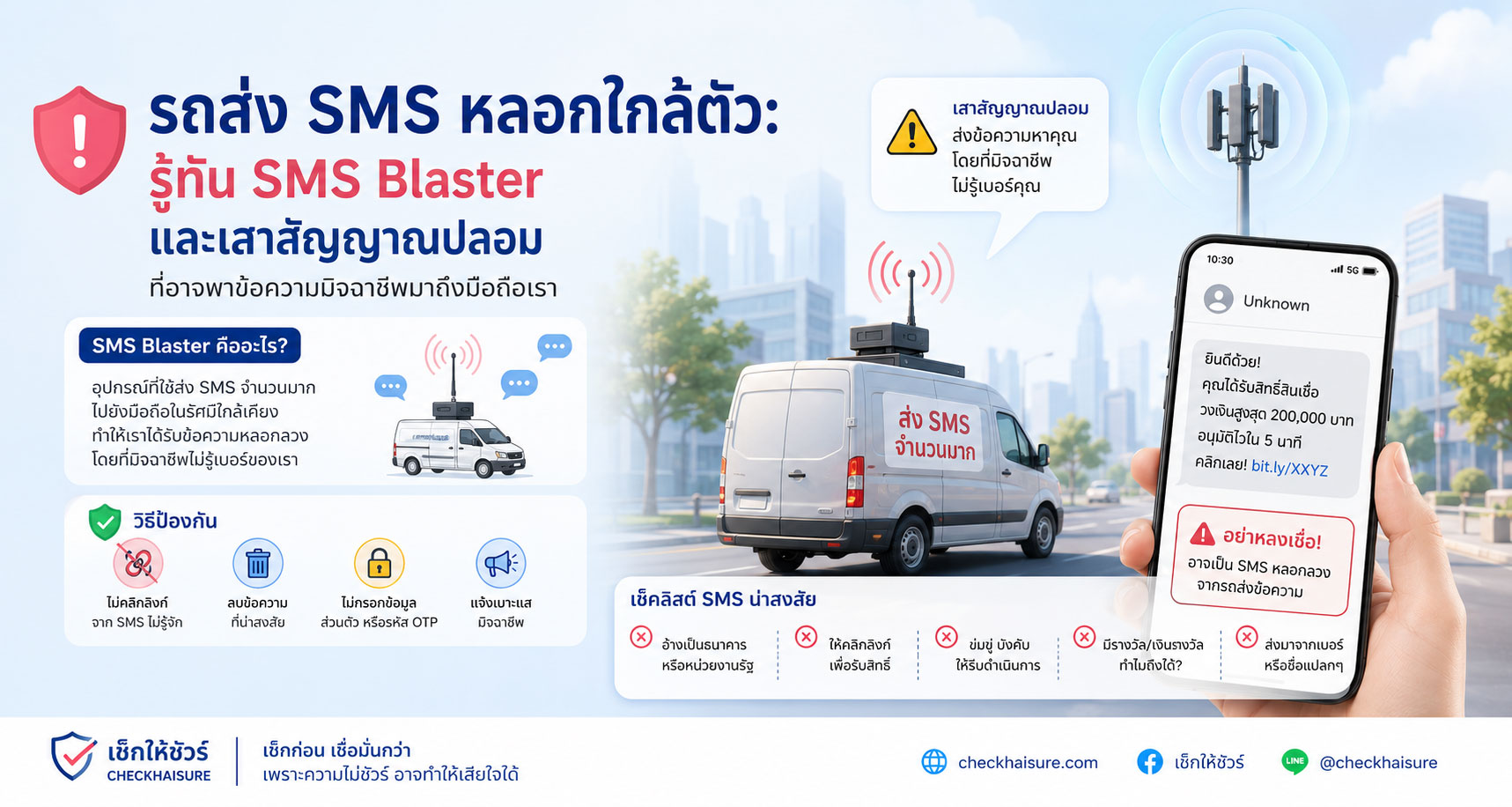
ปกติแล้ว เมื่อเราได้รับ SMS หลอกลวง หลายคนอาจคิดว่ามิจฉาชีพต้องมีเบอร์โทรของเราก่อน
อาจได้เบอร์มาจากฐานข้อมูลรั่ว
จากการสมัครบริการบางอย่าง
จากการสุ่มเบอร์
หรือจากรายชื่อที่ถูกขายต่อในตลาดมืด
แต่ในบางรูปแบบของภัยสมัยใหม่ มิจฉาชีพอาจไม่จำเป็นต้องรู้เบอร์ของเราล่วงหน้าด้วยซ้ำ
เพียงแค่มีอุปกรณ์ผิดกฎหมายบางชนิด ซ่อนอยู่ในรถ กระเป๋า หรือจุดใกล้พื้นที่คนหนาแน่น ก็อาจสามารถส่ง SMS หลอกลวงไปยังมือถือที่อยู่รอบบริเวณได้
ภัยลักษณะนี้มักถูกเรียกว่า SMS Blaster, Fake Base Station, False Base Station หรือเสาสัญญาณมือถือปลอม
มันไม่ได้มาในรูปแบบแอปที่เราติดตั้ง
ไม่ได้เริ่มจากคนโทรมาหาเรา
และไม่ได้จำเป็นต้องมีเบอร์เราอยู่ในรายชื่อ
แต่มันอาจเริ่มจาก “สัญญาณปลอม” ที่ทำให้มือถือของคนในบริเวณนั้นได้รับข้อความหลอกลวงโดยไม่ทันตั้งตัว
SMS Blaster คืออะไร แบบเข้าใจง่าย
SMS Blaster คืออุปกรณ์ที่มิจฉาชีพใช้เพื่อส่งข้อความ SMS จำนวนมากไปยังมือถือที่อยู่ใกล้บริเวณนั้น
บางกรณี อุปกรณ์นี้อาจถูกซ่อนไว้ในรถยนต์
บางกรณีอาจอยู่ในกระเป๋า
บางกรณีอาจถูกวางไว้ในพื้นที่คนพลุกพล่าน
เช่น ใกล้ห้าง สถานีรถไฟฟ้า สนามบิน ย่านธุรกิจ แหล่งท่องเที่ยว หรือสถานที่จัดงานใหญ่
แนวคิดหลักคือ อุปกรณ์จะพยายามทำตัวเหมือนเสาสัญญาณมือถือขนาดเล็ก หรือทำให้มือถือใกล้เคียงเข้าใจว่ามีสัญญาณเครือข่ายที่ควรเชื่อมต่อ
เมื่อมือถือของผู้ใช้ในบริเวณนั้นได้รับอิทธิพลจากสัญญาณดังกล่าว มิจฉาชีพก็อาจส่ง SMS ปลอมเข้ามาในเครื่องได้
ข้อความที่ส่งมาอาจดูเหมือนมาจากธนาคาร
หน่วยงานรัฐ
บริษัทขนส่ง
ผู้ให้บริการโทรศัพท์
แพลตฟอร์มชำระเงิน
หรือบริการที่คนทั่วไปคุ้นเคย
จุดอันตรายคือ ผู้ใช้ไม่จำเป็นต้องเคยติดต่อกับมิจฉาชีพมาก่อน และอาจไม่เข้าใจว่าทำไมตัวเองถึงได้รับข้อความนั้น
เพราะในมุมของผู้ใช้ มันก็ดูเหมือน SMS ทั่วไปที่เด้งเข้ามาในโทรศัพท์
ทำไมมิจฉาชีพถึงใช้รถหรืออุปกรณ์เคลื่อนที่
การซ่อนอุปกรณ์ไว้ในรถทำให้มิจฉาชีพเคลื่อนที่ได้ง่าย
วันนี้อาจขับผ่านย่านออฟฟิศ
พรุ่งนี้อาจไปใกล้ห้าง
วันต่อมาอาจไปแถวสถานีขนส่ง
หรือวนอยู่ในพื้นที่ที่มีคนจำนวนมาก
การเคลื่อนที่แบบนี้ทำให้สามารถกระจายข้อความไปยังกลุ่มคนจำนวนมากในหลายพื้นที่ได้ โดยไม่ต้องนั่งอยู่ที่จุดเดิมนานเกินไป
บางรายงานในต่างประเทศพบว่าอุปกรณ์ถูกซ่อนไว้ในท้ายรถ หรือเชื่อมต่อกับเสาส่งสัญญาณที่ดัดแปลงให้ดูเหมือนอุปกรณ์ปกติบนรถ
สำหรับประชาชนทั่วไป เราอาจไม่สามารถมองออกได้เลยว่ารถคันหนึ่งมีอุปกรณ์ลักษณะนี้อยู่หรือไม่
และนั่นคือเหตุผลที่การป้องกันตัวไม่ควรเริ่มจากการพยายามมองหารถต้องสงสัย
แต่ควรเริ่มจากการไม่เชื่อ SMS ที่มีลิงก์หรือข้อความเร่งด่วนง่ายเกินไป
ข้อความที่ถูกส่งมา มักไม่ใช่ข้อความแปลกๆ แต่เป็นข้อความที่ดูคุ้นเคย
SMS หลอกลวงจากอุปกรณ์ลักษณะนี้มักไม่จำเป็นต้องเขียนให้ดูซับซ้อน
ยิ่งเหมือนเรื่องปกติ ยิ่งหลอกได้ง่าย
ตัวอย่างข้อความที่ควรระวัง เช่น
“บัญชีของคุณถูกระงับ กรุณายืนยันตัวตนทันที”
“มีรายการผิดปกติ หากไม่ใช่คุณ กรุณากดลิงก์เพื่อยกเลิก”
“พัสดุของคุณจัดส่งไม่สำเร็จ โปรดแก้ไขที่อยู่”
“คุณมีค่าปรับค้างชำระ กรุณาดำเนินการภายในวันนี้”
“ระบบต้องการอัปเดตข้อมูลบัญชี”
“บัญชีของคุณจะถูกปิด หากไม่ยืนยันภายในเวลาที่กำหนด”
“คุณได้รับเงินคืน กรุณากรอกข้อมูลเพื่อรับสิทธิ์”
“แพ็กเกจของคุณหมดอายุ กดลิงก์เพื่อต่ออายุ”
สิ่งที่ข้อความเหล่านี้มีร่วมกันคือ การสร้างความรู้สึกเร่งด่วน
ทำให้เรากลัวว่าจะเสียเงิน
กลัวบัญชีถูกปิด
กลัวพัสดุตกค้าง
กลัวพลาดสิทธิ์
หรือกลัวว่ามีคนกำลังใช้บัญชีเรา
เมื่อความกลัวเกิดขึ้น เรามักอยากแก้ปัญหาให้เร็วที่สุด
และนั่นคือจังหวะที่มิจฉาชีพต้องการ
ทำไม SMS แบบนี้ถึงอันตรายกว่าการส่ง SMS ปกติ
SMS หลอกลวงทั่วไปอาจถูกระบบเครือข่ายมือถือหรือระบบป้องกันสแปมตรวจจับได้บางส่วน
แต่ SMS Blaster อาจพยายามส่งข้อความจากอุปกรณ์ที่อยู่ใกล้ผู้ใช้โดยตรง ทำให้สามารถเลี่ยงการตรวจจับบางรูปแบบของเครือข่ายได้
ผู้ใช้จึงอาจได้รับข้อความที่ดูเหมือนมาจากชื่อหน่วยงานหรือองค์กรที่คุ้นเคย
บางครั้งข้อความอาจไม่แสดงเป็นเบอร์แปลกๆ
แต่อาจแสดงชื่อที่ดูน่าเชื่อถือ
หรือถูกออกแบบให้ดูเหมือนข้อความจากระบบจริง
เมื่อ SMS ดูน่าเชื่อถือ และเข้ามาในเวลาที่เราอยู่ในพื้นที่คนเยอะ เช่น ห้าง สถานีรถไฟฟ้า หรือออฟฟิศ เราอาจไม่ได้คิดว่าเป็นภัยพิเศษ
เราอาจคิดว่าเป็นเรื่องของบัญชีเราโดยตรง
ทั้งที่ความจริงอาจเป็นข้อความที่ถูกยิงออกไปยังมือถือหลายเครื่องในบริเวณเดียวกัน
ปลายทางของ SMS มักเป็นเว็บปลอม แอปปลอม หรือหน้ากรอกข้อมูล
SMS Blaster เป็นเพียงช่องทางส่งข้อความ
อันตรายที่แท้จริงมักเริ่มหลังจากเรากดลิงก์
ลิงก์ใน SMS อาจพาไปยังเว็บไซต์ปลอมที่หน้าตาเหมือนธนาคาร
เว็บปลอมที่เหมือนบริษัทขนส่ง
เว็บปลอมที่เหมือนหน่วยงานรัฐ
หน้าชำระเงินปลอม
หน้าขอกรอก OTP
หน้าขอข้อมูลบัตร
หรือหน้าให้ดาวน์โหลดแอปนอก Store
บางเว็บอาจขอให้กรอกชื่อ เบอร์โทร เลขบัตรประชาชน รหัสผ่าน หรือ OTP
บางเว็บอาจบอกว่าต้องติดตั้งแอปเพื่อแก้ไขปัญหา
บางเว็บอาจแสดงข้อความว่า “กำลังตรวจสอบ” เพื่อถ่วงเวลา ในขณะที่ข้อมูลของเราถูกส่งไปยังมิจฉาชีพ
ดังนั้น ปัญหาไม่ได้อยู่ที่การได้รับ SMS เพียงอย่างเดียว
แต่อยู่ที่เรากดลิงก์ กรอกข้อมูล หรือทำตามขั้นตอนที่ข้อความนั้นสั่งหรือไม่
สัญญาณเตือนว่า SMS ที่ได้รับอาจไม่ปลอดภัย
แม้ SMS จะดูเหมือนมาจากองค์กรที่รู้จัก ก็ควรระวังหากมีสัญญาณเหล่านี้
ข้อความมีลิงก์ให้กด
ข้อความเร่งให้ทำทันที
ข้อความอ้างว่าบัญชีจะถูกปิด ระงับ หรือมีปัญหาร้ายแรง
ข้อความขอให้กรอกข้อมูลส่วนตัว รหัสผ่าน PIN หรือ OTP
ลิงก์ดูแปลก สั้นเกินไป ยาวเกินไป หรือไม่ใช่โดเมนทางการ
ข้อความบอกให้ดาวน์โหลดแอปหรือติดตั้งไฟล์
ข้อความอ้างว่าเป็นธนาคารหรือหน่วยงานรัฐ แต่ส่งมาในเวลาหรือรูปแบบที่ผิดปกติ
ข้อความทำให้คุณรู้สึกกลัว รีบ หรือกังวลจนอยากกดทันที
มีคนโทรมาตามหลัง SMS เพื่อเร่งให้คุณทำตามขั้นตอน
ถ้าเจอ SMS แบบนี้ อย่ากดลิงก์ทันที
ให้ถือว่าข้อความนั้น “ต้องตรวจสอบก่อน” ไม่ใช่ “ต้องทำตามก่อน”
วิธีป้องกันตัวจาก SMS Blaster และ SMS หลอกลวงใกล้ตัว
สิ่งสำคัญที่สุดคือ อย่ากดลิงก์จาก SMS ที่คุณไม่ได้ร้องขอ
ถ้าข้อความอ้างว่าเป็นธนาคาร ให้เปิดแอปธนาคารด้วยตัวเอง
ถ้าข้อความอ้างว่าเป็นบริษัทขนส่ง ให้เข้าแอปหรือเว็บไซต์ทางการด้วยตัวเอง โดยไม่กดจากลิงก์ใน SMS
ถ้าข้อความอ้างว่าเป็นหน่วยงานรัฐ ให้ตรวจสอบจากเว็บไซต์ทางการหรือช่องทางบริการที่ยืนยันได้
อย่าโทรกลับเบอร์ที่อยู่ใน SMS หากยังไม่แน่ใจ
อย่าให้ OTP กับใคร ไม่ว่าจะอ้างว่าเป็นเจ้าหน้าที่หรือระบบใดก็ตาม
อย่าดาวน์โหลดแอปจากลิงก์ใน SMS โดยเฉพาะไฟล์ APK หรือแอปที่อยู่นอก Store
ถ้ามือถือมีตัวเลือกด้านความปลอดภัย เช่น ปิดการเชื่อมต่อ 2G หรือเปิดระบบกรองข้อความจากผู้ส่งที่ไม่รู้จัก อาจพิจารณาใช้งานตามความเหมาะสมของเครื่องและพื้นที่ที่คุณอยู่
แต่แม้จะตั้งค่าความปลอดภัยแล้ว ก็ยังควรยึดหลักเดิมคือ
ข้อความที่มีลิงก์และเร่งให้ทำเรื่องเงินหรือข้อมูลส่วนตัว ต้องหยุดตรวจสอบก่อนเสมอ
ถ้าได้รับ SMS น่าสงสัยในพื้นที่คนเยอะ ควรทำอย่างไร
หากคุณได้รับ SMS แปลกๆ ขณะอยู่ในพื้นที่คนหนาแน่น เช่น ห้าง สถานีรถไฟฟ้า สนามบิน คอนเสิร์ต งานอีเวนต์ หรือย่านธุรกิจ อย่าเพิ่งตื่นตระหนก
ให้เริ่มจากไม่กดลิงก์
จับภาพหน้าจอเก็บไว้เป็นหลักฐาน
สังเกตชื่อผู้ส่ง ลิงก์ เวลา และข้อความที่ได้รับ
ตรวจสอบข้อมูลผ่านแอปหรือเว็บไซต์ทางการของหน่วยงานนั้นโดยตรง
หากเป็นข้อความเกี่ยวกับธนาคาร ให้ติดต่อธนาคารผ่านช่องทางทางการเท่านั้น
หากมีคนรอบตัวได้รับข้อความคล้ายกันในเวลาใกล้เคียงกัน อาจเป็นสัญญาณว่ามีการส่งข้อความแบบกระจายในพื้นที่
ในกรณีเช่นนี้ ควรแจ้งผู้ให้บริการมือถือหรือหน่วยงานที่เกี่ยวข้องตามช่องทางที่ประเทศนั้นกำหนด
และควรเตือนคนใกล้ตัวว่าอย่ากดลิงก์เดียวกัน
ถ้าเผลอกดลิงก์แล้ว ควรทำอย่างไร
ถ้ากดลิงก์แล้ว แต่ยังไม่ได้กรอกข้อมูล ให้ปิดหน้าเว็บทันที
อย่ากรอกข้อมูล
อย่าดาวน์โหลดไฟล์
อย่ากดอนุญาตสิทธิ์ใดๆ
และอย่าติดตั้งแอปจากหน้านั้น
ถ้ากรอกข้อมูลไปแล้ว เช่น รหัสผ่าน เลขบัตร ข้อมูลบัญชี หรือ OTP ให้รีบติดต่อหน่วยงานที่เกี่ยวข้องทันที
หากเกี่ยวกับธนาคาร ให้ติดต่อธนาคารผ่านเบอร์ทางการหรือแอปธนาคาร
ขอให้ธนาคารช่วยตรวจสอบบัญชี ระงับธุรกรรมที่เสี่ยง เปลี่ยนรหัสผ่าน หรือดำเนินการตามขั้นตอนความปลอดภัย
ถ้าเคยกรอกรหัสผ่านที่ใช้ซ้ำกับบริการอื่น ให้เปลี่ยนรหัสผ่านในบริการเหล่านั้นด้วย
ถ้ามีการดาวน์โหลดแอปหรือติดตั้งไฟล์ ให้ตรวจสอบเครื่อง ลบแอปที่ไม่รู้จัก และพิจารณาขอความช่วยเหลือจากศูนย์บริการหรือผู้เชี่ยวชาญที่เชื่อถือได้
อย่ารอจนเงินหายก่อนถึงจะเริ่มจัดการ
ยิ่งหยุดเร็ว ความเสียหายยิ่งมีโอกาสถูกจำกัด
อย่าคิดว่า “ส่งมาถึงเครื่องเรา” แปลว่า “เป็นเรื่องของเราแน่นอน”
นี่คือจุดสำคัญมาก
เมื่อ SMS เด้งขึ้นมาบนมือถือ เรามักรู้สึกว่าข้อความนั้นต้องเกี่ยวกับเราโดยตรง
แต่ในกรณี SMS Blaster ข้อความอาจถูกส่งแบบกระจายไปยังมือถือจำนวนมากในพื้นที่เดียวกัน
มันอาจไม่ได้รู้จักชื่อเรา
ไม่ได้รู้ข้อมูลบัญชีเรา
ไม่ได้รู้ว่าเรามีพัสดุจริงหรือไม่
และไม่ได้รู้ว่าเรามีปัญหากับธนาคารจริงหรือไม่
มันเพียงแค่ส่งข้อความที่ “มีโอกาสทำให้บางคนตกใจและกดลิงก์”
ดังนั้น อย่าให้การที่ SMS มาถึงเครื่องเรา กลายเป็นเหตุผลว่าเราต้องเชื่อ
ข้อความที่ส่งมาถึงเรา อาจไม่ได้แปลว่าเป็นเรื่องของเรา
มันอาจเป็นเพียงเหยื่อล่อที่หว่านไปในพื้นที่นั้น
ประโยคที่ควรจำ: เสาสัญญาณจริงหรือปลอม เราอาจไม่รู้ แต่ลิงก์ใน SMS เราเลือกไม่กดได้
ประชาชนทั่วไปอาจไม่มีเครื่องมือแยกได้ว่า สัญญาณรอบตัวมาจากเสาจริงหรือเสาปลอม
เราอาจไม่รู้ว่ารถคันใดมีอุปกรณ์ผิดกฎหมายอยู่
เราอาจไม่รู้ว่าข้อความหนึ่งถูกส่งผ่านระบบปกติหรือผ่านอุปกรณ์ต้องสงสัย
แต่สิ่งที่เราควบคุมได้คือ การตัดสินใจหลังจากได้รับข้อความ
เราเลือกไม่กดลิงก์ได้
เลือกไม่กรอกข้อมูลได้
เลือกไม่ให้ OTP ได้
เลือกไม่ติดตั้งแอปจาก SMS ได้
เลือกเปิดแอปทางการด้วยตัวเองได้
และเลือกตรวจสอบก่อนทำตามได้
ภัยแบบนี้อาจใช้เทคโนโลยีซับซ้อน
แต่การป้องกันตัวขั้นแรกยังเรียบง่ายมาก
คืออย่าให้ความรีบร้อนจากข้อความ พาเราไปสู่การเปิดเผยข้อมูลสำคัญ
สรุป: SMS ใกล้ตัวอาจไม่ได้มาจากระบบที่เราไว้ใจ
SMS Blaster และเสาสัญญาณปลอมเป็นตัวอย่างว่า มิจฉาชีพไม่ได้หยุดอยู่แค่การส่งข้อความจากเบอร์แปลกๆ อีกต่อไป
บางรายอาจใช้อุปกรณ์เคลื่อนที่ ทำตัวเหมือนสถานีฐานมือถือขนาดเล็ก และส่งข้อความหลอกไปยังคนที่อยู่ใกล้บริเวณนั้น
ข้อความอาจอ้างเป็นธนาคาร
บริษัทขนส่ง
หน่วยงานรัฐ
ผู้ให้บริการโทรศัพท์
หรือบริการที่คนคุ้นเคย
แต่ไม่ว่าจะดูเหมือนมาจากใคร หลักการป้องกันยังเหมือนเดิม
อย่ากดลิงก์จาก SMS ที่ไม่ได้ร้องขอ
อย่ากรอกข้อมูลส่วนตัวผ่านลิงก์
อย่าให้ OTP กับใคร
อย่าติดตั้งแอปจากข้อความ
ตรวจสอบผ่านแอปหรือเว็บไซต์ทางการด้วยตัวเอง
และถ้าไม่มั่นใจ ให้หยุดก่อนเสมอ
เพราะในโลกที่แม้แต่ “สัญญาณมือถือ” ก็อาจถูกนำมาใช้เป็นเครื่องมือหลอกลวงได้
การเช็กก่อนกด อาจเป็นเส้นแบ่งสำคัญระหว่างความปลอดภัยกับความเสียหาย
Scam SMS Sent from Nearby Vehicles: Understanding SMS Blasters and Fake Base Stations That Can Deliver Scam Messages to Your Phone
Normally, when we receive a scam SMS, many people may assume that scammers must already have our phone number.
They may have obtained it from a leaked database,
from a service we signed up for,
from random number generation,
or from contact lists sold in underground markets.
But in some modern forms of scams, scammers may not even need to know your phone number in advance.
With certain illegal devices hidden inside a car, a bag, or a location near a crowded area, they may be able to send scam SMS messages to mobile phones nearby.
This type of threat is commonly known as an SMS Blaster, Fake Base Station, False Base Station, or rogue mobile base station.
It does not start from an app you installed.
It does not begin with someone calling you.
And it does not necessarily require your number to be on a list.
It may begin with a “fake signal” that causes nearby phones to receive scam messages without users realizing what is happening.
What Is an SMS Blaster?
An SMS Blaster is a device used by scammers to send large numbers of SMS messages to mobile phones in a nearby area.
In some cases, the device may be hidden inside a car.
In other cases, it may be carried in a bag.
It may also be placed in crowded locations such as shopping malls, train stations, airports, business districts, tourist areas, or large events.
The basic idea is that the device attempts to act like a small mobile base station, or to influence nearby phones into treating it as a signal source they should connect to.
Once phones in the area are affected by the signal, scammers may be able to push fake SMS messages to them.
The message may appear to come from a bank,
a government agency,
a delivery company,
a mobile operator,
a payment platform,
or another service people commonly recognize.
The dangerous part is that users do not need to have interacted with the scammer before. They may not understand why they received that message.
From the user’s point of view, it may simply look like a normal SMS notification appearing on their phone.
Why Scammers Use Cars or Mobile Devices
Hiding the device inside a car allows scammers to move easily.
Today, they may drive through an office district.
Tomorrow, they may go near a shopping mall.
The next day, they may pass a transport station.
Or they may circle around areas with many people.
This mobility allows them to spread scam messages to many people across different locations without staying in one place for too long.
Some cases reported overseas found devices hidden in car trunks or connected to modified antennas designed to look like normal equipment on a vehicle.
For ordinary people, it may be almost impossible to tell whether a car contains this type of device.
That is why self-protection should not begin with trying to identify suspicious vehicles.
It should begin with not trusting SMS messages that contain links, urgent warnings, or requests for personal information too quickly.
The Messages May Not Look Strange. They May Look Familiar
Scam SMS messages sent through devices like this do not need to be complicated.
The more ordinary they look, the easier they may be to believe.
Examples of messages to be cautious about include:
“Your account has been suspended. Please verify your identity immediately.”
“Unusual transaction detected. If this was not you, click the link to cancel.”
“Your parcel delivery failed. Please update your address.”
“You have an unpaid fine. Please complete the payment today.”
“Your account information must be updated.”
“Your account will be closed if you do not verify within the required time.”
“You are eligible for a refund. Please enter your information to claim it.”
“Your package has expired. Click the link to renew.”
What these messages have in common is urgency.
They make us afraid of losing money,
having an account closed,
missing a parcel,
losing a benefit,
or discovering that someone may be using our account.
Once fear appears, we often want to fix the problem as quickly as possible.
That is exactly the moment scammers are trying to create.
Why This Can Be More Dangerous Than Ordinary Scam SMS
Ordinary scam SMS messages may sometimes be detected by mobile networks or spam protection systems.
But an SMS Blaster may try to send messages directly from a nearby device, which can help bypass some network-based filtering systems.
As a result, users may receive messages that appear to come from a familiar organization or service.
Sometimes the message may not appear as a strange phone number.
It may show a trustworthy-looking sender name.
Or it may be designed to look like a real system notification.
When an SMS looks believable and arrives while we are in a crowded area such as a mall, train station, or office district, we may not think of it as a special type of threat.
We may assume the message is directly related to our account.
In reality, it may have been broadcast to many phones in the same area.
The Final Destination Is Often a Fake Website, Fake App, or Data Collection Page
The SMS Blaster is only the delivery method.
The real danger often begins after you click the link.
The link in the SMS may lead to a fake banking website,
a fake delivery company website,
a fake government website,
a fake payment page,
an OTP request page,
a card information page,
or a page asking you to download an app outside the official store.
Some websites may ask for your name, phone number, national ID number, password, or OTP.
Some may say that you must install an app to fix the problem.
Some may display a “verifying” or “loading” screen to buy time while your information is being sent to scammers.
So the problem is not only receiving the SMS.
The real risk begins when we click the link, enter information, install something, or follow the steps in the message.
Warning Signs That an SMS May Not Be Safe
Even if an SMS appears to come from an organization you recognize, be careful if you notice these warning signs:
The message contains a link.
The message urges you to act immediately.
It claims your account will be closed, suspended, or seriously affected.
It asks you to enter personal information, passwords, PINs, or OTPs.
The link looks strange, too short, too long, or does not match the official domain.
It tells you to download an app or install a file.
It claims to be from a bank or government agency but arrives in an unusual style or at an unusual time.
It makes you feel afraid, rushed, or anxious enough to click immediately.
Someone calls you after the SMS to pressure you into following the steps.
If you receive this kind of SMS, do not click the link immediately.
Treat it as something that must be checked first, not something that must be followed first.
How to Protect Yourself from SMS Blasters and Nearby Scam SMS
The most important step is not to click links from SMS messages you did not request.
If the message claims to be from a bank, open your banking app yourself.
If it claims to be from a delivery company, use the official app or website directly, without clicking the SMS link.
If it claims to be from a government agency, verify through the official website or confirmed service channel.
Do not call back a number shown in the SMS unless you have confirmed it through an official source.
Never give your OTP to anyone, no matter whether they claim to be an officer, support agent, or automated system.
Do not download apps from SMS links, especially APK files or apps outside official stores.
If your phone has security options such as disabling 2G or filtering messages from unknown senders, consider using them where appropriate for your device and location.
But even with security settings enabled, the basic rule remains the same:
Any message that contains a link and pressures you about money or personal information should be checked before you do anything.
What to Do If You Receive a Suspicious SMS in a Crowded Area
If you receive a strange SMS while you are in a crowded area such as a shopping mall, train station, airport, concert, event venue, or business district, do not panic.
Start by not clicking the link.
Take a screenshot as evidence.
Note the sender name, link, time, and message content.
Verify the information through the official app or website of the organization being mentioned.
If the message is related to a bank, contact the bank only through official channels.
If people around you receive similar messages at nearly the same time, that may be a sign that messages are being broadcast in the area.
In that situation, it may be appropriate to report it to your mobile operator or relevant authority, depending on the reporting channels available in your country.
You should also warn people nearby not to click the same link.
What to Do If You Already Clicked the Link
If you clicked the link but have not entered any information, close the webpage immediately.
Do not enter information.
Do not download files.
Do not grant any permissions.
Do not install apps from that page.
If you already entered information such as a password, card number, account details, or OTP, contact the relevant organization immediately.
If it involves a bank, contact your bank through an official phone number or banking app.
Ask the bank to check your account, suspend risky activity, change passwords, or follow the necessary security steps.
If you entered a password that you also use for other services, change it on those services as well.
If you downloaded an app or installed a file, check your device, remove unknown apps, and consider seeking help from a trusted service center or security professional.
Do not wait until money disappears before taking action.
The faster you stop, the better your chance of limiting the damage.
Do Not Assume “It Was Sent to My Phone” Means “It Must Be About Me”
This is a very important point.
When an SMS appears on our phone, we often feel that the message must be directly related to us.
But in the case of SMS Blasters, the message may be broadcast to many phones in the same area.
It may not know your name.
It may not know your account details.
It may not know whether you really have a parcel.
It may not know whether there is truly a problem with your bank.
It may simply be sending a message that has a chance of frightening someone into clicking.
So do not let the fact that an SMS reached your phone become the reason you believe it.
A message sent to you does not always mean it is about you.
It may simply be bait spread across that area.
A Sentence to Remember: We May Not Know Whether a Signal Is Real or Fake, but We Can Choose Not to Click the Link
Ordinary users may not have the tools to know whether a nearby signal comes from a real base station or a fake one.
We may not know which vehicle contains illegal equipment.
We may not know whether a message was sent through the normal network or through a suspicious device.
But what we can control is what we do after receiving the message.
We can choose not to click the link.
We can choose not to enter information.
We can choose not to share an OTP.
We can choose not to install apps from SMS messages.
We can choose to open the official app ourselves.
And we can choose to verify before following instructions.
This kind of scam may use complex technology.
But the first step of protection is still simple:
Do not let urgency in a message push you into revealing important information.
Conclusion: Nearby SMS Messages May Not Come from a System You Can Trust
SMS Blasters and fake base stations show that scammers are no longer limited to sending messages from strange phone numbers.
Some may use mobile equipment that behaves like a small cellular base station and sends scam messages to people nearby.
The message may claim to come from a bank,
a delivery company,
a government agency,
a mobile operator,
or a familiar service.
But no matter who it appears to come from, the safety principles remain the same.
Do not click links from SMS messages you did not request.
Do not enter personal information through SMS links.
Do not share OTPs with anyone.
Do not install apps from text messages.
Verify through official apps or websites yourself.
And if you are not sure, pause first.
In a world where even “mobile signals” may be misused as part of a scam,
checking before clicking may be the line between safety and serious damage.

Leave a Reply
You must be logged in to post a comment.