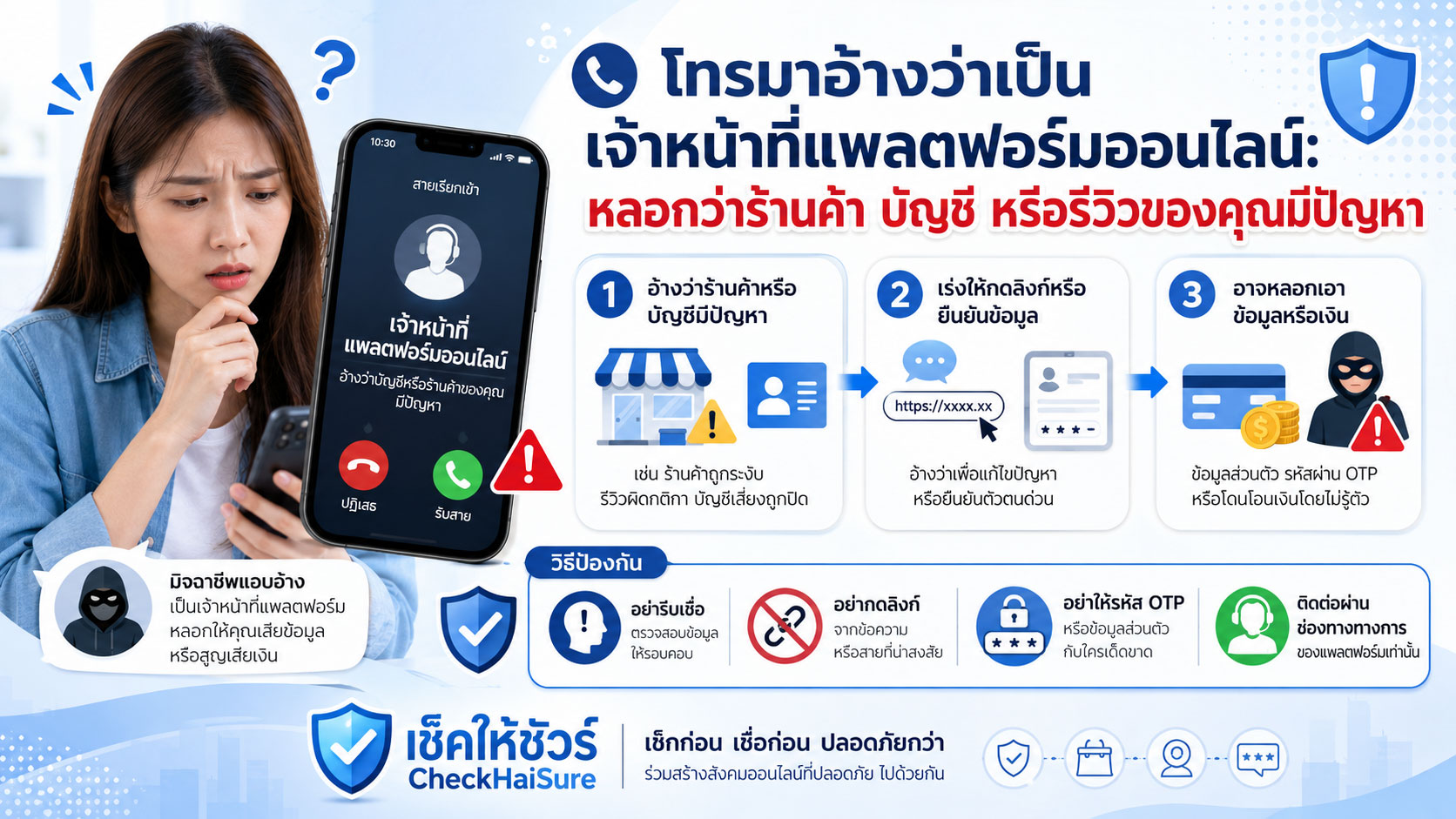
“ร้านค้าของคุณถูกรายงานจากลูกค้า”
“บัญชีของคุณมีความผิดปกติ ต้องยืนยันตัวตนด่วน”
“รีวิวของคุณละเมิดนโยบายแพลตฟอร์ม”
“ถ้าไม่แก้ไขวันนี้ บัญชีจะถูกระงับ”
“กรุณากดลิงก์นี้เพื่อตรวจสอบสถานะบัญชี”
ถ้าได้รับสายหรือข้อความแบบนี้ หลายคนอาจตกใจทันที
โดยเฉพาะคนที่ขายของออนไลน์ ใช้แพลตฟอร์มเป็นช่องทางหารายได้ หรือมีบัญชีร้านค้าที่สร้างมานาน
เพราะบัญชีออนไลน์ไม่ใช่แค่ชื่อผู้ใช้ธรรมดา
มันอาจเป็นหน้าร้าน
เป็นช่องทางติดต่อลูกค้า
เป็นที่เก็บรีวิว
เป็นประวัติการขาย
เป็นรายได้ของครอบครัว
เป็นความน่าเชื่อถือที่สะสมมาหลายปี
หรือเป็นช่องทางหลักในการทำธุรกิจ
แค่ได้ยินว่า “บัญชีจะถูกปิด” หรือ “ร้านค้าจะถูกระงับ” ก็ทำให้หลายคนใจหายแล้ว
มิจฉาชีพเข้าใจความกลัวนี้ดี
เขาจึงอาจโทรมา แชทมา หรือส่งข้อความมาอ้างว่าเป็นเจ้าหน้าที่แพลตฟอร์มออนไลน์ เจ้าหน้าที่ฝ่ายร้านค้า ฝ่ายตรวจสอบบัญชี ฝ่ายความปลอดภัย ฝ่ายนโยบาย หรือฝ่ายดูแลรีวิว แล้วบอกว่าบัญชีของเรามีปัญหา
จากนั้นจะเร่งให้เรากดลิงก์ ยืนยันตัวตน ส่งเอกสาร ให้รหัส OTP แจ้งรหัสผ่าน หรือโอนเงินเพื่อปลดล็อกบัญชี
จำไว้ว่า
บัญชีที่มีปัญหาจริง ต้องตรวจสอบผ่านแอปหรือเว็บไซต์ทางการ ไม่ใช่ผ่านลิงก์ที่คนแปลกหน้าส่งมา
ทำไมกลโกงนี้ถึงน่ากลัวสำหรับคนขายของออนไลน์
เพราะบัญชีร้านค้าออนไลน์เป็นเหมือนทรัพย์สินอย่างหนึ่ง
บางคนใช้เวลาหลายเดือนหรือหลายปีสร้างร้านขึ้นมา
ถ่ายรูปสินค้า
ตอบแชทลูกค้า
สะสมคะแนนร้าน
ดูแลรีวิว
จัดส่งสินค้า
ซื้อโฆษณา
ทำโปรโมชัน
แก้ปัญหาลูกค้า
และพยายามสร้างความน่าเชื่อถือ
เมื่อมีคนบอกว่าร้านจะถูกปิด บัญชีจะถูกระงับ หรือรีวิวมีปัญหา เจ้าของร้านจึงมักกังวลมาก
ไม่ใช่แค่กลัวเสียบัญชี
แต่กลัวเสียรายได้
เสียลูกค้า
เสียชื่อเสียง
เสียอันดับร้าน
เสียโอกาสขาย
หรือเสียทุกอย่างที่สร้างมา
มิจฉาชีพจึงใช้คำว่า “บัญชีมีปัญหา” เพื่อทำให้คนรีบทำตามโดยไม่ทันตรวจสอบ
รูปแบบที่มักเจอในสายหรือข้อความแพลตฟอร์มปลอม
กลโกงนี้อาจมาได้หลายแบบ
บางครั้งอ้างว่าร้านค้าถูกรายงาน
บางครั้งอ้างว่ามีลูกค้าร้องเรียน
มีคำสั่งซื้อผิดปกติ
บัญชีละเมิดนโยบาย
รีวิวมีเนื้อหาต้องห้าม
สินค้าถูกตรวจพบว่าไม่ตรงเงื่อนไข
ระบบพบการเข้าสู่ระบบแปลกๆ
บัญชีโฆษณามีปัญหา
หรือมีการชำระเงินที่ต้องยืนยัน
จากนั้นจะมีคำขู่หรือความเร่งด่วนตามมา เช่น
“ถ้าไม่แก้ไขภายใน 24 ชั่วโมง บัญชีจะถูกระงับ”
“ร้านค้าจะถูกปิดถาวร”
“ยอดเงินในระบบจะถูกอายัด”
“รีวิวทั้งหมดอาจถูกลบ”
“บัญชีจะถูกจำกัดการมองเห็น”
“ระบบจะปิดการขายชั่วคราว”
หรือ “ต้องยืนยันข้อมูลทันทีเพื่อป้องกันการปิดบัญชี”
เมื่อคนฟังกลัว เขาอาจส่งลิงก์หรือให้เพิ่มบัญชีแชทของ “เจ้าหน้าที่” เพื่อดำเนินการต่อ
ลิงก์ “ตรวจสอบบัญชี” อาจเป็นประตูขโมยบัญชี
หนึ่งในวิธีที่พบบ่อยที่สุดคือการส่งลิงก์
อาจบอกว่าเป็นลิงก์สำหรับ
ยืนยันตัวตน
ปลดล็อกบัญชี
ตรวจสอบร้านค้า
ยื่นอุทธรณ์
แก้ไขรีวิว
ยืนยันเจ้าของร้าน
ตรวจสอบคำร้องเรียน
หรือป้องกันการปิดบัญชี
หน้าเว็บอาจดูเหมือนของจริงมาก
มีโลโก้แพลตฟอร์ม
มีสีและปุ่มคล้ายของจริง
มีช่องให้กรอกอีเมลหรือเบอร์โทร
มีช่องให้ใส่รหัสผ่าน
มีช่องให้ใส่ OTP
มีช่องให้แนบบัตรประชาชน
หรือให้กรอกข้อมูลบัญชีรับเงิน
แต่ถ้าเป็นเว็บปลอม ข้อมูลที่กรอกอาจถูกส่งให้มิจฉาชีพทันที
จากนั้นเขาอาจนำข้อมูลไปเข้าสู่บัญชีจริงของเรา เปลี่ยนรหัสผ่าน ยึดบัญชีร้านค้า เปลี่ยนบัญชีรับเงิน หรือใช้บัญชีเราไปหลอกลูกค้าต่อ
อย่ากดลิงก์จากคนที่ติดต่อมาเอง
ถ้าต้องการตรวจสอบบัญชี ให้เข้าแอปหรือเว็บไซต์ทางการด้วยตัวเอง
อย่าให้ลิงก์จากข้อความเป็นประตูเข้าสู่ร้านค้าของคุณ
อย่าให้รหัสผ่านหรือ OTP เพื่อ “แก้ปัญหาบัญชี”
บางครั้งมิจฉาชีพอาจบอกว่า เจ้าหน้าที่ต้องใช้รหัสยืนยันเพื่อช่วยแก้ปัญหา
เช่น
“ขอ OTP เพื่อยืนยันว่าเป็นเจ้าของบัญชี”
“ต้องอ่านรหัสเพื่อปลดล็อกระบบ”
“ขอรหัสเข้าสู่ระบบชั่วคราวเพื่อแก้ไขหลังบ้าน”
“ถ้าไม่ยืนยันตอนนี้ ร้านจะถูกระงับ”
“ระบบส่งรหัสไปแล้ว กรุณาแจ้งเจ้าหน้าที่”
อย่าให้
OTP ไม่ใช่ข้อมูลสำหรับบอกเจ้าหน้าที่
รหัสผ่านก็ไม่ใช่ข้อมูลที่ควรให้ใคร
ถ้ามิจฉาชีพได้รหัสผ่านหรือ OTP เขาอาจเข้าสู่บัญชีของเราได้ทันที
เขาอาจเปลี่ยนข้อมูลร้าน
เปลี่ยนเบอร์โทร
เปลี่ยนอีเมล
เปลี่ยนบัญชีรับเงิน
ลบสินค้า
ตอบแชทลูกค้าแทนเรา
หรือใช้บัญชีของเราไปหลอกคนอื่น
OTP คือกุญแจบัญชี ไม่ใช่รหัสสำหรับให้เจ้าหน้าที่ปลดล็อกให้
ระวังการหลอกให้เพิ่ม LINE หรือแชทเจ้าหน้าที่ปลอม
หลายครั้งมิจฉาชีพจะไม่คุยทุกอย่างในสาย
แต่จะให้เพิ่ม LINE หรือแชทไปยังบัญชีที่อ้างว่าเป็นเจ้าหน้าที่
เขาอาจใช้ชื่อคล้ายแพลตฟอร์ม
ใช้โลโก้คล้ายของจริง
ใช้รูปโปรไฟล์ที่ดูน่าเชื่อ
มีข้อความต้อนรับเหมือนระบบอัตโนมัติ
หรือมีเอกสารปลอมส่งมาให้ดู
จากนั้นจะค่อยๆ ขอข้อมูล เช่น
อีเมลร้าน
เบอร์โทร
รหัสผ่าน
OTP
รูปบัตรประชาชน
เลขบัญชีธนาคาร
ข้อมูลบัญชีรับเงิน
หรือให้กดลิงก์ยืนยัน
ต้องจำไว้ว่า บัญชีแชทที่มีโลโก้ ไม่ได้แปลว่าเป็นบัญชีทางการเสมอไป
ถ้าจะติดต่อแพลตฟอร์ม ให้เริ่มจากแอป เว็บไซต์ หรือศูนย์ช่วยเหลือทางการด้วยตัวเอง
อย่าเพิ่มบัญชีเจ้าหน้าที่จากลิงก์หรือ QR Code ที่คนแปลกหน้าส่งมา
บัญชีร้านค้าอาจถูกใช้หลอกลูกค้าต่อ
ความเสียหายของกลโกงนี้ไม่ได้จบแค่เจ้าของบัญชี
ถ้ามิจฉาชีพยึดบัญชีร้านค้าได้ เขาอาจใช้ร้านของเราไปหลอกลูกค้าต่อ
เช่น
โพสต์สินค้าปลอม
เปลี่ยนเลขบัญชีรับเงิน
ตอบแชทลูกค้าด้วยข้อมูลปลอม
หลอกให้ลูกค้าโอนนอกระบบ
ส่งลิงก์ปลอมให้ลูกค้า
ประกาศโปรโมชันที่ไม่มีจริง
หรือใช้ชื่อร้านที่มีรีวิวดีมาทำให้คนเชื่อ
ผลคือ เจ้าของร้านอาจเสียทั้งบัญชี เสียทั้งชื่อเสียง และอาจถูกลูกค้าเข้าใจผิดว่าเป็นคนหลอก
ดังนั้นการป้องกันบัญชีร้านค้าไม่ได้ป้องกันแค่ตัวเรา
แต่ยังช่วยป้องกันลูกค้าของเราด้วย
รีวิวปลอมและคำร้องเรียนปลอมก็เป็นเหยื่อล่อได้
บางครั้งมิจฉาชีพไม่ได้เริ่มจากการบอกว่าบัญชีจะถูกปิด
แต่อ้างว่ารีวิวหรือคำร้องเรียนมีปัญหา
เช่น
“รีวิวของคุณละเมิดนโยบาย”
“ร้านค้าของคุณถูกลูกค้ารายงาน”
“มีคำร้องเรียนเรื่องสินค้าปลอม”
“มีรีวิวที่ต้องตรวจสอบด่วน”
“ถ้าไม่แก้ไข คะแนนร้านจะถูกลด”
“หากไม่ตอบกลับ ระบบจะปิดการมองเห็นร้าน”
คนขายของออนไลน์มักใส่ใจรีวิวมาก
เพราะรีวิวมีผลต่อความเชื่อมั่นและยอดขาย
มิจฉาชีพจึงใช้คำว่า “รีวิว” และ “รายงานจากลูกค้า” เพื่อทำให้เจ้าของร้านรีบเปิดลิงก์หรือคุยกับเจ้าหน้าที่ปลอม
ถ้ามีรีวิวหรือคำร้องเรียนจริง ควรตรวจสอบได้ในระบบของแพลตฟอร์ม
ไม่ควรต้องกดลิงก์แปลกๆ จากเบอร์หรือแชทที่ติดต่อมาเอง
ระวังค่าธรรมเนียมปลดล็อกหรือค่าดำเนินการปลอม
บางกรณีมิจฉาชีพอาจไม่ได้ต้องการยึดบัญชีอย่างเดียว แต่หลอกให้โอนเงินด้วย
เขาอาจบอกว่า
“ต้องจ่ายค่าปลดล็อกบัญชี”
“ต้องชำระค่าตรวจสอบร้านค้า”
“ต้องวางเงินประกันเพื่อไม่ให้ปิดบัญชี”
“ต้องจ่ายค่าดำเนินการอุทธรณ์”
“ต้องโอนเงินเพื่อยืนยันบัญชีรับรายได้”
“ถ้าชำระวันนี้ ระบบจะเปิดร้านคืนทันที”
ถ้าบัญชีรับเงินเป็นบัญชีบุคคลธรรมดา หรือบัญชีที่ไม่ตรงกับแพลตฟอร์ม ให้หยุดทันที
แพลตฟอร์มจริงควรมีช่องทางชำระเงินและประกาศนโยบายที่ตรวจสอบได้ ไม่ใช่ให้โอนเข้าบัญชีส่วนตัวของเจ้าหน้าที่
อย่าให้ความกลัวบัญชีถูกปิด ทำให้เราโอนเงินไปยังบัญชีที่ไม่รู้ว่าเป็นของใคร
สัญญาณเตือนของเจ้าหน้าที่แพลตฟอร์มออนไลน์ปลอม
ถ้ามีคนโทรหรือทักมาอ้างว่าเป็นเจ้าหน้าที่แพลตฟอร์มออนไลน์ ให้ระวังเป็นพิเศษเมื่อมีพฤติกรรมเหล่านี้
บอกว่าบัญชีหรือร้านค้าของคุณมีปัญหา แต่ไม่ให้ตรวจสอบในแอปทางการ
ขู่ว่าจะปิดบัญชีภายในไม่กี่ชั่วโมง
ส่งลิงก์ให้กรอกข้อมูลร้านค้า
ขอรหัสผ่าน
ขอ OTP หรือรหัสยืนยัน
ให้เพิ่ม LINE เจ้าหน้าที่
ให้สแกน QR Code เพื่อยืนยันบัญชี
ขอรูปบัตรประชาชน
ขอข้อมูลบัญชีรับเงิน
บอกว่าต้องจ่ายค่าปลดล็อก
ให้โอนเงินเข้าบัญชีบุคคล
ส่งเอกสารผ่านแชทแล้วเร่งให้ทำตาม
บอกว่าห้ามเปลี่ยนช่องทางติดต่อ
บอกว่าห้ามแจ้งฝ่ายสนับสนุนอื่น
หรือบอกว่าถ้าไม่ทำตอนนี้ ร้านจะถูกปิดถาวร
ถ้ามีหลายข้อในนี้ ให้หยุดก่อน
อย่าให้รหัสผ่าน
อย่าให้ OTP
อย่ากดลิงก์
อย่าโอนเงิน
อย่าเพิ่ม LINE
อย่าส่งเอกสาร
และอย่ารีบทำตามเพราะกลัวบัญชีหายทันที
ถ้าไม่แน่ใจว่าบัญชีมีปัญหาจริงหรือไม่ ควรทำอย่างไร
วิธีที่ปลอดภัยคือหยุดการคุยกับคนที่ติดต่อมา แล้วเข้าไปตรวจสอบเอง
เปิดแอปทางการของแพลตฟอร์ม
เข้าเว็บไซต์ทางการด้วยตัวเอง
ดูศูนย์แจ้งเตือนในบัญชี
ตรวจสอบข้อความจากระบบในแอป
ติดต่อศูนย์ช่วยเหลือทางการ
ดูอีเมลที่ส่งจากโดเมนทางการ
หรือตรวจสอบประกาศในบัญชีผู้ขาย
อย่าใช้ลิงก์ที่คนปลายสายส่งมา
อย่าใช้เบอร์หรือ LINE ที่เขาให้มาเป็นช่องทางหลัก
อย่าเข้าหน้าเว็บจากลิงก์ใน SMS หรือแชทที่น่าสงสัย
ถ้าปัญหามีจริง มักจะมีข้อมูลในระบบของแพลตฟอร์มจริงให้ตรวจสอบ
ถ้าในระบบจริงไม่มีแจ้งเตือนใดๆ แต่คนปลายสายยังเร่งให้ทำตาม ให้สงสัยไว้ก่อน
เจ้าของร้านควรมีขั้นตอนป้องกันบัญชี
ถ้าคุณขายของออนไลน์ ควรดูแลบัญชีเหมือนดูแลเงินในบัญชีธนาคาร
ตั้งรหัสผ่านที่เดายาก
ไม่ใช้รหัสผ่านซ้ำกับบัญชีอื่น
เปิดยืนยันตัวตนสองชั้น
กำหนดว่าใครในทีมเข้าถึงบัญชีได้
ไม่ให้พนักงานส่ง OTP ให้ใคร
ไม่ให้เปลี่ยนบัญชีรับเงินโดยไม่มีการตรวจสอบ
ตรวจสอบอีเมลและเบอร์โทรที่ผูกบัญชี
เก็บช่องทางติดต่อแพลตฟอร์มทางการไว้
และคุยกับทีมให้รู้ว่าเจ้าหน้าที่จริงไม่ควรขอรหัสผ่านหรือ OTP
ถ้ามีหลายคนดูแลร้าน ควรมีข้อตกลงชัดเจนว่า ใครมีสิทธิ์ตอบเรื่องบัญชี ใครมีสิทธิ์เปลี่ยนข้อมูล และถ้ามีสายหรือข้อความแปลกๆ ต้องแจ้งใครก่อน
บัญชีร้านค้าที่ปลอดภัย เริ่มจากการไม่ให้คนแปลกหน้าเข้าหลังบ้านของเรา
ถ้าเผลอกดลิงก์หรือให้ข้อมูลไปแล้ว
ถ้าเผลอกดลิงก์ กรอกรหัสผ่าน ให้ OTP ส่งเอกสาร หรือโอนเงินไปแล้ว ให้หยุดทันที
อย่าทำขั้นตอนต่อ
อย่าให้รหัสเพิ่ม
อย่าโอนเงินเพิ่ม
อย่าคุยต่อเพราะเขาบอกว่าจะช่วยแก้ให้สำเร็จ
ให้รีบทำสิ่งเหล่านี้
เปลี่ยนรหัสผ่านบัญชีทันที
ออกจากระบบทุกอุปกรณ์ถ้าทำได้
ตรวจสอบอีเมล เบอร์โทร และบัญชีรับเงิน
เปิดหรือรีเซ็ตการยืนยันตัวตนสองชั้น
ตรวจสอบรายการเปลี่ยนแปลงในบัญชี
แจ้งศูนย์ช่วยเหลือทางการของแพลตฟอร์ม
แจ้งลูกค้าหากบัญชีถูกใช้สื่อสารผิดปกติ
ติดต่อธนาคารหากมีการโอนเงินหรือข้อมูลบัญชีเกี่ยวข้อง
และเก็บหลักฐานทั้งหมด
หลักฐานที่ควรเก็บ เช่น
เบอร์โทร
บัญชีแชท
ลิงก์
QR Code
ข้อความ
เอกสารที่ส่งมา
ชื่อที่อีกฝ่ายใช้
เวลาที่เกิดเหตุ
ข้อมูลที่เผลอให้ไป
เลขบัญชีปลายทาง
ชื่อบัญชี
สลิปโอนเงิน
และคำพูดที่ใช้ขู่หรือเร่ง
อย่าลบหลักฐานเพราะอาย
การถูกหลอกด้วยเรื่องบัญชีร้านค้าเกิดขึ้นได้กับคนที่ตั้งใจทำธุรกิจจริงๆ
สิ่งสำคัญคือหยุดเร็วและรีบยึดบัญชีคืนให้เร็วที่สุด
คุยกับทีมและคนในบ้านเรื่องบัญชีแพลตฟอร์มปลอม
หัวข้อนี้ควรคุยกับทั้งคนในบ้านและคนที่ช่วยดูแลร้าน
โดยเฉพาะถ้าบัญชีร้านมีหลายคนเข้าใช้งาน
อาจตกลงกันว่า
ถ้ามีคนบอกว่าร้านมีปัญหา ให้ตรวจสอบในแอปทางการก่อน
ถ้าส่งลิงก์มาให้กรอกรหัสผ่าน ให้ไม่กด
ถ้าขอ OTP ให้ไม่ให้
ถ้าให้เพิ่ม LINE เจ้าหน้าที่ ให้ไม่เพิ่มทันที
ถ้าบอกว่าจะปิดบัญชีวันนี้ ให้ไม่ตัดสินใจคนเดียว
ถ้าให้โอนค่าปลดล็อก ให้หยุดก่อน
ถ้าขอเอกสารส่วนตัว ให้ตรวจสอบช่องทางทางการก่อน
ถ้ามีการเปลี่ยนบัญชีรับเงิน ต้องมีการยืนยันจากเจ้าของร้าน
และถ้าไม่แน่ใจ ให้ถามคนที่รับผิดชอบบัญชีหลักก่อนเสมอ
ข้อตกลงเล็กๆ เหล่านี้อาจช่วยป้องกันไม่ให้คนในทีมเผลอเปิดประตูให้มิจฉาชีพ
อย่าโทษตัวเองถ้าคุณตกใจเมื่อได้ยินว่าบัญชีจะถูกปิด
ถ้าคุณได้รับสายหรือข้อความแบบนี้แล้วตกใจ นั่นเป็นเรื่องเข้าใจได้
เพราะบัญชีร้านค้าอาจหมายถึงรายได้ทั้งเดือน
อาจหมายถึงความน่าเชื่อถือที่สร้างมานาน
อาจหมายถึงลูกค้าที่รอสินค้า
อาจหมายถึงรีวิวที่สะสมมา
อาจหมายถึงค่าโฆษณาที่ลงทุนไป
และอาจหมายถึงธุรกิจเล็กๆ ที่คุณดูแลด้วยตัวเอง
มิจฉาชีพเลือกใช้เรื่องนี้เพราะรู้ว่าคนขายของออนไลน์กลัวเสียบัญชี
สิ่งสำคัญไม่ใช่การไม่กลัว
แต่คือเมื่อกลัวแล้ว ให้หยุดก่อน
ไม่กดลิงก์ทันที
ไม่ให้รหัสผ่าน
ไม่ให้ OTP
ไม่โอนเงิน
ไม่เพิ่ม LINE
ไม่ส่งเอกสาร
และไม่ปล่อยให้คำว่า “บัญชีจะถูกปิด” ทำให้ลืมใช้ช่องทางทางการ
ประโยคที่ควรจำ: แพลตฟอร์มจริงต้องตรวจสอบได้ในช่องทางจริง
ถ้าต้องจำประโยคเดียวจากบทความนี้ ขอให้จำว่า
แพลตฟอร์มจริงต้องตรวจสอบได้ในช่องทางจริง ไม่ใช่ลิงก์ที่คนแปลกหน้าส่งมา
ถ้าร้านมีปัญหาจริง ระบบในแอปควรแจ้งได้
ถ้าบัญชีถูกจำกัดจริง ควรตรวจสอบผ่านศูนย์ช่วยเหลือทางการได้
ถ้ามีรีวิวหรือคำร้องเรียนจริง ควรเห็นในบัญชีของเราเอง
ถ้าต้องยืนยันตัวตนจริง ควรทำผ่านระบบทางการ
ถ้าขอรหัสผ่านหรือ OTP ให้หยุด
ถ้าให้โอนเข้าบัญชีบุคคล ให้สงสัย
ถ้าห้ามไปติดต่อศูนย์ช่วยเหลือทางการ ให้ยิ่งต้องตรวจสอบ
สรุป: อย่าให้ความกลัวบัญชีถูกปิด พาเราเปิดประตูให้มิจฉาชีพ
กลโกงเจ้าหน้าที่แพลตฟอร์มออนไลน์ปลอมอันตราย เพราะมันใช้ความกลัวของคนที่พึ่งพาบัญชีออนไลน์ในการทำงานหรือค้าขาย
กลัวร้านถูกปิด
กลัวรีวิวหาย
กลัวยอดขายตก
กลัวลูกค้าหาย
กลัวยอดเงินถูกอายัด
กลัวบัญชีที่สร้างมานานเสียหาย
และกลัวว่าถ้าไม่ทำทันที จะกู้บัญชีคืนไม่ได้
แต่สิ่งที่ควรทำคือหยุดก่อน
อย่ากดลิงก์ทันที
อย่าให้รหัสผ่าน
อย่าให้ OTP
อย่าเพิ่ม LINE เจ้าหน้าที่ปลอม
อย่าโอนค่าปลดล็อก
อย่าส่งเอกสารส่วนตัวผ่านแชทที่ตรวจสอบไม่ได้
อย่าเชื่อเพียงเพราะเขาใช้โลโก้หรือพูดชื่อแพลตฟอร์มถูก
ให้เข้าแอปหรือเว็บไซต์ทางการด้วยตัวเอง แล้วตรวจสอบจากศูนย์แจ้งเตือน ศูนย์ช่วยเหลือ หรือช่องทางทางการของแพลตฟอร์ม
ถ้าปัญหาจริง ยังตรวจสอบและแก้ไขได้
แต่ถ้าเป็นมิจฉาชีพ การไม่กดลิงก์และไม่ให้รหัส อาจช่วยให้บัญชีร้านค้าของคุณยังเป็นของคุณต่อไป
A Call Claims to Be from an Online Platform Officer: Beware of Scams Saying Your Shop, Account, or Review Has a Problem
“Your shop has been reported by a customer.”
“Your account has unusual activity and must be verified urgently.”
“Your review violates the platform’s policy.”
“If you do not fix this today, your account will be suspended.”
“Please click this link to check your account status.”
If you receive a call or message like this, many people may panic immediately.
This is especially true for online sellers, people who use platforms to earn income, or anyone who has built a shop account over a long time.
An online account is not just a username.
It can be your storefront.
Your customer contact channel.
Your collection of reviews.
Your sales history.
Your family income.
Your credibility built over many years.
Or the main channel for running your business.
Just hearing that “your account will be closed” or “your shop will be suspended” can make many people feel alarmed.
Scammers understand this fear very well.
They may call, chat, or message you pretending to be an online platform officer, seller support staff, account verification team, security team, policy team, or review support team. Then they claim that your account has a problem.
After that, they pressure you to click a link, verify your identity, send documents, provide an OTP, share your password, or transfer money to unlock the account.
Remember this:
If a platform account really has a problem, it should be checked through the official app or website, not through a link sent by a stranger.
Why This Scam Is So Frightening for Online Sellers
An online shop account can feel like a valuable asset.
Some sellers spend months or years building their shop.
Taking product photos.
Replying to customers.
Collecting shop ratings.
Managing reviews.
Shipping orders.
Buying ads.
Running promotions.
Solving customer issues.
And building trust.
So when someone says the shop will be closed, the account will be suspended, or reviews have a problem, sellers can become very anxious.
It is not only fear of losing an account.
It is fear of losing income.
Losing customers.
Losing reputation.
Losing shop ranking.
Losing sales opportunities.
Or losing everything built over time.
Scammers use the phrase “your account has a problem” to make people act quickly before they have time to verify.
Common Forms of Fake Online Platform Calls or Messages
This scam can appear in many forms.
Sometimes they claim your shop has been reported.
Sometimes they claim there is a customer complaint.
An unusual order.
A policy violation.
A review with prohibited content.
A product that does not meet platform rules.
A suspicious login.
A problem with your advertising account.
Or a payment that needs confirmation.
Then they add urgency or threats, such as:
“If you do not fix this within 24 hours, your account will be suspended.”
“Your shop will be permanently closed.”
“Your balance in the system may be frozen.”
“All reviews may be removed.”
“Your account visibility will be limited.”
“Selling will be temporarily disabled.”
Or “You must verify your information immediately to prevent account closure.”
Once the seller becomes afraid, the scammer may send a link or ask them to add a fake “officer” account to continue the process.
A “Check Your Account” Link May Be the Door to Account Theft
One of the most common methods is sending a link.
They may say the link is for:
Identity verification
Account unlocking
Shop review
Appeal submission
Review correction
Shop owner confirmation
Complaint checking
Or preventing account closure
The webpage may look very real.
It may have the platform logo.
Similar colors and buttons.
Fields for email or phone number.
A password field.
An OTP field.
An ID card upload field.
Or a form asking for payout account information.
But if the website is fake, anything you enter may go directly to scammers.
After that, they may use the information to log in to your real account, change your password, take over your shop, change the payout account, or use your shop to scam customers.
Do not click links sent by someone who contacts you first.
If you need to check your account, open the official app or website yourself.
Do not let a link from a message become the doorway into your shop account.
Do Not Share Passwords or OTPs to “Fix Account Problems”
Sometimes scammers claim that officers need a verification code to help fix your account.
They may say:
“We need the OTP to confirm you are the account owner.”
“You must read the code to unlock the system.”
“We need temporary login access to fix the seller backend.”
“If you do not verify now, your shop will be suspended.”
“The system has sent a code. Please provide it to the officer.”
Do not share it.
An OTP is not information to give to an officer.
Your password should not be given to anyone either.
If scammers get your password or OTP, they may access your account immediately.
They may change shop information.
Change phone number.
Change email.
Change payout account.
Delete products.
Reply to customers as you.
Or use your account to scam other people.
An OTP is an account key, not a code for an officer to unlock your shop.
Beware of Being Asked to Add a Fake LINE or Chat Officer
Many scammers do not handle everything by phone.
They may ask you to add a LINE account or chat account that claims to be an officer.
They may use a name similar to the platform.
Use a logo that looks real.
Use a convincing profile picture.
Show an automated welcome message.
Or send fake documents to look official.
Then they gradually ask for information such as:
Shop email
Phone number
Password
OTP
Photo of your ID card
Bank account number
Payout account details
Or ask you to click a verification link
Remember: a chat account with a logo does not mean it is official.
If you need to contact the platform, start from the official app, official website, or official help center yourself.
Do not add an officer account from a link or QR code sent by a stranger.
Your Shop Account May Be Used to Scam Customers
The damage from this scam may not end with the account owner.
If scammers take over your shop account, they may use it to scam customers.
For example:
Posting fake products
Changing the payment account
Replying to customers with false information
Tricking customers into paying outside the platform
Sending fake links to customers
Announcing fake promotions
Or using a shop with good reviews to make people trust them
As a result, the shop owner may lose the account, lose reputation, and be misunderstood by customers as the scammer.
Protecting your shop account does not only protect you.
It also protects your customers.
Fake Reviews and Fake Complaints Can Also Be Used as Bait
Sometimes scammers do not begin by saying the account will be closed.
They may start by claiming that a review or complaint has a problem.
For example:
“Your review violates policy.”
“Your shop was reported by a customer.”
“There is a complaint about counterfeit products.”
“There is a review that needs urgent inspection.”
“If you do not fix this, your shop rating will be reduced.”
“If you do not respond, the system will hide your shop.”
Online sellers care deeply about reviews.
Reviews affect trust and sales.
Scammers use words like “review” and “customer report” to make sellers open links or speak with fake officers quickly.
If there is a real review or complaint, it should be visible inside the platform’s system.
You should not need to click a strange link from an unknown number or chat account.
Beware of Fake Unlocking Fees or Processing Fees
In some cases, scammers do not only want to steal your account. They may also try to make you transfer money.
They may say:
“You need to pay an account unlocking fee.”
“You must pay a shop inspection fee.”
“You need to place a deposit to prevent account closure.”
“You must pay an appeal processing fee.”
“You need to transfer money to verify your payout account.”
“If you pay today, the system will reopen your shop immediately.”
If the receiving account is a personal bank account or does not match the platform, stop immediately.
A real platform should have verifiable payment channels and clear policies. It should not ask you to transfer money to a staff member’s personal account.
Do not let fear of account suspension make you transfer money to an account whose owner you cannot verify.
Warning Signs of a Fake Online Platform Officer
If someone calls or messages claiming to be from an online platform, be especially careful if they do any of the following:
They say your account or shop has a problem but do not let you check in the official app.
They threaten to close your account within a few hours.
They send a link asking you to enter shop information.
They ask for your password.
They ask for an OTP or verification code.
They ask you to add a LINE officer.
They ask you to scan a QR code to verify the account.
They ask for a photo of your ID card.
They ask for payout account information.
They say you must pay an unlocking fee.
They ask you to transfer money to a personal account.
They send documents through chat and rush you to follow instructions.
They tell you not to change communication channels.
They tell you not to contact other support teams.
Or they say that if you do not act now, your shop will be permanently closed.
If several of these signs appear, stop first.
Do not share your password.
Do not provide OTPs.
Do not click links.
Do not transfer money.
Do not add LINE.
Do not send documents.
And do not act quickly just because you fear losing the account.
What Should You Do If You Are Not Sure Whether Your Account Really Has a Problem?
The safest step is to stop communicating with the person who contacted you and check by yourself.
Open the official platform app.
Go to the official website yourself.
Check the notification center in your account.
Look for system messages inside the app.
Contact the official help center.
Check emails sent from the official domain.
Or check announcements inside your seller account.
Do not use the link sent by the caller.
Do not use the phone number or LINE account they provide as your main contact channel.
Do not open webpages from suspicious SMS or chat links.
If the problem is real, there is usually information inside the real platform system.
If the official system shows no warning, but the caller still pressures you, treat it as suspicious.
Sellers Should Have Account Protection Procedures
If you sell online, treat your shop account like a bank account.
Use a strong password.
Do not reuse passwords across accounts.
Enable two-factor authentication.
Decide clearly who on your team can access the account.
Do not let staff send OTPs to anyone.
Do not change payout accounts without verification.
Check the email and phone number linked to the account.
Save the platform’s official contact channels.
And make sure everyone on the team knows that real officers should not ask for passwords or OTPs.
If multiple people manage the shop, set clear rules about who can respond to account issues, who can change account settings, and who must be informed if suspicious calls or messages appear.
A secure shop account begins with not letting strangers into your backend.
If You Already Clicked a Link or Shared Information
If you already clicked a link, entered your password, provided an OTP, sent documents, or transferred money, stop immediately.
Do not continue the next steps.
Do not provide more codes.
Do not transfer more money.
Do not keep chatting because they say they can fix the issue successfully.
Take action quickly:
Change the account password immediately.
Log out from all devices if possible.
Check the email, phone number, and payout account.
Enable or reset two-factor authentication.
Review recent account changes.
Contact the platform’s official help center.
Warn customers if the account was used abnormally.
Contact your bank if money or bank account information was involved.
And save all evidence.
Evidence to keep includes:
Phone number
Chat account
Links
QR code
Messages
Documents sent
Name used by the caller
Time of incident
Information you shared
Destination account number
Account name
Transfer slip
And words used to threaten or pressure you
Do not delete evidence because you feel embarrassed.
Being tricked through a shop account problem can happen to people who are genuinely trying to run a business.
The important thing is to stop quickly and recover control of the account as soon as possible.
Talk with Your Team and Family About Fake Platform Officers
This topic should be discussed with both family members and anyone helping manage the shop.
Especially if multiple people can access the seller account.
You can agree on simple rules:
If someone says the shop has a problem, check inside the official app first.
If they send a link asking for a password, do not click it.
If they ask for an OTP, do not provide it.
If they ask you to add a LINE officer, do not add immediately.
If they say the account will be closed today, do not decide alone.
If they ask for an unlocking fee, stop first.
If they ask for personal documents, check through official channels first.
If there is any change to the payout account, the shop owner must confirm it.
And if you are unsure, ask the person responsible for the main account first.
Small agreements like these can prevent someone on the team from accidentally opening the door to scammers.
Do Not Blame Yourself If You Panic When You Hear Your Account May Be Closed
If you receive a call or message like this and panic, that is understandable.
A shop account may represent a whole month’s income.
It may represent credibility built over a long time.
It may represent customers waiting for products.
It may represent years of reviews.
It may represent money spent on advertising.
And it may represent a small business you manage by yourself.
Scammers use this topic because they know online sellers fear losing accounts.
The goal is not to never feel afraid.
The goal is to stop when fear begins.
Do not click links immediately.
Do not share passwords.
Do not provide OTPs.
Do not transfer money.
Do not add LINE.
Do not send documents.
And do not let the words “your account will be closed” make you forget official channels.
A Sentence to Remember: Real Platforms Must Be Checked Through Real Channels
If you remember only one sentence from this article, remember this:
A real platform issue must be checked through the real platform channel, not through a link sent by a stranger.
If your shop really has a problem, the system in the app should show it.
If your account is really restricted, it should be verifiable through the official help center.
If there is a real review or complaint, it should appear in your own account.
If identity verification is truly required, it should happen through the official system.
If someone asks for your password or OTP, stop.
If they ask you to transfer money to a personal account, be suspicious.
If they tell you not to contact the official help center, that is even more reason to verify.
Conclusion: Do Not Let Fear of Account Closure Open the Door to Scammers
Fake online platform officer scams are dangerous because they use the fear of people who depend on online accounts for work or sales.
Fear that the shop will be closed.
Fear that reviews will disappear.
Fear that sales will drop.
Fear that customers will be lost.
Fear that balances will be frozen.
Fear that a long-built account will be damaged.
And fear that if you do not act immediately, the account cannot be recovered.
But the safest first step is to stop.
Do not click links immediately.
Do not share your password.
Do not provide OTPs.
Do not add fake LINE officers.
Do not pay unlocking fees.
Do not send personal documents through unverifiable chats.
Do not believe a message just because it uses the platform logo or says the platform name correctly.
Open the official app or website yourself and check through the notification center, help center, or official support channel.
If the problem is real, it can still be checked and handled.
But if it is a scam, refusing to click the link or share your code may keep your shop account in your hands.

Leave a Reply
You must be logged in to post a comment.