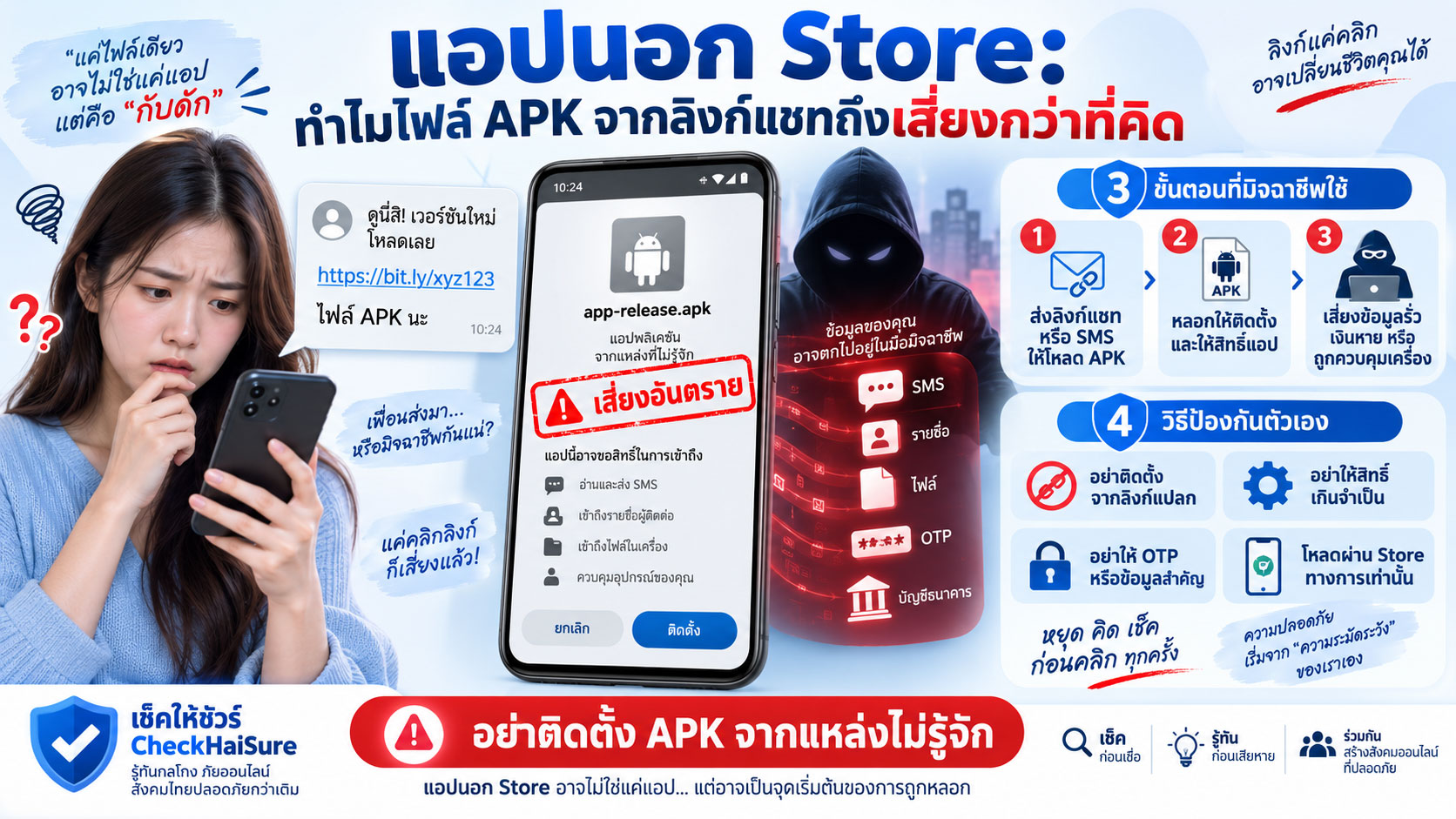
“แอปนี้ไม่มีใน Play Store ครับ ต้องโหลดจากลิงก์นี้”
“เป็นเวอร์ชันพิเศษสำหรับลูกค้า”
“กดดาวน์โหลดไฟล์นี้ แล้วเปิดติดตั้งได้เลย”
“ถ้าระบบขึ้นเตือน ให้กดอนุญาตครับ เป็นขั้นตอนปกติ”
“ต้องเปิดติดตั้งจากแหล่งที่ไม่รู้จักก่อน เดี๋ยวผมบอกทีละขั้น”
ถ้ามีใครส่งลิงก์แบบนี้มาให้ แล้วเรากำลังตกใจ รีบ หรือกำลังรอแก้ปัญหาบางอย่าง เราอาจกดตามโดยไม่ทันคิด
โดยเฉพาะถ้าคนที่ส่งมาบอกว่าเป็น
เจ้าหน้าที่ธนาคาร
เจ้าหน้าที่ขนส่ง
เจ้าหน้าที่แพลตฟอร์ม
ฝ่ายไอที
เจ้าหน้าที่รัฐ
บริษัทเงินกู้
หรือฝ่ายบริการลูกค้า
หลายคนไม่ได้ติดตั้งไฟล์ APK เพราะอยากเสี่ยง
แต่เพราะคิดว่า
“ถ้าเจ้าหน้าที่เป็นคนให้มา ก็น่าจะใช้ได้”
ตรงนี้คือจุดที่อันตราย
เพราะไฟล์ที่มาจากลิงก์ในแชทอาจดูเหมือนแอปธรรมดา แต่เราแทบไม่รู้เลยว่าใครเป็นคนสร้าง ใครแก้ไขไฟล์ล่าสุด หรือหลังติดตั้งแล้วมันจะขอสิทธิ์อะไรจากมือถือของเรา
จำประโยคนี้ไว้ก่อน
ถ้ามีคนติดต่อมาเอง แล้วบอกให้ติดตั้งแอปจากลิงก์ที่เขาส่งมา ให้หยุดตรวจสอบก่อนเสมอ
APK คืออะไร และทำไมคนทั่วไปถึงเจอมันบ่อยขึ้น
APK คือไฟล์ติดตั้งแอปบน Android
ถ้าเปรียบง่าย ๆ มันคล้ายไฟล์สำหรับติดตั้งโปรแกรมลงเครื่อง
โดยปกติ คนส่วนใหญ่ดาวน์โหลดแอปผ่าน Play Store
เราค้นชื่อแอป
ดูชื่อผู้พัฒนา
ดูรีวิว
ดูจำนวนดาวน์โหลด
ดูรายละเอียด
แล้วกดติดตั้ง
แต่ไฟล์ APK สามารถถูกส่งให้กันโดยตรงได้
เช่น
ผ่าน LINE
SMS
Messenger
อีเมล
เว็บไซต์
QR Code
หรือไฟล์ที่ส่งมาในแชท
ตัวไฟล์ APK เองไม่ได้แปลว่าเป็นมัลแวร์ทุกไฟล์
นักพัฒนา บริษัท หรือองค์กรบางแห่งอาจมีเหตุผลในการติดตั้งแอปภายในที่ไม่ได้เผยแพร่ผ่าน Store
แต่สำหรับคนทั่วไป ความเสี่ยงอยู่ที่ว่า
เราแทบไม่มีทางรู้จากชื่อไฟล์อย่างเดียวว่า ไฟล์นั้นคือแอปที่เขาบอกจริงหรือไม่
ชื่อไฟล์สามารถตั้งใหม่ได้
ไอคอนสามารถเลียนแบบได้
โลโก้สามารถคัดลอกได้
และหน้าตาของแอปหลังติดตั้งก็สามารถทำให้คล้ายของจริงได้
“ไม่มีใน Store” ไม่ควรเป็นเหตุผลให้เราลดความระวัง
มิจฉาชีพอาจเตรียมคำอธิบายไว้แล้วว่า ทำไมต้องติดตั้งจากลิงก์
เช่น
“แอปยังไม่เปิดให้คนทั่วไปใช้”
“เป็นระบบภายในของธนาคาร”
“เป็นเวอร์ชันเจ้าหน้าที่”
“แอปนี้ใช้เฉพาะเคสเร่งด่วน”
“เวอร์ชัน Play Store ใช้งานฟังก์ชันนี้ไม่ได้”
“ต้องติดตั้งตัวนี้ก่อนเพื่อยืนยันบัญชี”
ฟังแล้วอาจดูสมเหตุสมผล
โดยเฉพาะถ้าเราไม่คุ้นกับเรื่องไอที
แต่ตรงนี้ควรถามกลับในใจว่า
ถ้าเป็นธนาคารจริง
ทำไมต้องส่งไฟล์แอปผ่าน LINE?
ถ้าเป็นบริษัทใหญ่จริง
ทำไมลูกค้าต้องเปิดการติดตั้งจากแหล่งที่ไม่รู้จัก?
ถ้าเป็นแพลตฟอร์มจริง
ทำไมปัญหาในบัญชีถึงต้องแก้ด้วยไฟล์ที่เจ้าหน้าที่ส่งมาเฉพาะกิจ?
คำว่า “พิเศษ” หรือ “ภายใน” ไม่ได้ทำให้ไฟล์ปลอดภัยขึ้น
บางครั้งกลับเป็นคำที่ทำให้คนยอมทำสิ่งที่ปกติจะไม่ทำ
จุดอันตรายเริ่มตั้งแต่ตอนที่มือถือเตือนเรา
เวลาติดตั้งไฟล์จากนอก Store มือถืออาจแสดงคำเตือนบางอย่าง
เช่น
ไม่อนุญาตให้ติดตั้งจากแหล่งนี้
ต้องเปิด Unknown Sources
ต้องอนุญาตให้แอปนี้ติดตั้งไฟล์
หรือมีข้อความเตือนด้านความปลอดภัย
ตรงนี้หลายคนเริ่มลังเล
แต่คนปลายสายอาจรีบบอกว่า
“ไม่เป็นไรครับ กด Allow ได้เลย”
“เป็นระบบปกติของ Android”
“ต้องเปิดก่อนถึงจะติดตั้งได้”
“ทุกคนต้องทำแบบนี้”
ปัญหาคือ เมื่ออีกฝ่ายเป็นคนพาเราข้ามคำเตือนของระบบทีละขั้น เรากำลังยกเลิกกลไกป้องกันของมือถือด้วยคำอธิบายจากคนที่เราเองยังตรวจสอบตัวตนไม่ได้
มือถือเตือนเรา
แต่คนปลายสายบอกว่าไม่ต้องสนใจ
ตรงนี้ควรเป็นจุดหยุด ไม่ใช่จุดกดต่อ
ไฟล์เดียวกัน อาจไม่ได้เหมือนกันสำหรับทุกคน
สิ่งที่คนทั่วไปอาจไม่ทันคิดคือ ชื่อแอปเดียวกันไม่ได้หมายความว่าไฟล์เหมือนกันทุกครั้ง
สมมติมีคนส่งไฟล์ชื่อ
bank_update.apk
ชื่อดูเหมือนระบบธนาคาร
แต่อีกคนอาจแก้ไฟล์ภายใน เปลี่ยนบางส่วน แล้วตั้งชื่อกลับเป็นชื่อเดิม
คนรับไฟล์เห็นเพียงชื่อ
แต่ไม่รู้ว่าไฟล์ข้างในคืออะไร
เราอาจคิดว่า
“เพื่อนอีกคนก็ติดตั้งแอปชื่อนี้”
แต่ไฟล์ที่เราได้รับวันนี้ อาจไม่ใช่ไฟล์เดียวกับที่เขาเคยใช้
ดังนั้นคำว่า
“ชื่อเหมือนกัน”
ไม่ได้แปลว่า
“ปลอดภัยเหมือนกัน”
ไอคอนเหมือนของจริง ก็ไม่ได้ช่วยพิสูจน์อะไร
แอปปลอมสามารถทำให้ดูคล้ายแอปจริงได้มาก
ใช้โลโก้เดียวกัน
ใช้ชื่อใกล้เคียงกัน
ใช้สีเดียวกัน
มีหน้าล็อกอินคล้ายกัน
มีปุ่มเหมือนกัน
บางครั้งยังใส่ชื่อบริษัทหรือข้อความภาษาไทยให้ดูน่าเชื่อ
คนที่ติดตั้งอาจคิดว่า
“หน้าตาเหมือนแอปธนาคารเลย”
แต่สิ่งที่เราเห็นบนหน้าจอไม่ใช่หลักฐานว่าคนข้างหลังแอปคือใคร
หน้าตาสร้างเลียนแบบได้ง่ายกว่าความน่าเชื่อถือของผู้พัฒนา
ถ้าต้นทางของแอปไม่น่าไว้ใจ
ความสวยของหน้าจอไม่ควรทำให้เราวางใจ
มิจฉาชีพไม่ได้ต้องการแค่ให้ติดตั้ง เขาต้องการให้ “อนุญาตต่อ”
หลังจากติดตั้ง แอปอาจเริ่มขอสิทธิ์
บางอย่างดูธรรมดา
บางอย่างไม่ธรรมดาเลย
เช่น
เข้าถึงรายชื่อ
อ่าน SMS
เข้าถึงไฟล์และรูป
ใช้ไมโครโฟน
ใช้กล้อง
แสดงทับแอปอื่น
เปิด Accessibility
ควบคุมหน้าจอ
หรือเข้าถึงการแจ้งเตือน
หลายครั้งมิจฉาชีพจะอยู่ในสายตลอดเวลาเพื่อบอกว่า
“กด Allow ได้เลยครับ”
“อันนี้จำเป็น”
“ต้องเปิดทั้งหมด”
“ถ้าไม่เปิด ระบบจะทำงานไม่ได้”
ตรงนี้คือเหตุผลที่การติดตั้ง APK จากคนแปลกหน้าเสี่ยงกว่าการติดตั้งแอปทั่วไปมาก
เพราะสิ่งที่เขาต้องการไม่ใช่แค่ให้แอปอยู่ในเครื่อง
แต่ต้องการให้มันมีสิทธิ์ทำบางอย่างหลังจากนั้น
ถ้าแอปเกี่ยวกับเงิน แต่กลับขอสิทธิ์ดูรายชื่อ ให้ถามก่อนว่าเพราะอะไร
แอปบางประเภทมีเหตุผลในการขอข้อมูลบางอย่าง
แต่ถ้าแอปที่อ้างว่าใช้
ตรวจสอบบัญชี
รับเงินคืน
ยืนยันตัวตน
ตรวจพัสดุ
หรือแก้ปัญหาธนาคาร
กลับขอ
รายชื่อทั้งหมด
SMS
Accessibility
การควบคุมหน้าจอ
ควรสงสัยทันที
คำถามง่าย ๆ คือ
ฟังก์ชันที่เขาบอกว่าแอปทำ กับสิทธิ์ที่แอปขอ มันสัมพันธ์กันจริงหรือไม่
แอปตรวจพัสดุไม่ควรต้องควบคุมหน้าจอมือถือ
แอปรับเงินคืนไม่ควรต้องอ่านรายชื่อเพื่อนทั้งหมด
แอปยืนยันตัวตนไม่ควรต้องพาเราเข้า Mobile Banking ขณะมีคนอื่นดูหน้าจอ
ถ้าคำอธิบายไม่ตรงกับสิทธิ์ ให้หยุด
บางไฟล์ไม่ได้ขโมยเงินทันที แต่มันอาจเปิดทางให้ความเสียหายเกิดทีหลัง
นี่เป็นจุดที่คนมักเข้าใจผิด
บางคนติดตั้งแล้วเห็นว่า
“ยังไม่มีอะไรเกิดขึ้น”
เงินยังอยู่
มือถือยังใช้ได้
จึงคิดว่าแอปปลอดภัย
แต่แอปที่เป็นอันตรายไม่จำเป็นต้องทำอะไรทันทีให้เราเห็น
มันอาจรอ
รอให้เราเปิดแอปธนาคาร
รอให้มี SMS เข้า
รอให้มี OTP
รอให้เราอยู่ในสถานการณ์ที่มิจฉาชีพควบคุม
หรือรอรับคำสั่งบางอย่าง
ดังนั้นคำว่า
“ติดตั้งมาสิบนาทีแล้วยังไม่เกิดอะไร”
ไม่ได้พิสูจน์ว่าแอปปลอดภัย
ความเสียหายบางอย่างเกิดขึ้นหลังจากเราลืมไปแล้วว่าเคยติดตั้งมันด้วยซ้ำ
ถ้าคนปลายสายพาเข้า Settings ให้ระวังมากขึ้นอีกระดับ
หนึ่งในรูปแบบที่น่ากังวลคือคนปลายสายบอกให้เข้า Settings
แล้วบอกเส้นทางทีละขั้น
“เข้า Setting ครับ”
“เลือก Security”
“เปิด Install Unknown Apps”
“เลือกแอปนี้”
“กด Allow”
จากนั้นอาจพาไปเมนูอื่นต่อ
“เข้า Accessibility”
“เปิด Service นี้”
“กด Enable”
ถ้าคนที่เราไม่รู้จักกำลังพาเราเดินเข้าเมนูความปลอดภัยของมือถือทีละขั้น นั่นไม่ใช่เรื่องเล็ก
เราไม่จำเป็นต้องรู้ว่าแต่ละเมนูอันตรายอย่างไรทั้งหมด
ให้ใช้กฎง่าย ๆ ว่า
คนแปลกหน้าที่โทรมา ไม่ควรเป็นคนตั้งค่าความปลอดภัยในมือถือของเรา
“เดี๋ยวผมบอกทีละขั้น” ฟังดูช่วยเหลือ แต่จริง ๆ อาจลดเวลาที่เราได้คิด
มิจฉาชีพมักทำให้ทุกอย่างง่าย
ไม่ต้องคิด
เขาคิดให้
ไม่ต้องอ่าน
เขาบอกว่ากดอะไร
ไม่ต้องตรวจสอบ
เขาบอกว่าเป็นเจ้าหน้าที่
จากนั้นเราจะกลายเป็นคนทำตามขั้นตอนอย่างเดียว
“กดตรงนี้”
“เลื่อนลง”
“เลือกอันที่สอง”
“กด Allow”
“กลับหน้าแรก”
“เปิดธนาคาร”
ยิ่งทำทีละขั้น เราอาจยิ่งลืมถามว่า
“ทำไมเราต้องทำทั้งหมดนี้ตั้งแต่แรก”
ถ้าสถานการณ์เริ่มกลายเป็นแบบนี้
หยุดทำตาม
วางสาย
แล้วกลับมาดูภาพรวมใหม่
ถ้าเขาบอกว่า “ห้ามวางสายจนกว่าติดตั้งเสร็จ” ให้ยิ่งสงสัย
คำว่า “ห้ามวางสาย” มักเป็นสัญญาณสำคัญ
เพราะถ้าเราวางสาย เราอาจมีเวลา
ค้นชื่อแอป
โทรหาธนาคาร
ถามคนในบ้าน
ค้นชื่อบริษัท
หรือสงสัยว่าเรื่องที่เขาเล่าจริงหรือไม่
เขาจึงต้องรักษาแรงกดดันไว้
บางคนจะพูดว่า
“ถ้าวางสายขั้นตอนจะเริ่มใหม่”
“ระบบจะยกเลิก”
“บัญชีจะถูกระงับทันที”
“เจ้าหน้าที่ต้องอยู่กับคุณจนจบ”
อย่าให้คำเหล่านี้ทำให้เราคิดว่าเราห้ามวางสาย
ถ้าคุณรู้สึกไม่มั่นใจ
คุณมีสิทธิ์วางสายทันที
ถ้ามีคนส่ง APK มาแล้วอ้างว่าเป็นธนาคาร ให้เริ่มใหม่จากศูนย์
อย่าพยายามพิสูจน์กับเขาว่าไฟล์จริงหรือปลอม
ไม่จำเป็นต้องถามต่อว่า
“คุณเป็นเจ้าหน้าที่จริงไหม”
เพราะคนหลอกย่อมตอบว่าใช่
สิ่งที่ปลอดภัยกว่าคือ
วางสาย
เปิดเว็บไซต์ธนาคารเอง
หาเบอร์จากเว็บไซต์หรือแอปทางการเอง
โทรกลับเอง
แล้วถามว่าเรื่องที่เกิดขึ้นมีจริงหรือไม่
ถ้าเป็นเจ้าหน้าที่จริง การตรวจสอบแบบนี้ไม่ควรเป็นปัญหา
ถ้าเป็นมิจฉาชีพ คุณได้ออกจากระบบที่เขาควบคุมทันที
อย่าใช้ช่องทางที่มิจฉาชีพเตรียมไว้ เพื่อพิสูจน์ว่ามิจฉาชีพเป็นของจริง
นี่เป็นหลักที่ใช้ได้กับหลายกลโกง
คนปลายสายบอกว่าเป็นธนาคาร
แล้วให้ลิงก์ธนาคาร
ให้แอปธนาคาร
ให้ LINE เจ้าหน้าที่
ให้เบอร์โทรกลับ
ให้ QR Code
ทุกอย่างมาจากเขาหมด
สุดท้ายเราคิดว่า
“ตรวจสอบหลายอย่างแล้ว ตรงกันหมด”
แต่จริง ๆ เรากำลังตรวจสอบข้อมูลหนึ่งด้วยข้อมูลอีกชุดที่มาจากคนเดียวกัน
การตรวจสอบจริงต้องมีแหล่งที่สอง ซึ่งเราเป็นคนหาเอง
ก่อนติดตั้ง APK ลองถามตัวเอง 8 ข้อ
ถ้ามีใครส่งไฟล์ APK หรือมีเว็บไซต์ให้ดาวน์โหลด ลองถามก่อน
- ฉันรู้จักบริษัทหรือผู้พัฒนาแอปนี้จริงหรือไม่?
- ฉันเป็นคนเข้าเว็บไซต์นี้เอง หรือมีคนส่งลิงก์มา?
- ทำไมแอปนี้ถึงไม่มีใน Store?
- ฉันสามารถตรวจสอบข้อมูลแอปจากเว็บไซต์หลักขององค์กรได้หรือไม่?
- ทำไมต้องเปิด Install Unknown Apps?
- หลังติดตั้ง แอปขอสิทธิ์อะไรบ้าง?
- คนที่บอกให้ติดตั้งกำลังเร่งหรือห้ามวางสายหรือไม่?
- ถ้าไม่ติดตั้งตอนนี้ จะเกิดอะไรจริง ๆ หรือเป็นเพียงสิ่งที่เขาพูด?
ถ้าคำตอบส่วนใหญ่ต้องฝากไว้กับความเชื่อในคนปลายสาย
ยังไม่ควรติดตั้ง
ผู้สูงอายุและคนที่ไม่คุ้นกับ Android ไม่จำเป็นต้องรู้จักคำว่า APK ก็ป้องกันได้
เราไม่จำเป็นต้องสอนทุกคนในบ้านว่า APK ทำงานอย่างไร
ไม่ต้องอธิบายเรื่อง certificate
ไม่ต้องอธิบายระบบ permission ลึก ๆ
อาจสอนเพียงกฎง่าย ๆ ว่า
ถ้ามีคนโทรหรือแชทมา แล้วบอกให้โหลดแอปจากลิงก์ที่เขาส่งมา อย่าโหลด ให้โทรหาคนในบ้านก่อน
และอีกข้อหนึ่งคือ
ถ้ามือถือขึ้นเตือน แต่คนปลายสายบอกว่า “กดผ่านไปได้” ให้หยุดทันที
สองประโยคนี้อาจช่วยป้องกันได้มากกว่าการให้จำศัพท์เทคนิคหลายคำ
ถ้าเผลอติดตั้ง APK ไปแล้ว ควรทำอย่างไร
ถ้าเพิ่งรู้ตัวว่าอาจติดตั้งไฟล์ที่ไม่น่าไว้ใจ อย่าตกใจจนรีบกดทุกอย่างในมือถือ
สิ่งแรกคือหยุดคุยกับคนที่เป็นคนพาเราติดตั้ง
อย่าทำตามขั้นตอนต่อ
อย่าเปิด Mobile Banking
อย่าให้ OTP
อย่ากรอกข้อมูลเพิ่ม
ถ้าเป็นไปได้และเหมาะสม ให้ตัดการเชื่อมต่ออินเทอร์เน็ตของอุปกรณ์ที่สงสัย
จากนั้นใช้เครื่องอื่นที่เชื่อถือได้ติดต่อธนาคารหรือบริการสำคัญผ่านช่องทางทางการ หากมีความเสี่ยงเกี่ยวกับข้อมูลทางการเงิน
ตรวจสอบว่าแอปได้รับสิทธิ์อะไรไปบ้าง
และขอความช่วยเหลือจากคนที่ไว้ใจได้ถ้าไม่แน่ใจ
อย่าเพิ่งลบทุกอย่างก่อนเก็บหลักฐาน
ปฏิกิริยาแรกของหลายคนคือ
“ลบแอปทิ้งเลย”
การถอนการติดตั้งอาจเป็นขั้นตอนที่เหมาะสมในหลายสถานการณ์
แต่ถ้ามีความเสียหายเกิดขึ้นแล้ว ควรเก็บข้อมูลพื้นฐานก่อนหากทำได้อย่างปลอดภัย
เช่น
ชื่อแอป
ไอคอน
ชื่อไฟล์ APK
ลิงก์ที่ใช้ดาวน์โหลด
เว็บไซต์
เบอร์โทรของคนที่ติดต่อมา
บัญชี LINE หรือแชท
เวลาโหลด
เวลาติดตั้ง
สิทธิ์ที่จำได้ว่าเปิด
ข้อความที่ได้รับ
ภาพหน้าจอ
และธุรกรรมผิดปกติถ้ามี
ข้อมูลเหล่านี้อาจช่วยในการตามเรื่องภายหลัง
ถ้าเคยเปิด Mobile Banking หลังติดตั้งแอปต้องสงสัย อย่ารอให้เงินหายก่อน
ถ้าคุณรู้ว่า
ติดตั้งแอปจากลิงก์แปลก
เปิดสิทธิ์ตามคนปลายสาย
แล้วเปิด Mobile Banking หลังจากนั้น
อย่ารอว่าจะมีเงินออกหรือไม่ก่อนจึงค่อยดำเนินการ
ใช้เครื่องที่เชื่อถือได้ติดต่อธนาคารผ่านช่องทางทางการ
แจ้งตรง ๆ ว่า
คุณอาจติดตั้งแอปต้องสงสัยและเคยเปิด Mobile Banking หลังจากนั้น
ข้อมูลนี้ช่วยให้ธนาคารเข้าใจบริบทของความเสี่ยงได้เร็วขึ้น
อย่าโทษคนในบ้านที่เผลอติดตั้ง
ถ้าพ่อแม่หรือคนในครอบครัวบอกว่า
“มีเจ้าหน้าที่ส่งแอปมาให้ แล้วฉันติดตั้งไปแล้ว”
สิ่งแรกที่ช่วยได้มากที่สุดไม่ใช่
“บอกแล้วว่าอย่ากด!”
แต่คือถามว่า
ใครส่งมา
คุยผ่านอะไร
แอปชื่ออะไร
โหลดจากลิงก์ไหน
เปิดสิทธิ์อะไรไปแล้ว
มีเปิดธนาคารหรือไม่
มีให้ OTP หรือไม่
มีเงินออกหรือยัง
ยังคุยกับคนเดิมอยู่หรือไม่
เป้าหมายแรกคือหยุดความเสียหาย
การหาว่าใครผิดไว้ทีหลังได้
ความเสี่ยงไม่ได้อยู่ที่คำว่า APK แต่อยู่ที่เราไม่รู้ว่าใครควบคุมต้นทาง
ไฟล์ APK ไม่ได้เป็นของอันตรายโดยนิยาม
แต่ในสถานการณ์หลอกลวง ความเสี่ยงสูงเพราะต้นทางของไฟล์มักตรวจสอบไม่ได้
คนที่ส่งไฟล์
คือคนที่เล่าเรื่องให้เรากลัว
คือคนที่บอกว่าไฟล์ปลอดภัย
คือคนที่พาเราปิดคำเตือน
คือคนที่บอกให้เปิดสิทธิ์
และบางครั้งคือคนเดียวกันที่พาเราเปิดแอปธนาคารต่อ
เมื่อทุกขั้นตอนมาจากคนคนเดียว
เรากำลังให้เขาควบคุมทั้งเรื่องที่เราเชื่อ และเครื่องมือที่เราใช้แก้เรื่องนั้น
ประโยคที่ควรจำ: อย่าให้ลิงก์ในแชทเป็นคนเลือกแอปที่จะเข้าเครื่องเรา
ถ้าต้องจำเพียงประโยคเดียว ขอให้จำว่า
อย่าให้ลิงก์ในแชท เป็นคนเลือกแอปที่จะเข้าไปอยู่ในมือถือของเรา
ถ้าเป็นแอปของธนาคาร ให้เราไปหาเองจากช่องทางธนาคาร
ถ้าเป็นแอปของบริษัท ให้เข้าเว็บไซต์ของบริษัทเอง
ถ้าเป็นแอปของหน่วยงาน ให้ตรวจสอบจากเว็บไซต์ทางการเอง
ถ้าเป็นแอปของแพลตฟอร์ม ให้ค้นจาก Store หรือศูนย์ช่วยเหลือทางการเอง
อย่าเริ่มจากสิ่งที่คนแปลกหน้าส่งมา
แล้วค่อยพยายามหาหลักฐานมาพิสูจน์ทีหลังว่ามันปลอดภัย
สรุป: ไฟล์ APK จากแชทเสี่ยง เพราะเรายอมให้คนอื่นพาแอปเข้ามือถือแทนเรา
อันตรายของแอปนอก Store ไม่ได้มีแค่เรื่องว่า Store ตรวจหรือไม่ตรวจ
สิ่งที่ควรระวังมากกว่าคือรูปแบบที่เกิดขึ้นรอบ ๆ การติดตั้ง
มีคนติดต่อมาก่อน
สร้างเรื่องให้กลัว
ส่งลิงก์
บอกให้โหลด
ให้เปิด Unknown Sources
บอกให้ข้ามคำเตือน
พาเปิดสิทธิ์
ห้ามวางสาย
แล้วอาจพาไปถึง Mobile Banking
ถ้าเจอลำดับแบบนี้
อย่ารอจนรู้แน่ชัดว่าไฟล์เป็นมัลแวร์หรือไม่
หยุดได้ก่อน
วางสายได้ก่อน
ตรวจสอบได้ก่อน
และถ้าต้องใช้แอปจริง ให้เราเป็นคนหาแอปจากช่องทางทางการเอง
เพราะสิ่งที่อยู่ในมือถือเรา อาจเข้าถึงทั้งงาน รูปภาพ ข้อมูลส่วนตัว รายชื่อ และเงินในบัญชี
แอปหนึ่งตัวจึงไม่ควรได้เข้ามาในเครื่อง เพียงเพราะคนที่เราไม่เคยรู้จักมาก่อนบอกว่า
“กดติดตั้งได้เลยครับ ปลอดภัยแน่นอน”
Apps Outside the Store: Why APK Files from Chat Links Are Riskier Than They Look
“This app is not available in the Play Store. You need to download it from this link.”
“This is a special version for customers.”
“Download this file and open it to install.”
“If your phone shows a warning, just tap Allow. That is normal.”
“You need to enable installation from unknown sources first. I’ll guide you step by step.”
If someone sends you a link like this while you are worried, in a hurry, or trying to solve an urgent problem, it is easy to follow the instructions without thinking much about them.
Especially if the person claims to be:
A bank officer
A delivery company employee
A platform support officer
IT support
A government officer
A loan company representative
Or customer service
Most people do not install an APK because they want to take a risk.
They install it because they think:
“If an officer sent it, it should be safe.”
That is where the danger begins.
A file downloaded from a chat link may look like an ordinary app, but you may have almost no way of knowing who really created it, who modified it most recently, or what permissions it will ask for after installation.
Remember this first:
If someone contacts you first and tells you to install an app from a link they provide, stop and verify before doing anything.
What Is an APK, and Why Are People Seeing Them More Often?
APK is a file format used to install apps on Android devices.
In simple terms, it is similar to an installer file for a computer program.
Most people normally install Android apps through the Play Store.
You search for the app.
Check the developer name.
Read reviews.
Look at download numbers.
Read the description.
Then tap Install.
But an APK file can also be shared directly.
For example through:
LINE
SMS
Messenger
A website
A QR code
Or a file sent through chat
An APK file itself is not automatically malware.
Developers, businesses, or organizations may sometimes have legitimate reasons to distribute internal apps outside a public app store.
But for ordinary users, the risk is this:
You cannot reliably tell what an APK really contains just by looking at the file name.
The file can be renamed.
The icon can be copied.
The logo can be imitated.
And the interface after installation can be made to look like a real app.
“It’s Not in the Store” Should Not Be a Reason to Lower Your Guard
Scammers often prepare explanations for why the app must be installed from a link.
They may say:
“This app has not been released to the public yet.”
“This is the bank’s internal system.”
“This version is for officers only.”
“This app is used only for urgent cases.”
“The Play Store version cannot perform this function.”
“You must install this version first to verify your account.”
It can sound believable.
Especially if you are not familiar with technology.
But ask yourself:
If this is really a bank,
why is the app being sent through LINE?
If this is really a large company,
why does a customer need to enable installation from unknown sources?
If this is really an online platform,
why does an account problem need to be fixed through a file sent specifically by one support officer?
Words like “special” or “internal” do not make the file safer.
Sometimes they are simply used to make people accept something they would normally question.
The Danger May Begin When Your Phone Warns You
When you install an app from outside the store, your phone may show a warning.
For example:
Installation from this source is not allowed.
You need to enable Unknown Sources.
You must allow this app to install other apps.
Or another security warning appears.
Many people hesitate at this point.
But the caller may quickly say:
“It’s fine. Just press Allow.”
“That is normal on Android.”
“You need to enable it first.”
“Everyone has to do this.”
The problem is that when a stranger is guiding you past the phone’s security warnings one step at a time, you are disabling protections based only on the explanation of someone whose identity you have not verified.
Your phone is warning you.
The caller is telling you to ignore it.
That should be a stopping point, not a reason to continue.
The Same App Name Does Not Mean the Same File
One thing many users do not realize is that two APK files with the same name do not have to be identical.
Imagine someone sends you a file called:
bank_update.apk
The name sounds like a banking system update.
But someone could modify the file internally, change its behavior, then rename it back to the same thing.
The person receiving it only sees the name.
They do not know what is inside.
You may think:
“My friend installed an app with the same name.”
But the file you receive today may not be the same file your friend used.
So:
“Same name”
does not mean:
“Same safety.”
A Real-Looking Icon Proves Very Little
A fake app can be designed to look extremely convincing.
It may use the same logo.
A similar name.
The same colors.
A familiar login screen.
The same style of buttons.
It may even display the company name and polished Thai-language instructions.
The person installing it may think:
“It looks exactly like the bank app.”
But what appears on the screen does not prove who created the software.
Interfaces are easier to copy than trust.
If the source of the app cannot be verified,
a professional-looking design should not be enough to reassure you.
Scammers Do Not Only Want You to Install the App — They Want You to Keep Granting Permissions
After installation, the app may begin asking for permissions.
Some look ordinary.
Others can be far more sensitive.
For example:
Contacts
SMS access
Files and photos
Microphone
Camera
Display over other apps
Accessibility
Screen control
Notification access
Often, the scammer stays on the phone and says:
“Just press Allow.”
“This is required.”
“You need to enable all of them.”
“The system will not work otherwise.”
This is one reason why installing an APK from a stranger can be especially dangerous.
The goal may not simply be to get the app onto your phone.
The goal may be to get the app enough permissions to do more afterward.
If a Financial App Wants Your Contact List, Ask Why
Some apps have legitimate reasons to request certain permissions.
But if an app supposedly used to:
Check an account
Receive a refund
Verify identity
Track a parcel
Or fix a banking problem
then suddenly asks for:
Your entire contact list
SMS access
Accessibility
Screen control
you should stop and question it.
Ask:
Does what this app claims to do actually match the permissions it wants?
A parcel-tracking app should not need to control your phone screen.
A refund app should not need access to all your contacts.
An identity-verification app should not need to guide you into mobile banking while another person is watching the screen.
If the explanation does not match the permission, stop.
Some Malicious Files Do Not Steal Money Immediately
This is another common misunderstanding.
Some people install an app and think:
“Nothing happened.”
The money is still there.
The phone still works.
So they assume the app must be safe.
But a harmful app does not have to do something visible immediately.
It may wait.
Wait until you open your banking app.
Wait for an SMS.
Wait for an OTP.
Wait until the scammer has you in the right situation.
Or wait for additional instructions.
So:
“Nothing happened for ten minutes”
does not prove the app is safe.
Some damage begins long after you have forgotten that you installed the file.
If the Caller Guides You into Settings, Be Even More Careful
One especially concerning pattern is when the caller tells you to open Settings.
Then guides you step by step.
“Open Settings.”
“Select Security.”
“Enable Install Unknown Apps.”
“Choose this app.”
“Press Allow.”
Then they may continue to another section.
“Open Accessibility.”
“Turn on this service.”
“Press Enable.”
If someone you do not know is walking you through your phone’s security settings step by step, that is not a small thing.
You do not need to understand every technical detail.
A simple rule is enough:
A stranger who calls you should not be the person configuring your phone’s security settings.
“I’ll Guide You Step by Step” Can Sound Helpful, but It Also Stops You from Thinking
Scammers often make the process feel easy.
You do not need to think.
They think for you.
You do not need to read.
They tell you what to press.
You do not need to verify.
They tell you they are an officer.
Then you become someone who simply follows instructions.
“Press here.”
“Scroll down.”
“Choose the second option.”
“Tap Allow.”
“Go back.”
“Open your bank app.”
The more you follow instructions one by one, the easier it becomes to forget to ask:
“Why am I doing any of this in the first place?”
If the situation starts to feel like this,
stop following instructions.
Hang up.
Then look at the whole situation again.
If They Say “Do Not Hang Up Until Installation Is Complete,” Be Even More Suspicious
“Do not hang up” is an important warning sign.
If you hang up, you may have time to:
Search the app name
Call the bank
Ask someone in your family
Look up the company
Or question whether the story is true
That is why scammers often try to keep the pressure going.
They may say:
“If you hang up, you will need to restart.”
“The system will cancel.”
“Your account will be suspended immediately.”
“The officer must stay with you until the process is complete.”
Do not let these statements make you feel trapped.
If you are uncomfortable,
you are free to hang up immediately.
If Someone Sends an APK and Claims to Be from a Bank, Start Over from Zero
Do not try to prove to the caller that the file is real or fake.
You do not need to ask:
“Are you really a bank officer?”
A scammer will simply say yes.
A safer approach is:
Hang up.
Open the bank’s official website yourself.
Find the official contact number yourself.
Call the bank yourself.
Then ask whether the issue is real.
If the caller was genuine, independent verification should not be a problem.
If the caller was a scammer, you have immediately stepped outside the environment they control.
Do Not Use the Scammer’s Own Channels to Verify Whether the Scammer Is Real
This principle applies to many scams.
The caller claims to be from a bank.
Then they provide:
A bank link
A bank app
A LINE account
A callback number
A QR code
Everything comes from the same person.
Then you think:
“I checked several things, and they all match.”
But in reality, you may be verifying one piece of information using another piece of information created by the same source.
Real verification requires an independent second source that you find yourself.
Before Installing an APK, Ask Yourself These 8 Questions
If someone sends you an APK file or gives you a website to download from, pause and ask:
- Do I really know who the company or developer is?
- Did I navigate to this website myself, or did someone send me the link?
- Why is the app not available in the official store?
- Can I verify this app from the organization’s official website?
- Why do I need to enable Install Unknown Apps?
- What permissions does the app request after installation?
- Is the person telling me to install it rushing me or telling me not to hang up?
- If I do not install it right now, what will actually happen — and what part of that is only based on what the caller says?
If most of the answers depend on trusting the caller,
do not install the app yet.
Older Users Do Not Need to Understand APK Technology to Stay Safe
You do not need to teach everyone in your family how APK files work.
You do not need to explain digital certificates.
You do not need to teach deep technical details about permissions.
A simpler rule can work:
If someone calls or messages you and tells you to download an app from a link they sent, do not download it. Call someone you trust first.
And another:
If your phone shows a security warning but the caller says “just ignore it,” stop immediately.
Those two rules may protect someone more effectively than a long list of technical terms.
What Should You Do If You Already Installed the APK?
If you realize that you may have installed an untrusted file, do not panic and start pressing random things.
First, stop talking to the person who guided you through the installation.
Do not follow further instructions.
Do not open mobile banking.
Do not provide an OTP.
Do not enter more personal information.
If possible and appropriate, disconnect the suspicious device from the internet.
Then use another trusted device to contact your bank or other important services through official channels if financial information may be at risk.
Check what permissions the app has already been given.
And ask for help from someone you trust if you are not sure what to do next.
Do Not Delete Everything Before Saving Evidence
Many people immediately think:
“Delete the app.”
Removing the app may be the right step in many situations.
But if damage has already happened, save basic evidence first if it is safe to do so.
For example:
App name
App icon
APK file name
Download link
Website
Phone number of the caller
LINE or chat account
Time of download
Time of installation
Permissions you remember enabling
Messages
Screenshots
And any unusual transactions
This information may be useful later when reconstructing what happened.
If You Opened Mobile Banking After Installing a Suspicious App, Do Not Wait for Money to Disappear
If you know that you:
Installed an app from a suspicious link
Enabled permissions while following a caller’s instructions
Then opened mobile banking
do not wait until you see money missing.
Use a trusted device to contact your bank through official channels.
Tell them clearly:
You may have installed a suspicious app and opened mobile banking afterward.
That context can help the bank understand the situation more quickly.
Do Not Blame a Family Member Who Installed It
If a parent or family member says:
“An officer sent me an app and I installed it.”
The first helpful response is not:
“I told you not to click things!”
Instead, ask:
Who sent it?
How did they contact you?
What is the app called?
Where did the link come from?
What permissions were enabled?
Was mobile banking opened?
Was an OTP shared?
Has any money moved?
Are you still speaking with the same person?
The first goal is to stop further damage.
Blame can wait.
The Risk Is Not the Word “APK” — It Is Not Knowing Who Controls the Source
APK files are not inherently dangerous by definition.
The risk in scams is much higher because the source of the file often cannot be independently verified.
The person sending the file
may be the same person creating the frightening story.
The same person saying the file is safe.
The same person helping you bypass the warning.
The same person telling you to enable permissions.
And sometimes the same person leading you into mobile banking next.
When every step comes from one person,
you are allowing them to control both the story you believe and the tool you use to solve that story.
A Sentence to Remember: Do Not Let a Chat Link Choose What Gets Installed on Your Phone
If you remember only one sentence from this article, remember this:
Do not let a link in a chat decide what gets installed on your phone.
If it is a banking app, find it through the bank’s official channel yourself.
If it is a company app, go to the company’s official website yourself.
If it is a government app, verify it through the official government website yourself.
If it is an online platform app, search through the official store or help center yourself.
Do not begin with something a stranger sent you
and then try to prove afterward that it was safe.
Conclusion: APK Files from Chat Links Are Risky Because Someone Else Is Choosing the App for You
The danger of apps outside the store is not only whether an app store has reviewed them.
The more important warning sign is often the sequence surrounding the installation.
Someone contacts you first.
Creates fear.
Sends a link.
Tells you to download.
Guides you to enable Unknown Sources.
Tells you to ignore warnings.
Asks for permissions.
Tells you not to hang up.
And may eventually guide you into mobile banking.
If you see this pattern,
you do not need to wait until you can prove the file is malware.
You can stop earlier.
You can hang up earlier.
You can verify earlier.
And if the app is genuinely necessary, you can find it through the official channel yourself.
Your phone may contain:
Work information
Photos
Personal data
Contacts
And access to your money
One app should not be allowed onto that device simply because someone you have never met says:
“Just install it. It’s completely safe.”

Leave a Reply
You must be logged in to post a comment.