“โหลดแอปนี้ก่อนครับ เดี๋ยวเจ้าหน้าที่ช่วยตรวจสอบให้”
“กดอนุญาตตรงนี้นะคะ เป็นขั้นตอนยืนยันตัวตน”
“ถ้าหน้าจอขึ้นอะไร เดี๋ยวผมบอกว่าต้องกดตรงไหน”
“อย่าเพิ่งวางสาย ระบบกำลังดำเนินการ”
บางคนเริ่มต้นจากแค่โทรศัพท์หนึ่งสาย
บางคนเริ่มจาก SMS แจ้งพัสดุ
บางคนเริ่มจากคนที่อ้างว่าเป็นธนาคาร
บางคนเริ่มจากตำรวจปลอม
บางคนเริ่มจากโฆษณาเงินกู้
บางคนเริ่มจากข้อความว่าโทรศัพท์มีไวรัส
แล้วสุดท้ายทุกอย่างมาจบที่ประโยคเดียวกัน
“ติดตั้งแอปนี้ก่อน”
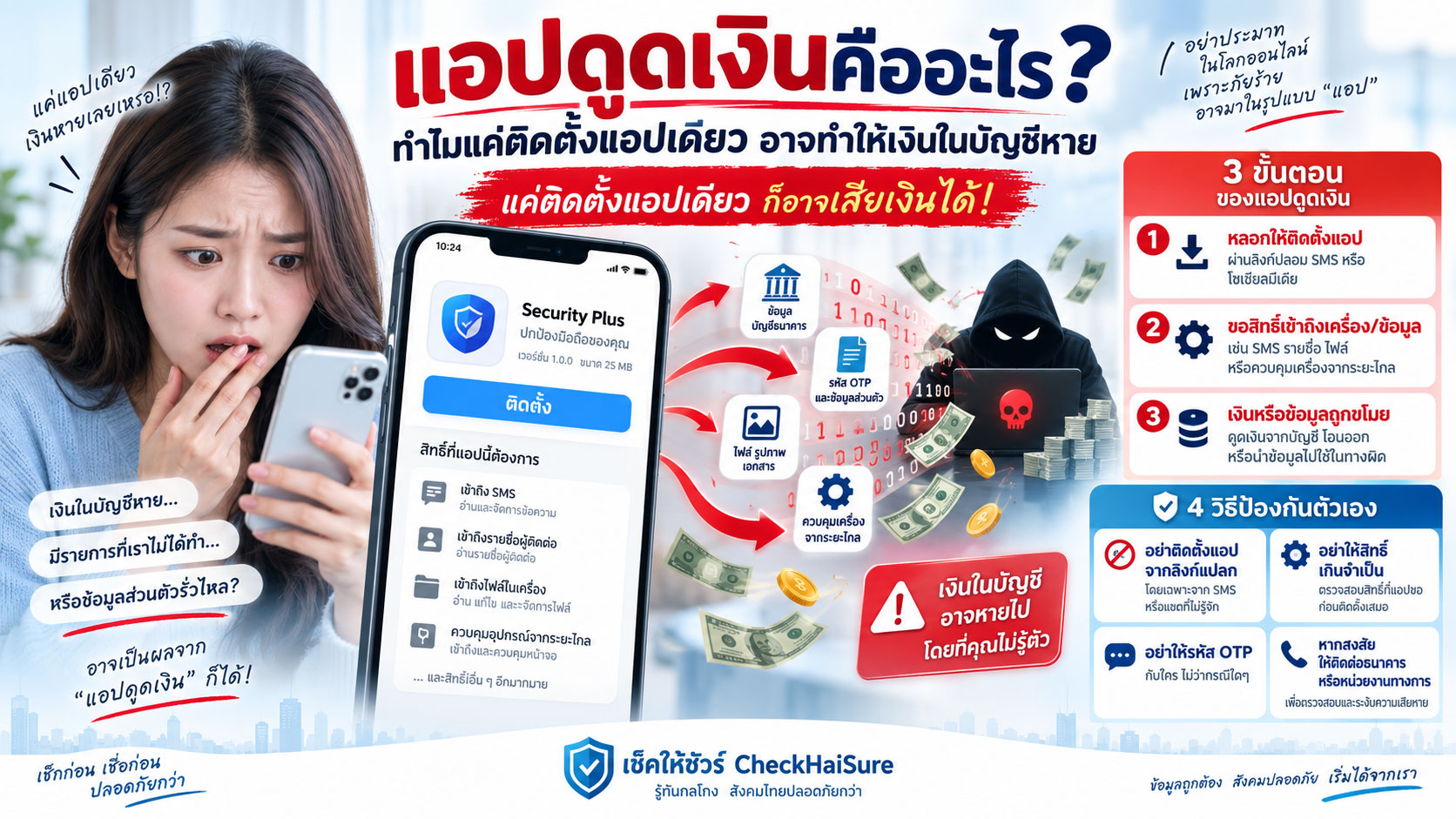
หลายคนเรียกแอปประเภทนี้รวม ๆ ว่า “แอปดูดเงิน”
ชื่อฟังดูเหมือนว่า เพียงกดติดตั้งแล้วแอปจะสามารถยื่นมือเข้าไปในบัญชีธนาคารและดึงเงินออกมาเองทันที
ในความเป็นจริง หลายเหตุการณ์ไม่ได้เกิดขึ้นแบบนั้นตรง ๆ
สิ่งที่อันตรายกว่าคือ มิจฉาชีพอาจค่อย ๆ หลอกให้เราเปิดสิทธิ์บางอย่างในมือถือ ทำตามคำสั่งทีละขั้น หรือเปิดทางให้เขามองเห็นและควบคุมสิ่งที่เกิดขึ้นบนหน้าจอ
จากมือถือที่อยู่ในมือเรา
อาจค่อย ๆ กลายเป็นมือถือที่อีกคนหนึ่งกำลังบอกเราว่าต้องกดอะไร
และบางครั้ง เขาอาจมองเห็นมากกว่าที่เราคิด
ดังนั้นสิ่งที่ควรจำตั้งแต่ต้นคือ
แอปไม่ได้ต้อง “ดูดเงิน” ได้ด้วยตัวเองเสมอไป แค่ทำให้มิจฉาชีพเข้ามาใกล้ขั้นตอนโอนเงินมากพอ ก็อันตรายแล้ว
ทำไมคนถึงยอมติดตั้ง ทั้งที่ปกติเราก็ระวังอยู่แล้ว
เวลาอ่านข่าวย้อนหลัง มันอาจดูง่ายมาก
“ทำไมถึงยอมโหลด”
“ทำไมถึงกด Allow”
“ทำไมไม่วางสาย”
แต่ตอนอยู่ในเหตุการณ์จริง เรื่องมักไม่ได้เริ่มด้วยคำว่า
“สวัสดีครับ ผมเป็นมิจฉาชีพ กรุณาติดตั้งแอปอันตราย”
มันอาจเริ่มจากเรื่องที่ดูสมเหตุสมผลมากกว่า
“บัญชีคุณมีรายการผิดปกติ”
“เบอร์โทรคุณถูกนำไปใช้ทำผิดกฎหมาย”
“คุณต้องยืนยันตัวตนเพื่อรับเงินคืน”
“ต้องติดตั้งแอปของเจ้าหน้าที่เพื่อดำเนินการ”
“ระบบของธนาคารต้องตรวจสอบโทรศัพท์”
หรือ
“มือถือคุณติดไวรัส เราจะช่วยแก้ให้”
คนที่กำลังตกใจจะไม่ได้คิดว่า
“นี่เป็นแอปอะไร”
แต่กำลังคิดว่า
“ต้องทำยังไงไม่ให้บัญชีถูกอายัด”
“ต้องทำยังไงไม่ให้เงินหาย”
“ต้องทำยังไงไม่ให้มีคดี”
“ต้องทำยังไงให้ได้เงินคืน”
มิจฉาชีพจึงไม่ได้เริ่มจากการโจมตีมือถือก่อน
เขาเริ่มจากทำให้เจ้าของมือถือกลัวก่อน
เมื่อเรายอมทำตาม เขาจึงค่อยพาไปยังขั้นตอนติดตั้งแอป
คำว่า “แอปดูดเงิน” จริง ๆ หมายถึงอะไร
ในภาษาที่คนทั่วไปใช้ “แอปดูดเงิน” มักหมายถึงแอปหรือซอฟต์แวร์ที่ถูกนำมาใช้เป็นส่วนหนึ่งของการหลอกลวงทางการเงิน
แต่ไม่ได้มีรูปแบบเดียว
บางแอปอาจพยายามขโมยข้อมูล
บางแอปอาจขอสิทธิ์เข้าถึงหน้าจอ
บางแอปอาจทำให้คนอื่นควบคุมเครื่องจากระยะไกล
บางแอปอาจดักหรืออ่านข้อมูลบางประเภท
บางแอปอาจสร้างหน้าจอปลอมให้เรากรอกรหัส
และบางเหตุการณ์ แอปที่ถูกใช้เดิมอาจเป็นเครื่องมือปกติ แต่ถูกมิจฉาชีพนำมาใช้ผิดวัตถุประสงค์
ดังนั้นคำถามที่สำคัญกว่า
“แอปนี้ชื่อแอปดูดเงินหรือไม่”
คือ
“ทำไมคนที่โทรมาถึงต้องการให้เราติดตั้งแอป และเขากำลังขอสิทธิ์อะไรจากมือถือเรา”
จุดอันตรายอาจไม่ได้อยู่ตอนติดตั้ง แต่อยู่ตอนกด “อนุญาต”
ตอนติดตั้งแอป เรามักเจอคำถามต่าง ๆ
อนุญาตให้เข้าถึงรูปภาพไหม
อนุญาตให้ใช้ไมโครโฟนไหม
อนุญาตให้ดูรายชื่อผู้ติดต่อไหม
อนุญาตให้แสดงทับแอปอื่นไหม
อนุญาตให้เข้าถึงการช่วยเหลือการใช้งานไหม
อนุญาตให้แชร์หน้าจอไหม
บางครั้งเราเคยชินกับการกด “อนุญาต” จนแทบไม่อ่าน
เพราะแอปทั่วไปก็ขอสิทธิ์หลายอย่างเหมือนกัน
แต่ความแตกต่างคือ
สิทธิ์แต่ละอย่างมีอำนาจไม่เท่ากัน
ถ้าแอปไฟฉายขอใช้กล้องเพื่อเปิดไฟ อาจมีเหตุผล
แต่ถ้าแอปที่อ้างว่าใช้ตรวจสอบบัญชีธนาคาร กลับขอสิทธิ์ควบคุมหน้าจอ อ่านสิ่งที่แสดง หรือให้เปิดฟังก์ชันที่เราไม่เข้าใจ
ควรหยุดก่อน
อย่ากดเพราะคนปลายสายพูดว่า
“อันนี้เป็นขั้นตอนปกติครับ”
ฟังก์ชัน Accessibility อาจกลายเป็นสิ่งที่มิจฉาชีพต้องการมากที่สุด
ใน Android มีระบบ Accessibility ซึ่งสร้างขึ้นมาเพื่อช่วยให้ผู้ใช้งานที่ต้องการความช่วยเหลือสามารถใช้อุปกรณ์ได้สะดวกขึ้น
ฟังก์ชันนี้มีประโยชน์จริง
แต่สิทธิ์บางรูปแบบสามารถทำให้แอปเห็นหรือโต้ตอบกับสิ่งที่เกิดขึ้นบนหน้าจอได้มากกว่าสิทธิ์ทั่วไป
ดังนั้นถ้าแอปที่ไม่รู้จักพยายามพาเราเข้า Settings แล้วบอกให้เปิด Accessibility ให้มัน
ควรหยุดและถามทันทีว่า
ทำไมแอปนี้ต้องการสิทธิ์ระดับนี้
มิจฉาชีพอาจใช้คำง่าย ๆ เช่น
“เปิดเมนูช่วยเหลือ”
“เปิดการสนับสนุน”
“อนุญาตระบบรักษาความปลอดภัย”
“เปิดเพื่อให้เจ้าหน้าที่ตรวจสอบ”
คำบนหน้าจออาจไม่ได้เขียนคำว่า “ให้มิจฉาชีพควบคุมมือถือ”
แต่นั่นไม่ได้หมายความว่าสิทธิ์ที่เรากำลังเปิดไม่มีความสำคัญ
แชร์หน้าจอเพียงอย่างเดียว ก็อาจเปิดเผยมากกว่าที่คิด
บางคนอาจคิดว่า
“แค่เห็นหน้าจอ จะทำอะไรได้”
แต่ลองนึกถึงสิ่งที่ปรากฏบนหน้าจอเราในแต่ละวัน
ชื่อธนาคาร
ยอดเงิน
ชื่อบัญชี
เลขบางส่วนของบัญชี
ข้อความ SMS
การแจ้งเตือน
OTP
อีเมล
รายชื่อผู้ติดต่อ
แอปที่เราใช้
และข้อมูลที่ช่วยบอกว่าเรากำลังทำอะไรอยู่
ถ้ามิจฉาชีพเห็นหน้าจอแบบเรียลไทม์ เขาไม่จำเป็นต้องเดาว่าคุณติดอยู่ตรงไหน
เขาสามารถบอกได้ทันทีว่า
“กดปุ่มขวาบนครับ”
“เลือกบัญชีนี้”
“ใส่จำนวนตรงนี้”
“รหัสมาแล้วใช่ไหมครับ กรอกเลย”
สิ่งที่ดูเหมือนว่าเรากำลังทำเอง
อาจกลายเป็นการทำตามคำสั่งของคนที่กำลังมองทุกอย่างอยู่
แอปรีโมตไม่ใช่แอปอันตรายทุกตัว แต่การใช้ผิดบริบทอันตรายมาก
เครื่องมือ Remote Support หรือ Remote Access มีการใช้งานที่ถูกต้องมากมาย
ฝ่าย IT ใช้ช่วยพนักงาน
ช่างใช้ช่วยแก้ปัญหาคอมพิวเตอร์
คนในครอบครัวอาจใช้ช่วยตั้งค่าเครื่องให้กัน
ปัญหาไม่ได้อยู่ที่ว่าเครื่องมือรีโมตทุกตัวเป็นมิจฉาชีพ
ปัญหาอยู่ที่
ใครเป็นคนบอกให้เราติดตั้ง และเขาต้องการใช้มันทำอะไร
ถ้าคนแปลกหน้าโทรเข้ามาก่อน แล้วอ้างว่าเป็นธนาคาร ตำรวจ หน่วยงานรัฐ บริษัทขนส่ง หรือเจ้าหน้าที่แพลตฟอร์ม จากนั้นให้ติดตั้งแอปควบคุมเครื่อง
ควรถือว่าเป็นสัญญาณอันตรายอย่างมาก
โดยเฉพาะถ้าขั้นตอนต่อไปเกี่ยวข้องกับแอปธนาคาร
“ห้ามวางสาย” มักมาคู่กับการควบคุมมือถือ
อีกสิ่งที่ควรสังเกตคือ คนปลายสายพยายามให้เราอยู่กับเขาตลอดเวลา
“อย่าเพิ่งวางนะครับ”
“ห้ามออกจากหน้าจอนี้”
“อย่ารับสายซ้อน”
“ห้ามคุยกับใครระหว่างดำเนินการ”
“ระบบจะยกเลิกถ้าวางสาย”
เหตุผลหนึ่งคือ ถ้าเราวางสาย เราอาจมีเวลาได้คิด
เราอาจโทรหาลูก
ถามเพื่อน
โทรหาธนาคาร
ค้นชื่อแอป
หรือเริ่มสงสัย
มิจฉาชีพจึงพยายามให้ทั้ง
เสียงของเขาอยู่ในหูเรา และหน้าจอของเราอยู่ในขั้นตอนที่เขาควบคุม
ถ้าใครกำลังพาคุณเข้าแอปธนาคาร พร้อมกับบอกว่าห้ามวางสาย
ให้หยุดทันที
อย่าเปิด Mobile Banking ระหว่างมีคนแปลกหน้าควบคุมหรือมองหน้าจอ
นี่เป็นกฎง่าย ๆ ที่ควรจำ
ถ้าคุณกำลัง
แชร์หน้าจอ
เปิดแอปรีโมต
เปิดสิทธิ์ควบคุมเครื่อง
หรือไม่แน่ใจว่ามีใครมองหน้าจออยู่หรือไม่
อย่าเปิด Mobile Banking
อย่าเช็กยอด
อย่าโอน
อย่ากรอกรหัส
อย่าเปิด OTP
อย่าพยายาม “ทดสอบให้เจ้าหน้าที่ดู”
เพราะมิจฉาชีพอาจใช้การทดสอบนั้นเป็นขั้นตอนเข้าสู่บัญชีจริง
การตรวจสอบบัญชีธนาคารควรทำเมื่อเราเป็นคนเดียวที่ควบคุมอุปกรณ์
ระวังหน้าจอปลอมที่ดูเหมือนแอปธนาคารจริง
อีกความเสี่ยงหนึ่งคือหน้าจอที่ทำให้เราเชื่อว่ากำลังกรอกข้อมูลในระบบจริง
หน้าตาอาจคล้าย
หน้า Login
หน้า OTP
หน้ากรอกรหัส PIN
หน้าแจ้งเตือนธนาคาร
หรือหน้ารับเงินคืน
สิ่งที่มิจฉาชีพต้องการอาจไม่ใช่ให้คุณทำธุรกรรมในหน้านั้นจริง ๆ
แต่ต้องการให้คุณพิมพ์ข้อมูลสำคัญลงไป
เราอาจคิดว่า
“กำลังล็อกอินธนาคาร”
แต่จริง ๆ กำลังกรอกรหัสให้คนอื่น
นี่จึงเป็นอีกเหตุผลว่าทำไมไม่ควรเปิดลิงก์หรือแอปที่คนปลายสายส่งมา แล้วกรอกข้อมูลสำคัญตามที่เขาบอก
OTP ไม่ใช่รหัสสำหรับให้เจ้าหน้าที่ตรวจสอบเครื่อง
เมื่อมิจฉาชีพเข้ามาใกล้ขั้นตอนการเงินมากขึ้น มักมีคำว่า OTP ตามมา
“รหัสนี้ใช้ยืนยันเครื่องนะครับ”
“OTP นี้ใช้ปิดระบบรีโมต”
“ต้องอ่านให้เจ้าหน้าที่เพื่อยืนยันว่าเป็นเจ้าของบัญชี”
“เป็นแค่รหัสตรวจสอบ ไม่ใช่รหัสโอนเงิน”
อย่าเชื่อคำอธิบายจากคนปลายสายเพียงอย่างเดียว
ให้ดูข้อความ OTP ที่ส่งมาเอง
และที่สำคัญที่สุดคือ
อย่าอ่าน OTP ให้คนอื่นฟัง
OTP อาจใช้ยืนยันธุรกรรม
ยืนยันอุปกรณ์
เปลี่ยนข้อมูล
เข้าสู่ระบบ
หรืออนุมัติสิ่งที่เราไม่เห็นภาพทั้งหมด
รหัสที่เข้ามือถือเรา ควรอยู่กับเรา
ทำไมบางคนบอกว่า “ฉันไม่ได้กดโอนเอง”
เหตุการณ์ที่เกิดขึ้นอาจซับซ้อนกว่าการกดปุ่มโอนเพียงครั้งเดียว
บางคนจำได้ว่าไม่ได้ตั้งใจโอน
แต่ก่อนหน้านั้นอาจมีการ
ให้สิทธิ์แอป
แชร์หน้าจอ
เปิดระบบควบคุม
กรอกข้อมูล
เปิดแอปธนาคาร
หรือทำตามขั้นตอนที่คนปลายสายบอกหลายอย่าง
เมื่อทุกอย่างเกิดเร็วมาก คนที่เจอเหตุการณ์อาจไม่ทันรู้ว่า ขั้นตอนไหนเป็นจุดที่ทำให้บัญชีเริ่มมีความเสี่ยง
นี่คือเหตุผลที่การป้องกันควรเริ่มก่อนถึงหน้าจอโอนเงิน
ไม่ใช่รอจนเห็นยอดเงินกำลังจะออก
สัญญาณเตือนก่อนติดตั้งแอปที่ควรหยุดทันที
ถ้ามีคนติดต่อมาเอง แล้วเกิดหลายข้อต่อไปนี้พร้อมกัน ให้ระวังมาก
บอกให้ติดตั้งแอปทันที
ส่งลิงก์หรือไฟล์ APK มาให้
บอกว่าแอปนี้ไม่มีใน Store
ให้เปิด Unknown Sources
ให้เปิด Accessibility
ให้เปิด Screen Sharing
ให้เปิด Remote Control
ให้กด Allow ทุกอย่าง
ไม่อธิบายว่าแต่ละสิทธิ์ใช้ทำอะไร
บอกให้เปิด Mobile Banking
ขอให้เช็กยอดเงินระหว่างสาย
ขอ OTP
บอกให้โอนเงินเพื่อทดสอบระบบ
ห้ามวางสาย
ห้ามคุยกับคนอื่น
หรือบอกว่าถ้าไม่ทำทันที บัญชีจะถูกอายัด มีคดี หรือเงินจะหาย
เพียงข้อเดียวก็มีเหตุผลให้ตรวจสอบ
ถ้ามาหลายข้อพร้อมกัน ยิ่งไม่ควรทำต่อ
แอปที่น่ากลัวที่สุด อาจเป็นแอปที่เราคิดว่า “เจ้าหน้าที่เป็นคนให้มา”
เวลาคนส่งลิงก์มาจากโฆษณา เราอาจระวัง
แต่ถ้าอีกฝ่ายโทรมาพูดชื่อเรา
รู้ข้อมูลบางอย่าง
มีเอกสาร
มีโลโก้
หรือพูดเหมือนเจ้าหน้าที่
เรามักลดความระวังลง
เราคิดว่า
“เขาเป็นเจ้าหน้าที่ เขาน่าจะรู้”
แต่มิจฉาชีพสามารถใช้ข้อมูลที่หลุดหรือข้อมูลพื้นฐานมาสร้างความน่าเชื่อถือได้
การรู้ชื่อเรา ไม่ได้ทำให้ลิงก์ปลอดภัย
การรู้ธนาคารที่เราใช้ ไม่ได้ทำให้แอปเป็นของธนาคาร
การมีโลโก้ราชการ ไม่ได้ทำให้ไฟล์ APK กลายเป็นแอปของรัฐ
อย่าตัดสินความปลอดภัยของแอปจากความน่าเชื่อถือของเสียงในสาย
ก่อนติดตั้งแอปจากใคร ให้ถามตัวเอง 6 ข้อ
ถ้ามีคนส่งแอปมาให้ ลองหยุดแล้วถามตัวเอง
- ฉันเป็นคนติดต่อหน่วยงานนี้ก่อน หรือเขาเป็นคนโทรมาหาฉัน?
- ทำไมเรื่องนี้ถึงต้องแก้ด้วยการติดตั้งแอป?
- แอปนี้มาจาก Store หรือช่องทางทางการจริงหรือไม่?
- ทำไมแอปต้องการสิทธิ์ Accessibility, แชร์หน้าจอ หรือควบคุมเครื่อง?
- ทำไมเจ้าหน้าที่ต้องให้ฉันเปิด Mobile Banking ระหว่างคุย?
- ถ้าฉันวางสายตอนนี้ แล้วโทรหาหน่วยงานจริงด้วยเบอร์ที่หาเอง ฉันจะตรวจสอบเรื่องนี้ได้หรือไม่?
ถ้าข้อสุดท้ายทำได้
ให้ทำข้อสุดท้ายก่อน
ถ้าเผลอติดตั้งไปแล้ว อย่าเพิ่งเปิดแอปธนาคารเพื่อเช็ก
หลายคนพอเริ่มสงสัยจะทำสิ่งแรกคือ
“ขอเปิดธนาคารเช็กเงินก่อน”
แต่ถ้าแอปอันตรายยังทำงานอยู่ หรือยังไม่แน่ใจว่าสิทธิ์ควบคุมถูกปิดหรือไม่ การเปิดแอปธนาคารทันทีอาจเพิ่มความเสี่ยง
สิ่งที่ควรทำคือหยุดการติดต่อกับคนปลายสายก่อน
ถ้าเป็นไปได้ ให้ตัดการเชื่อมต่ออินเทอร์เน็ตของอุปกรณ์ที่สงสัย
ใช้เครื่องอื่นที่เชื่อถือได้ติดต่อธนาคารผ่านช่องทางทางการ
แจ้งว่ามีความเสี่ยงจากแอปต้องสงสัย
จากนั้นค่อยตรวจสอบอุปกรณ์และบัญชีตามคำแนะนำที่เหมาะสม
อย่าใช้ช่องทางติดต่อที่คนปลายสายเป็นผู้ให้มา
ถ้าให้สิทธิ์แอปไปแล้ว ควรตรวจสอบอะไร
ลองตรวจดูว่าแอปได้รับสิทธิ์อะไรบ้าง
เช่น
Accessibility
การแสดงทับแอปอื่น
สิทธิ์ผู้ดูแลอุปกรณ์
แชร์หน้าจอ
การเข้าถึง SMS
รายชื่อ
ไฟล์และรูปภาพ
ไมโครโฟน
กล้อง
หรือสิทธิ์อื่นที่ไม่สอดคล้องกับหน้าที่ของแอป
หากไม่มั่นใจ อย่าพยายามสุ่มกดไปเรื่อย ๆ ขณะยังมีคนปลายสายบอกทาง
หยุดการติดต่อก่อน แล้วขอความช่วยเหลือจากช่องทางที่ไว้ใจได้
ถ้าเงินออกจากบัญชีไปแล้ว ให้หยุดความเสียหายก่อนหาคำตอบว่าเกิดจากอะไร
เวลาพบว่าเงินหาย หลายคนใช้เวลาพยายามคิดว่า
“มันทำได้ยังไง”
“เราไปกดตรงไหน”
“ใครเอารหัสไป”
แต่ช่วงแรก สิ่งที่สำคัญกว่าคือหยุดความเสียหายเพิ่ม
ติดต่อธนาคารผ่านช่องทางทางการโดยเร็ว
แจ้งว่ามีธุรกรรมต้องสงสัยหรืออาจมีอุปกรณ์ถูกควบคุม
เก็บหลักฐาน
อย่าลบแอปหรือข้อความทุกอย่างก่อนเก็บข้อมูลที่จำเป็น
เก็บ
ชื่อแอป
ไอคอน
ลิงก์ดาวน์โหลด
ไฟล์ APK ถ้ามี
เบอร์โทร
ข้อความ
บัญชี LINE หรือแชท
เวลาที่ติดตั้ง
เวลาที่ให้สิทธิ์
ภาพหน้าจอที่เกี่ยวข้อง
SMS
รายการเงินออก
บัญชีปลายทาง
ยอดเงิน
และสิ่งที่คนปลายสายบอกให้ทำ
หลักฐานเหล่านี้อาจช่วยให้ตามลำดับเหตุการณ์ได้ง่ายขึ้น
อย่าโทษคนในครอบครัวที่เผลอติดตั้ง
ถ้าคนในบ้านโทรมาบอกว่า
“เมื่อกี้มีเจ้าหน้าที่ให้ติดตั้งแอป”
สิ่งแรกที่ควรทำไม่ใช่
“ทำไมถึงไปโหลด!”
เพราะถ้าเขารู้สึกถูกตำหนิ เขาอาจหยุดเล่ารายละเอียดที่สำคัญ
ลองถามแทนว่า
แอปชื่ออะไร
ใครโทรมา
โหลดจากไหน
เปิดสิทธิ์อะไรไปบ้าง
เปิดธนาคารหรือยัง
ให้ OTP หรือเปล่า
มีเงินออกหรือยัง
ยังคุยกับเขาอยู่ไหม
คำตอบเหล่านี้ช่วยหยุดความเสียหายได้มากกว่าการหาว่าใครผิด
ผู้สูงอายุอาจไม่ได้รู้ว่าคำว่า Accessibility หรือ Remote Access หมายถึงอะไร
คนที่ใช้สมาร์ตโฟนทุกวัน ไม่ได้หมายความว่าจะเข้าใจทุกเมนูในระบบ
โดยเฉพาะเมนูที่มีชื่อเทคนิค
Accessibility
Device Admin
Screen Capture
Appear on Top
Unknown Apps
Remote Support
มิจฉาชีพอาจบอกว่า
“กดตรงนี้ครับ เป็นระบบรักษาความปลอดภัย”
ถ้าคนในบ้านไม่เคยรู้มาก่อนว่าเมนูเหล่านี้มีความสำคัญ เขาก็อาจกดตามได้ง่าย
ดังนั้นแทนที่จะบอกผู้ใหญ่เพียงว่า
“อย่ากดลิงก์”
อาจสอนกฎที่ง่ายกว่า
ถ้ามีคนโทรมาแล้วให้เข้า Settings เพื่อตั้งค่าอะไรที่ไม่เคยทำ ให้หยุดแล้วโทรหาคนในบ้านก่อน
กฎนี้จำง่ายและใช้ได้กับหลายสถานการณ์
ธนาคารไม่จำเป็นต้องเข้ามาควบคุมมือถือเราเพื่อช่วยรักษาเงินในบัญชี
นี่เป็นประโยคที่ควรคุยกันในครอบครัว
ถ้ามีคนบอกว่าเป็นเจ้าหน้าที่ธนาคารและต้อง
ติดตั้งแอป
แชร์หน้าจอ
เปิดสิทธิ์ควบคุม
บอก OTP
หรือให้เข้า Mobile Banking ตามคำสั่ง
ให้หยุดก่อน
ถ้าบัญชีมีปัญหาจริง เราสามารถวางสาย แล้วติดต่อธนาคารจากช่องทางทางการได้เอง
เราไม่จำเป็นต้องมอบหน้าจอของเราให้คนปลายสายเพื่อพิสูจน์ว่าเงินของเราเป็นของเรา
ประโยคที่ควรจำ: อย่าให้คนที่โทรมาเป็นคนบอกว่าเราต้องติดตั้งอะไร
ถ้าต้องจำเพียงประโยคเดียวจากบทความนี้ ขอให้จำว่า
อย่าให้คนที่โทรมาเอง เป็นคนกำหนดว่าเราต้องติดตั้งอะไรลงในมือถือ
ถ้าเป็นธนาคาร ให้ตรวจสอบกับธนาคารเอง
ถ้าเป็นตำรวจ ให้ตรวจสอบกับหน่วยงานเอง
ถ้าเป็นขนส่ง ให้เปิดแอปขนส่งเอง
ถ้าเป็นแพลตฟอร์ม ให้เข้าแอปทางการเอง
ถ้าเป็นหน่วยงานรัฐ ให้หาเว็บไซต์หรือเบอร์ทางการเอง
อย่าใช้ลิงก์ แอป QR Code หรือช่องทางที่คนปลายสายเป็นคนจัดเตรียมให้ทั้งหมด
เพราะถ้าทั้งเรื่องเล่าและเครื่องมือในการ “ตรวจสอบ” มาจากคนคนเดียวกัน
เรากำลังตรวจสอบเขาด้วยสิ่งที่เขาสร้างขึ้นเอง
สรุป: สิ่งที่อันตรายไม่ใช่แค่แอป แต่คือการมอบสิทธิ์ควบคุมมือถือให้คนที่เราไม่รู้จัก
คำว่า “แอปดูดเงิน” ช่วยให้คนระวังได้ง่าย
แต่ถ้าจะป้องกันให้ได้จริง เราต้องเข้าใจมากกว่านั้น
เงินอาจไม่ได้หายเพียงเพราะติดตั้งแอปหนึ่งครั้ง
ความเสียหายมักเกิดจากหลายขั้นตอนต่อกัน
เริ่มจากสายโทรศัพท์
ตามด้วยความกลัว
ตามด้วยลิงก์
ตามด้วยการติดตั้ง
ตามด้วยการกด Allow
ตามด้วยการเปิดสิทธิ์
ตามด้วยการแชร์หน้าจอ
ตามด้วยการเปิด Mobile Banking
และสุดท้ายอาจไปถึงการโอนเงินหรือการเปิดเผยข้อมูลสำคัญ
เพราะฉะนั้น เราไม่จำเป็นต้องรอจนถึงขั้นสุดท้ายจึงค่อยหยุด
หยุดได้ตั้งแต่คนแปลกหน้าบอกให้ติดตั้งแอป
หยุดได้ตั้งแต่เขาพาเข้า Settings
หยุดได้ตั้งแต่เขาขอแชร์หน้าจอ
หยุดได้ตั้งแต่เขาบอกว่าอย่าวางสาย
และหยุดได้ทันทีที่เขาให้เปิดแอปธนาคาร
โทรศัพท์ควรเป็นอุปกรณ์ที่เราควบคุม
ไม่ใช่อุปกรณ์ที่คนแปลกหน้ากำลังบอกเราทีละขั้นว่าต้องกดอะไร
ถ้าคุณไม่แน่ใจว่าแอปนั้นปลอดภัยหรือไม่
อย่าเพิ่งติดตั้ง
เพราะการหยุดก่อนหนึ่งครั้ง อาจง่ายกว่าการพยายามหยุดเงินหลังจากที่อีกคนเข้ามาใกล้บัญชีของเราแล้ว
What Is a Money-Stealing App? How One App Can Put Your Bank Account at Risk
“Install this app first. I’ll help you check the issue.”
“Tap Allow here. It’s part of the identity verification process.”
“If anything appears on the screen, I’ll tell you exactly what to press.”
“Please don’t hang up. The system is still processing.”
For some people, it begins with one phone call.
For others, it begins with an SMS about a parcel.
Some are contacted by someone claiming to be from a bank.
Some by fake police officers.
Some through a loan advertisement.
Some through a warning that their phone has a virus.
And eventually, many of these stories arrive at the same instruction:
“Install this app first.”
People often use the phrase “money-stealing app” to describe this kind of threat.
The name can make it sound as though simply installing an app allows it to reach into your bank account and pull money out automatically.
In many real scam situations, the process is not that simple.
What can be more dangerous is that scammers gradually convince the victim to grant certain permissions, follow instructions step by step, or allow another person to see and control what is happening on the phone.
A phone that is physically in your hand
can slowly become a phone where someone else is telling you exactly what to press.
And sometimes, that person may be able to see far more than you realize.
So one thing is important to understand from the beginning:
An app does not always need to “steal money automatically” to be dangerous. If it brings a scammer close enough to your banking activity, that can already be enough.
Why Do People Install These Apps Even When They Are Normally Careful?
When we read about scams afterward, the answer can seem obvious.
“Why did they install it?”
“Why did they press Allow?”
“Why didn’t they hang up?”
But when the scam is happening in real time, it rarely begins with someone saying:
“Hello, I’m a scammer. Please install this dangerous app.”
It usually begins with something that sounds more believable.
“There is suspicious activity on your bank account.”
“Your phone number has been used in a criminal case.”
“You need to verify your identity to receive a refund.”
“You must install the officer’s app to continue.”
“The bank needs to inspect your phone.”
Or:
“Your phone is infected. We can help fix it.”
A frightened person is not thinking:
“What kind of app is this?”
They are thinking:
“How do I stop my account from being frozen?”
“How do I stop my money from disappearing?”
“How do I avoid getting involved in a case?”
“How do I get my money back?”
That is why scammers often attack fear before they attack the phone.
Once the victim starts following instructions, the scammer can guide them toward installing the app.
What Does “Money-Stealing App” Actually Mean?
In everyday language, “money-stealing app” is a broad term for apps or software used as part of financial scams.
There is not just one type.
Some may try to steal information.
Some may ask for screen-access permissions.
Some may allow another person to control the device remotely.
Some may read or capture certain information.
Some may imitate login screens to collect passwords or codes.
And in some cases, the software itself may originally be a legitimate tool that scammers misuse.
So the better question is not:
“Is this officially called a money-stealing app?”
The better questions are:
Why does the person on the phone want me to install this app?
And:
What permissions are they asking me to give it?
The Dangerous Moment May Not Be Installation — It May Be When You Press “Allow”
When installing an app, you may see requests such as:
Allow access to photos?
Allow microphone access?
Allow access to contacts?
Allow display over other apps?
Allow accessibility access?
Allow screen sharing?
Many people are used to tapping “Allow” without thinking much about it.
Normal apps ask for permissions too.
But there is an important difference:
Not all permissions have the same level of power.
If a flashlight app asks to use the camera because the flash is part of the camera system, that may make sense.
But if an app supposedly used to “check your bank account” suddenly asks to control the screen, read what is displayed, or activate a setting you do not understand, stop.
Do not continue just because the caller says:
“This is a normal step.”
Accessibility Permissions Can Be Extremely Sensitive
Android includes Accessibility features designed to help people use their devices more easily.
These features are legitimate and useful.
But certain accessibility permissions can also allow apps to observe or interact with what is happening on the screen in ways that go far beyond ordinary app permissions.
So if an unfamiliar app takes you into Settings and tells you to enable Accessibility access, stop and ask:
Why does this app need this level of access?
A scammer may describe it with softer words like:
“Turn on assistance mode.”
“Enable support.”
“Allow the security function.”
“Turn this on so the officer can check your device.”
The phone may never display the words:
“Allow a scammer to control your phone.”
That does not mean the permission is harmless.
Screen Sharing Alone Can Reveal More Than You Think
Some people think:
“If they can only see my screen, what can they really do?”
Think about what appears on your phone during a normal day:
Bank name
Account balance
Part of your account number
SMS messages
Notifications
OTP codes
Contact names
Apps you use
And clues about what you are doing
If a scammer can see your screen in real time, they do not have to guess where you are in the process.
They can immediately say:
“Tap the top-right button.”
“Choose this account.”
“Enter the amount here.”
“The code arrived, right? Enter it now.”
What feels like you are operating your own phone
may actually become you following instructions from someone who can see everything.
Remote Access Apps Are Not Always Malicious — But the Context Can Be Dangerous
Remote support and remote access tools have many legitimate uses.
IT teams use them to help employees.
Technicians use them to troubleshoot devices.
Family members may use them to help each other with settings.
The problem is not that every remote-access app is malicious.
The problem is:
Who told you to install it, and why do they want access?
If a stranger contacts you first and claims to be from a bank, police department, government agency, delivery company, or online platform, then tells you to install a remote-control app, treat that as a major warning sign.
Especially if the next step involves your banking app.
“Do Not Hang Up” Often Appears Together with Device Control
Another thing to notice is how strongly scammers try to keep you on the line.
“Do not hang up yet.”
“Do not leave this screen.”
“Do not answer another call.”
“Do not talk to anyone while we process this.”
“If you hang up, the system will cancel.”
One reason is simple:
If you hang up, you may have time to think.
You may call your child.
Ask a friend.
Call the bank.
Search the app name.
Or start noticing that something feels wrong.
The scammer wants both:
Their voice in your ear, and your phone on the screen they are directing.
If someone is guiding you toward your banking app while telling you not to hang up,
stop immediately.
Never Open Mobile Banking While a Stranger Can See or Control Your Screen
This is one of the simplest rules to remember.
If you are:
Sharing your screen
Using a remote-access app
Allowing device control
Or unsure whether someone can see your screen
Do not open mobile banking.
Do not check your balance.
Do not transfer money.
Do not enter your PIN.
Do not open OTP messages.
Do not “test the account for the officer.”
That “test” may become the path into your real account.
Banking activity should only happen when you are certain you are the only person controlling the device.
Beware of Fake Screens That Look Like Real Banking Pages
Another danger is a fake screen designed to make you believe you are entering information into a genuine system.
It may look like:
A login page
An OTP page
A PIN-entry screen
A bank warning page
Or a refund page
The scammer may not even need you to complete a real transaction on that page.
They may only want you to type sensitive information into it.
You think:
“I’m logging in to my bank.”
But in reality:
You may be typing your credentials directly into a fake interface.
This is another reason not to open links or apps sent by someone on the phone and then enter sensitive information under their guidance.
OTP Is Not a Code for an Officer to Check Your Phone
As the scam gets closer to money, OTP often appears.
“This OTP verifies the device.”
“This code will turn off the remote system.”
“You need to read it to confirm you own the account.”
“It is only for verification, not a transfer.”
Do not rely on the caller’s explanation.
Read the actual OTP message yourself.
And most importantly:
Do not read the OTP to anyone.
An OTP may be used to:
Approve a transaction
Register a device
Change account details
Log in
Or confirm something you do not fully understand
A code sent to your phone should stay with you.
Why Do Some Victims Say, “I Didn’t Press Transfer”?
These incidents can be more complicated than one single transfer button.
A person may honestly remember that they never intended to transfer money.
But before that point, they may already have:
Granted app permissions
Shared the screen
Enabled device control
Entered account information
Opened the banking app
Or followed a long sequence of instructions
When everything happens quickly, it can be difficult to identify which step created the real risk.
That is why prevention should begin long before the transfer screen.
Do not wait until you see money leaving the account before deciding something is wrong.
Warning Signs That Should Make You Stop Before Installing an App
If someone contacts you first and several of these things happen together, be very careful:
They tell you to install an app immediately.
They send an APK file or download link.
They say the app is not available in the official store.
They tell you to enable installation from unknown sources.
They ask you to enable Accessibility.
They ask you to enable screen sharing.
They ask you to enable remote control.
They tell you to press Allow on everything.
They cannot clearly explain why each permission is necessary.
They tell you to open mobile banking.
They ask you to check your account balance while on the call.
They ask for an OTP.
They tell you to make a transfer to test the system.
They tell you not to hang up.
They tell you not to speak to anyone else.
Or they say that if you do not act immediately, your account will be frozen, you will face legal trouble, or your money will disappear.
Even one of these signs can justify checking first.
Several together are a strong reason to stop.
The Most Dangerous App May Be the One You Trust Because “The Officer Sent It”
If a random advertisement sends you a link, you may be cautious.
But if the caller knows your name,
knows some personal details,
has documents,
uses official-looking logos,
or sounds professional,
you may lower your guard.
You may think:
“They are an officer. They should know what they are doing.”
But scammers can use leaked data or basic personal information to sound convincing.
Knowing your name does not make a link safe.
Knowing which bank you use does not make an app an official banking app.
Using a government logo does not turn an APK into a government application.
Do not judge the safety of an app based on how convincing the caller sounds.
Before Installing an App Someone Sends You, Ask Yourself These 6 Questions
Stop for a moment and ask:
- Did I contact this organization first, or did they contact me?
- Why does this problem require installing an app?
- Did I find the app through the official store or official channel myself?
- Why does it need Accessibility, screen sharing, or device-control permissions?
- Why does the person need me to open mobile banking while we are talking?
- If I hang up right now and call the organization through an official number I find myself, can I verify the situation?
If the answer to number six is yes,
do that first.
If You Already Installed the App, Do Not Immediately Open Your Bank App to “Check”
When people start feeling suspicious, their first reaction is often:
“Let me open the banking app and see if my money is still there.”
But if the suspicious app is still running, or you are not sure whether remote access has been disabled, opening mobile banking may increase the risk.
The safer first step is to stop communicating with the caller.
If possible, disconnect the suspicious device from the internet.
Use another trusted device to contact your bank through an official channel.
Explain that your phone may have been exposed to a suspicious app or remote-control access.
Then follow appropriate steps to check the device and account.
Do not use contact information given by the suspected scammer.
If You Already Granted Permissions, Check What the App Can Access
Review the permissions the app has received.
These may include:
Accessibility
Display over other apps
Device administrator privileges
Screen sharing
SMS access
Contacts
Files and photos
Microphone
Camera
Or other permissions that do not match the app’s purpose
If you are unsure, do not keep tapping through settings while the caller is still guiding you.
End the communication first.
Then get help from a trusted support source.
If Money Has Already Left Your Account, Stop the Damage Before Trying to Understand Every Detail
When someone discovers money is missing, they often start asking:
“How did this happen?”
“What did I press?”
“How did they get the code?”
Those questions matter.
But during the first moments, stopping further damage is more important.
Contact your bank through official channels as quickly as possible.
Report suspicious transactions or possible device compromise.
Save evidence.
Do not immediately delete every app and message before preserving useful information.
Keep:
App name
App icon
Download link
APK file if available
Phone numbers
Messages
LINE or chat accounts
Time the app was installed
Time permissions were granted
Relevant screenshots
SMS messages
Outgoing transactions
Destination accounts
Amounts
And instructions the caller gave you
This information can help reconstruct what happened.
Do Not Blame a Family Member Who Installed the App
If someone in your family calls and says:
“An officer told me to install an app.”
The first question should not be:
“Why did you do that?”
If they feel attacked, they may stop telling you important details.
Ask instead:
What is the app called?
Who contacted you?
Where did you download it?
What permissions did you enable?
Did you open your banking app?
Did you share an OTP?
Has any money left the account?
Are you still talking to them?
Those answers are far more useful for stopping damage.
Older Family Members May Not Know What “Accessibility” or “Remote Access” Means
Using a smartphone every day does not mean someone understands every system setting.
Especially technical terms like:
Accessibility
Device Admin
Screen Capture
Appear on Top
Unknown Apps
Remote Support
A scammer may simply say:
“Tap this. It is a security setting.”
If someone has never been taught why these settings matter, it is easy to follow the instructions.
Instead of only telling older family members:
“Do not click strange links,”
give them a simpler rule:
If someone calls and tells you to go into Settings and change something you have never changed before, stop and call someone you trust first.
That rule is easy to remember and works in many scam situations.
A Bank Does Not Need to Take Control of Your Phone to Protect Your Money
This is another useful family rule.
If someone claims to be a bank officer and says you must:
Install an app
Share your screen
Allow remote control
Provide an OTP
Or open mobile banking while following their instructions
stop.
If there is a real problem with your account, you can hang up and contact the bank through an official channel yourself.
You do not need to hand over your screen to someone on the phone to prove that your money belongs to you.
A Sentence to Remember: Do Not Let the Person Who Called You Decide What You Must Install
If you remember only one sentence from this article, remember this:
Do not let someone who contacted you first decide what must be installed on your phone.
If they claim to be from a bank, contact the bank yourself.
If they claim to be police, verify with the real agency yourself.
If they claim to be a delivery company, open the official delivery app yourself.
If they claim to be an online platform, open the official platform yourself.
If they claim to be a government agency, find the official website or number yourself.
Do not rely on links, apps, QR codes, or contact channels prepared entirely by the caller.
Because if the same person creates both the frightening story and the “tool” you are supposed to use to verify it,
you are not really verifying them at all.
You are checking their story using something they created.
Conclusion: The Risk Is Not Only the App — It Is Giving Control of Your Phone to Someone You Do Not Know
The phrase “money-stealing app” is useful because it is easy to remember.
But real protection requires understanding a little more.
Money may not disappear simply because an app was installed once.
The damage often comes from several steps connected together.
A phone call.
Then fear.
Then a link.
Then installation.
Then pressing Allow.
Then enabling permissions.
Then screen sharing.
Then opening mobile banking.
And finally, a transfer or exposure of sensitive information.
That means you do not need to wait until the final step before stopping.
You can stop when a stranger tells you to install an app.
You can stop when they guide you into Settings.
You can stop when they ask you to share your screen.
You can stop when they say not to hang up.
And you can stop immediately when they tell you to open mobile banking.
Your phone should be a device that you control.
Not a device where a stranger is telling you, step by step, what to press.
If you are unsure whether an app is safe,
do not install it yet.
Stopping once before installation can be much easier than trying to stop the money after someone has already moved close to your bank account.

Leave a Reply
You must be logged in to post a comment.