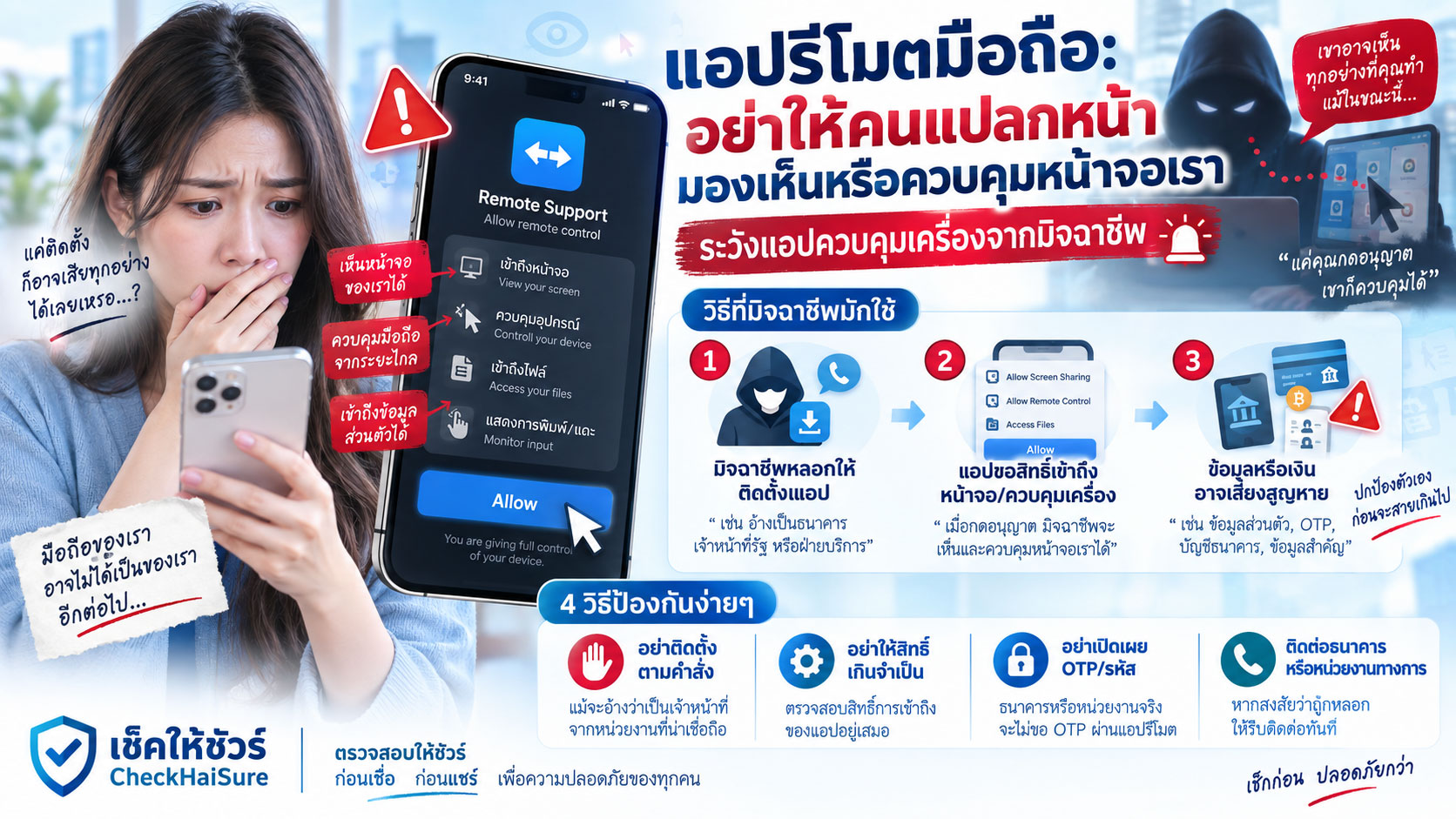
“โหลดแอปนี้ก่อนครับ เดี๋ยวผมช่วยตั้งค่าให้”
“แชร์หน้าจอมาได้เลย จะได้แก้ปัญหาเร็วขึ้น”
“กดอนุญาต Remote Control นะครับ”
“ไม่ต้องกลัว ผมเป็นเจ้าหน้าที่”
“เปิดแอปธนาคารขึ้นมา เดี๋ยวผมดูให้ว่ามีรายการผิดปกติหรือเปล่า”
ถ้ามีคนแปลกหน้าโทรเข้ามา แล้วบทสนทนาเริ่มพาไปถึงประโยคแบบนี้ ให้หยุดก่อนทันที
เพราะสิ่งที่กำลังเกิดขึ้น อาจไม่ใช่แค่การ “ช่วยเหลือจากระยะไกล”
แต่คือการเปิดหน้าจอมือถือของเราให้คนที่เราไม่รู้จักเข้ามาดู
และถ้าให้สิทธิ์มากพอ เขาอาจไม่ได้แค่ดู
แต่อาจสามารถควบคุมบางอย่างบนหน้าจอได้ด้วย
หลายคนเคยได้ยินคำว่า Remote Access หรือ Remote Support จากที่ทำงาน
ฝ่าย IT ใช้ช่วยแก้คอมพิวเตอร์
ช่างใช้ช่วยตั้งค่าโปรแกรม
คนในครอบครัวใช้ช่วยกันแก้ปัญหาโทรศัพท์
ดังนั้นคำว่า “แอปรีโมต” จึงไม่ได้ฟังดูน่ากลัวตั้งแต่แรก
แต่สิ่งที่ทำให้มันอันตราย คือ ใครเป็นคนขอให้เราเปิด และเขาต้องการเข้ามาทำอะไรต่อ
จำประโยคนี้ไว้ก่อน
แอปรีโมตไม่ได้น่ากลัวเพราะมันรีโมตได้ แต่น่ากลัวเมื่อคนที่เราไม่รู้จักเป็นคนขอสิทธิ์เข้ามาในมือถือของเรา
แอปรีโมตมือถือคืออะไร
พูดง่าย ๆ แอปรีโมตคือเครื่องมือที่ช่วยให้อุปกรณ์หนึ่งสามารถมองเห็น หรือในบางกรณีควบคุมอุปกรณ์อีกเครื่องหนึ่งจากระยะไกล
มันมีประโยชน์จริง
เช่น
ฝ่าย IT ช่วยพนักงานแก้ปัญหา
ผู้ดูแลระบบช่วยติดตั้งโปรแกรม
ช่างเทคนิคดูหน้าจอเพื่อหาสาเหตุของปัญหา
หรือคนในครอบครัวช่วยผู้สูงอายุตั้งค่ามือถือ
ปัญหาไม่ได้อยู่ที่เทคโนโลยี
แต่เกิดขึ้นเมื่อมิจฉาชีพนำเครื่องมือแบบเดียวกันมาใช้
เขาอาจโทรมาอ้างว่าเป็น
ธนาคาร
ตำรวจ
หน่วยงานรัฐ
บริษัทขนส่ง
ฝ่ายไอที
แพลตฟอร์มออนไลน์
บริษัทโทรศัพท์
บริษัทสินเชื่อ
หรือเจ้าหน้าที่ช่วยเหลือ
จากนั้นบอกว่า
“ต้องแชร์หน้าจอเพื่อช่วยตรวจสอบ”
ตรงนี้คือจุดที่ต้องระวังมาก
แชร์หน้าจอ ไม่ได้หมายความว่าเขาเห็นแค่ภาพธรรมดา
หลายคนคิดว่า
“ให้ดูหน้าจอเฉย ๆ จะเป็นอะไร”
แต่ลองนึกถึงสิ่งที่ปรากฏบนหน้าจอมือถือเราในแต่ละวัน
ชื่อธนาคาร
ยอดเงิน
ชื่อบัญชี
เลขบัญชีบางส่วน
ข้อความจากธนาคาร
OTP
อีเมล
รายชื่อผู้ติดต่อ
การแจ้งเตือน
แอปที่ติดตั้ง
ตำแหน่งบางอย่าง
ประวัติสนทนา
รูปภาพ
และข้อมูลอีกจำนวนมากที่ช่วยให้คนอื่นรู้จักเราได้มากขึ้น
แม้อีกฝ่ายจะยังควบคุมเครื่องไม่ได้
แค่เห็นหน้าจอแบบเรียลไทม์ ก็ช่วยให้เขารู้ว่าเรากำลังอยู่ตรงไหนในแต่ละขั้นตอน
เขาสามารถพูดได้ทันทีว่า
“กดปุ่มขวาบนนะครับ”
“เลือกบัญชีนี้”
“กรอกจำนวนตรงนี้”
“รหัสเข้าแล้วใช่ไหม กรอกเลย”
เราอาจรู้สึกว่าเป็นคนกดเองทุกอย่าง
แต่จริง ๆ เรากำลังทำตามคำสั่งของคนที่มองเห็นหน้าจออยู่
Remote View กับ Remote Control ไม่เหมือนกัน
สิ่งที่ควรเข้าใจคือ การรีโมตไม่ได้มีเพียงแบบเดียว
บางเครื่องมืออนุญาตแค่ดูหน้าจอ
บางเครื่องมืออาจช่วยควบคุมเมาส์หรือการแตะ
บางแบบต้องให้เจ้าของเครื่องยืนยันทุกครั้ง
บางแบบอาจขอสิทธิ์เพิ่ม
และบนมือถือ การควบคุมจริงอาจขึ้นอยู่กับระบบปฏิบัติการ รุ่นเครื่อง และสิทธิ์ที่เราเปิด
สำหรับคนทั่วไป ไม่จำเป็นต้องจำศัพท์ทั้งหมด
ให้จำง่าย ๆ ว่า
ถ้ามีคนแปลกหน้ากำลังขอ
แชร์หน้าจอ
สิทธิ์ Accessibility
Remote Control
Screen Capture
หรือให้ติดตั้งแอปเพื่อ “ดูเครื่อง”
ให้หยุดคิดก่อนเสมอ
เพราะสิทธิ์ที่เรากำลังเปิด อาจมากกว่าคำว่า “ช่วยดู”
มิจฉาชีพมักสร้างปัญหาก่อน แล้วเสนอรีโมตเป็นทางออก
คนส่วนใหญ่จะไม่ยอมให้คนแปลกหน้าเข้ามาดูมือถือแบบไม่มีเหตุผล
มิจฉาชีพจึงต้องสร้างเหตุผลก่อน
เช่น
“บัญชีของคุณกำลังถูกแฮ็ก”
“เงินกำลังจะถูกโอนออก”
“มือถือมีไวรัส”
“มีคดีอยู่ในชื่อคุณ”
“ต้องตรวจสอบแอปธนาคาร”
“มีคนใช้บัญชีคุณฟอกเงิน”
เมื่อเรากลัว
เขาจะเสนอทางออกทันที
“ไม่ต้องห่วงครับ ผมช่วยได้”
“ติดตั้งแอปนี้ เดี๋ยวตรวจให้”
“แชร์หน้าจอมา จะได้แก้เร็ว”
มันฟังดูเหมือนความช่วยเหลือ
แต่สิ่งที่เกิดขึ้นจริงอาจเป็น
คนที่สร้างความกลัว กำลังขอสิทธิ์เข้ามาในมือถือเพื่อ ‘ช่วยแก้’ ปัญหาที่เขาเป็นคนเล่าเอง
ถ้าคนปลายสายขอให้เปิด Mobile Banking ระหว่างรีโมต ให้หยุดทันที
นี่เป็นจุดอันตรายที่สุดจุดหนึ่ง
มิจฉาชีพอาจพูดว่า
“เปิดแอปธนาคารให้ดูหน่อยครับ”
“เช็กยอดเงินก่อน”
“ต้องตรวจสอบว่าบัญชียังปลอดภัย”
“ลองเข้าแอป เพื่อดูว่ามีรายการแปลกไหม”
“โอนทดสอบ 1 บาท เพื่อเช็กระบบ”
อย่าทำ
ถ้าหน้าจอกำลังถูกแชร์ หรือยังมี Remote Access ทำงานอยู่
อย่าเปิด Mobile Banking
อย่ากรอก PIN
อย่าเช็กยอด
อย่าเปิด OTP
อย่าโอนแม้แต่บาทเดียว
และอย่าคิดว่า
“แค่ดูเฉย ๆ ไม่น่ามีอะไร”
เพราะการเปิดแอปธนาคารในช่วงที่อีกคนกำลังดูหรือควบคุมหน้าจอ คือการพาเขาเข้าใกล้ข้อมูลทางการเงินของเรามากที่สุด
คำว่า “ผมมองไม่เห็นรหัสหรอกครับ” ไม่ควรเป็นสิ่งที่ทำให้เราสบายใจ
คนปลายสายอาจพูดเพื่อให้เราวางใจว่า
“ผมเห็นแค่บางส่วน”
“ระบบปิดบังรหัสให้”
“ผมเข้าถึงบัญชีไม่ได้”
“แอปนี้เป็นของเจ้าหน้าที่ ปลอดภัย”
อย่าใช้คำพูดของเขาเป็นหลักฐาน
เพราะเราอาจไม่รู้จริง ๆ ว่าแอปได้รับสิทธิ์อะไรบ้าง
และต่อให้เขาไม่เห็น PIN โดยตรง เขาอาจยังเห็นข้อมูลอื่นมากพอที่จะช่วยหลอกต่อได้
เช่น
เราใช้ธนาคารอะไร
มียอดประมาณเท่าไร
ชื่อบัญชีอะไร
มีบัญชีกี่บัญชี
มี SMS อะไรเข้ามา
หรือเรากำลังทำขั้นตอนไหนอยู่
คำว่า “ผมมองไม่เห็น” ไม่ควรสำคัญเท่ากับคำถามว่า
ทำไมคนแปลกหน้าถึงต้องมองหน้าจอธนาคารของเราตั้งแต่แรก
OTP ยิ่งไม่ควรอยู่บนหน้าจอที่กำลังถูกแชร์
OTP เป็นอีกจุดที่อันตราย
สมมติเรากำลังแชร์หน้าจออยู่
มี SMS เข้า
แถบแจ้งเตือนขึ้นบนหน้าจอ
หรือเราเปิดข้อความเพื่อดูรหัส
สิ่งที่เราเห็น อาจเป็นสิ่งที่อีกฝ่ายเห็นด้วย
แม้บางระบบหรือบางแอปจะมีมาตรการป้องกันบางประเภท แต่เราไม่ควรฝากความปลอดภัยไว้กับความหวังว่า “เขาคงมองไม่เห็น”
วิธีที่ปลอดภัยกว่าคือ
ถ้ามีใครกำลังแชร์หรือควบคุมหน้าจอ อย่าเปิด OTP เลย
และอย่าอ่านรหัสให้คนปลายสายฟังด้วย
ทำไมมิจฉาชีพถึงชอบให้เราอยู่ในสายตลอดเวลา
เพราะการคุยต่อทำให้เขาคุมจังหวะเราได้
เขาจะพูดต่อเนื่อง
“กดตรงนี้”
“ต่อไปอันนี้”
“อย่าเพิ่งวาง”
“ระบบกำลังดำเนินการ”
“ห้ามออกจากแอป”
เมื่อเราไม่มีช่วงเงียบ
เราก็ไม่มีเวลาคิด
ไม่มีเวลาโทรถามคนอื่น
ไม่มีเวลาเช็กชื่อแอป
ไม่มีเวลาติดต่อธนาคารเอง
และไม่มีเวลาเริ่มสงสัยว่า
“ทำไมเจ้าหน้าที่ธนาคารถึงต้องมาดูหน้าจอมือถือเรา”
ดังนั้นถ้าใครพูดว่า
“ห้ามวางสายระหว่าง Remote”
ให้มองว่านี่เป็นสัญญาณเตือน
ไม่ใช่ขั้นตอนบริการลูกค้าปกติที่เราต้องยอมทำตาม
การรีโมตที่ถูกต้อง ควรเกิดในบริบทที่เรารู้ว่าใครกำลังช่วยเรา
ลองเปรียบเทียบสองสถานการณ์
สถานการณ์แรก
คุณโทรหา IT ของบริษัทเอง
คุณรู้ว่าเป็นใคร
มี Ticket
รู้ชื่อเจ้าหน้าที่
รู้ว่ากำลังแก้ปัญหาอะไร
และการรีโมตเกิดขึ้นเพื่อแก้ปัญหาคอมพิวเตอร์ในงาน
กับอีกสถานการณ์หนึ่ง
มีเบอร์แปลกโทรเข้ามาเอง
บอกว่าบัญชีมีปัญหา
เร่งให้ติดตั้งแอป
บอกให้แชร์หน้าจอ
ห้ามวางสาย
แล้วให้เปิด Mobile Banking
สองสถานการณ์นี้ต่างกันมาก
จุดสำคัญจึงไม่ใช่เพียงว่า
“แอปรีโมตนี้เป็นแอปจริงหรือไม่”
แต่คือ
ความสัมพันธ์ระหว่างเรา กับคนที่กำลังขอเข้ามารีโมตเครื่อง
แอปรีโมตของจริง ก็ถูกใช้ในกลโกงได้
นี่เป็นสิ่งที่ต้องระวังมาก
บางครั้งคนอาจค้นชื่อแอป แล้วพบว่า
“แอปนี้มีอยู่จริง”
“บริษัทจริง”
“มีเว็บไซต์”
“มีคนใช้เยอะ”
จึงคิดว่าปลอดภัย
แต่เครื่องมือจริงสามารถถูกใช้ในสถานการณ์หลอกลวงได้
เหมือนโทรศัพท์เป็นของจริง
ธนาคารเป็นของจริง
อินเทอร์เน็ตแบงก์กิ้งเป็นของจริง
แต่คนที่โทรมาอ้างชื่อธนาคารอาจเป็นมิจฉาชีพ
ดังนั้นอย่าถามแค่ว่า
“แอปนี้ปลอดภัยไหม”
ให้ถามเพิ่มว่า
“คนที่ให้ฉันใช้แอปนี้เป็นใคร และฉันเป็นคนติดต่อเขาก่อนหรือไม่”
ถ้าเป็นธนาคารจริง เขาไม่ควรต้องควบคุมหน้าจอเราเพื่อช่วยปกป้องเงิน
จำง่าย ๆ แบบนี้ได้เลย
ถ้ามีปัญหากับบัญชีธนาคาร
เราสามารถวางสาย
เปิดแอปอย่างเป็นส่วนตัว
โทรหา Call Center จากเบอร์ทางการ
ไปสาขา
หรือใช้ช่องทางช่วยเหลืออย่างเป็นทางการได้
เราไม่ควรต้องให้คนที่โทรมาเอง เข้ามามองหรือควบคุมหน้าจอเพื่อพิสูจน์ว่าบัญชีเป็นของเรา
ยิ่งถ้าคนนั้นพูดว่า
“ต้องเปิดธนาคารให้ผมดู”
ยิ่งควรหยุด
ถ้าอ้างว่าเป็นตำรวจหรือหน่วยงานรัฐ ก็ไม่ควรใช้ Remote Access มาตรวจเงินในบัญชี
อีกเรื่องที่พบในกลโกงคือการอ้างคดี
“บัญชีคุณเกี่ยวกับฟอกเงิน”
“ต้องตรวจสอบยอด”
“ต้องเปิดบัญชีให้เจ้าหน้าที่ดู”
“ต้องรีโมตเพื่อตรวจสอบที่มาของเงิน”
อย่าทำ
ถ้ามีเรื่องกฎหมายจริง ควรมีช่องทางทางการในการติดต่อและตรวจสอบ
ไม่ควรเริ่มจากคนแปลกหน้าเข้ามาควบคุมโทรศัพท์ส่วนตัวของเรา
และยิ่งไม่ควรมีขั้นตอนที่ให้เปิด Mobile Banking เพื่อให้เขาดู
คำว่า “ฝ่าย IT” ก็ถูกใช้เป็นข้ออ้างได้เหมือนกัน
บางคนระวังธนาคารปลอม
แต่กลับไม่ระวังคำว่า IT
“ฝ่าย IT โทรมาครับ”
“เครื่องคุณมีไวรัส”
“ต้องรีโมตเข้าไปแก้”
ถ้าเป็นเครื่องของบริษัทจริง ให้ตรวจสอบกับฝ่าย IT ผ่านช่องทางที่เรารู้จัก
ถ้าเป็นมือถือส่วนตัว และมีคนโทรมาเองโดยที่เราไม่ได้แจ้งปัญหาไว้
ให้ระวังมากขึ้น
ถามตัวเองว่า
ใครเปิด Ticket?
ใครขอความช่วยเหลือ?
เขารู้ปัญหาจากไหน?
ทำไมต้องรีโมตตอนนี้?
ตรวจสอบกับองค์กรจริงได้หรือไม่?
คำว่า “IT” ไม่ใช่ใบอนุญาตให้ใครเข้ามาในเครื่องเรา
ผู้สูงอายุอาจเข้าใจคำว่า “แชร์หน้าจอ” ว่าเหมือนเปิดกล้องให้ดู
บางคนอาจไม่ได้รู้ว่าการแชร์หน้าจอหมายถึงอะไรทั้งหมด
เขาอาจคิดว่า
“เจ้าหน้าที่แค่จะดูว่าหน้าจอขึ้นอะไร”
ไม่ได้คิดว่า
อีกฝ่ายอาจเห็น
ข้อความ
การแจ้งเตือน
OTP
ยอดเงิน
หรือข้อมูลส่วนตัวอื่น ๆ
ดังนั้นถ้าจะเตือนผู้ใหญ่ในบ้าน อาจไม่ต้องอธิบายเทคนิคมาก
ใช้กฎง่าย ๆ ได้ว่า
ถ้ามีคนแปลกหน้าโทรมา แล้วขอให้แชร์หน้าจอมือถือ ให้ปฏิเสธก่อนทุกครั้ง
แล้วค่อยโทรหาลูก หลาน หรือหน่วยงานจริงเพื่อเช็ก
อย่าให้คำว่า “เดี๋ยวช่วยให้” ทำให้เรามอบทั้งหน้าจอไปให้
มิจฉาชีพมักมีบทบาทเป็นคนช่วย
เขาไม่ต้องพูดข่มขู่ทุกครั้ง
บางคนพูดสุภาพมาก
“ไม่ต้องกังวลครับ”
“ผมช่วยคุณเอง”
“เดี๋ยวดูให้ทีละขั้น”
“คุณไม่ต้องทำอะไรยาก”
คนที่กำลังตกใจจะรู้สึกโล่งเมื่อมีใครสักคนเข้ามาช่วย
แต่เราควรจำว่า
คนที่จะช่วยเรา
ควรเป็นคนที่เราสามารถตรวจสอบได้
ไม่ใช่คนที่เป็นฝ่ายโทรเข้ามาเอง แล้วขอสิทธิ์เข้ามาในมือถือของเรา
สัญญาณเตือนของ Remote Access Scam
ถ้ามีหลายข้อเหล่านี้พร้อมกัน ให้หยุดทันที
คนแปลกหน้าเป็นฝ่ายโทรมาก่อน
อ้างว่าเป็นธนาคาร ตำรวจ เจ้าหน้าที่รัฐ หรือฝ่าย IT
บอกว่าบัญชีหรือมือถือมีปัญหา
เร่งให้ติดตั้งแอปรีโมต
ส่งลิงก์ให้ดาวน์โหลด
ขอ Screen Sharing
ขอ Accessibility
ขอ Remote Control
พาเข้า Settings
บอกให้ Allow ทุกอย่าง
ห้ามวางสาย
ห้ามคุยกับคนอื่น
ให้เปิด Mobile Banking
ให้ดูยอดเงิน
ให้กรอก PIN
ให้เปิด OTP
ให้โอนทดสอบ
หรือบอกว่าถ้าไม่ทำ เงินจะหายหรือบัญชีจะถูกอายัด
ยิ่งมีหลายข้อพร้อมกัน
ยิ่งไม่ควรทำต่อ
ก่อนแชร์หน้าจอให้ใคร ลองถามตัวเอง 6 ข้อ
- ฉันเป็นคนขอความช่วยเหลือจากคนนี้ก่อนหรือไม่?
- ฉันรู้แน่ว่าเขาเป็นใครและอยู่หน่วยงานไหนหรือไม่?
- ทำไมปัญหานี้ถึงต้องใช้การแชร์หรือควบคุมหน้าจอ?
- ในหน้าจอฉันมีข้อมูลสำคัญอะไรที่เขาอาจเห็น?
- เขากำลังพยายามพาฉันเข้าแอปธนาคารหรือไม่?
- ถ้าฉันวางสายแล้วติดต่อองค์กรจริงเอง เรื่องนี้ยังตรวจสอบได้หรือไม่?
ถ้าข้อหกตอบว่า “ได้”
ให้ทำข้อหกก่อน
ถ้าเผลอให้ Remote Access ไปแล้ว ควรทำอย่างไร
ถ้าเริ่มสงสัย ให้หยุดการเชื่อมต่อกับคนปลายสายทันที
อย่าทำขั้นตอนต่อ
อย่าเปิด Mobile Banking
อย่าให้ OTP
อย่ากรอกรหัสเพิ่ม
ปิดการแชร์หน้าจอหรือ Remote Session หากสามารถทำได้อย่างปลอดภัย
ตรวจสอบว่าแอปได้รับสิทธิ์อะไร
ตรวจสอบ Accessibility
ตรวจสอบสิทธิ์แสดงทับแอปอื่น
ตรวจสอบ Device Administrator หรือสิทธิ์สำคัญอื่น
และหากไม่มั่นใจ ให้ขอความช่วยเหลือจากคนที่ไว้ใจได้หรือผู้เชี่ยวชาญด้านอุปกรณ์
ถ้ามีข้อมูลการเงินเกี่ยวข้อง ให้ใช้เครื่องอื่นที่เชื่อถือได้ติดต่อธนาคารผ่านช่องทางทางการ
ถ้าเปิด Mobile Banking ระหว่าง Remote ไปแล้ว อย่ารอให้เกิดธุรกรรมก่อน
ถ้าคุณรู้ว่า
มีคนรีโมตมือถือ
แล้วคุณเปิด Mobile Banking
หรือกรอกข้อมูลทางการเงินระหว่างนั้น
อย่ารอให้เงินหายก่อน
ติดต่อธนาคารผ่านช่องทางทางการจากอุปกรณ์ที่เชื่อถือได้
บอกตามตรงว่า
“มีบุคคลอื่นเข้าถึงหรือมองเห็นหน้าจอมือถือ และมีการเปิด Mobile Banking ระหว่างนั้น”
ข้อมูลนี้สำคัญ เพราะช่วยอธิบายระดับความเสี่ยงได้ชัดกว่าการพูดเพียงว่า
“ไม่แน่ใจว่าบัญชีปลอดภัยหรือไม่”
เก็บหลักฐานก่อนลบทุกอย่าง
หากสงสัยว่าเป็นกลโกง เก็บข้อมูลที่จำเป็นไว้ก่อนถ้าทำได้อย่างปลอดภัย
เช่น
ชื่อแอป
ลิงก์ดาวน์โหลด
บัญชีแชท
เบอร์โทร
ชื่อที่อีกฝ่ายใช้
เวลาเริ่ม Remote
เวลาหยุด Remote
สิทธิ์ที่เปิด
ภาพหน้าจอ
SMS
รายการธุรกรรม
บัญชีปลายทาง
และคำพูดที่อีกฝ่ายใช้บอกให้ทำตาม
ข้อมูลเหล่านี้ช่วยให้เราเรียงลำดับเหตุการณ์ได้ในภายหลัง
ถ้าเป็นคนในครอบครัว อย่าเริ่มจากคำว่า “ทำไมถึงไปให้เขารีโมต”
ถ้าคนในบ้านมาบอกว่า
“มีเจ้าหน้าที่เข้ามาดูหน้าจอให้”
สิ่งสำคัญคือหาว่า ตอนนี้เขายังเข้าถึงอยู่หรือไม่
ถามก่อนว่า
แอปอะไร
ใครโทรมา
ยังคุยกันอยู่ไหม
เปิด Remote อยู่หรือไม่
เปิดธนาคารหรือยัง
ให้ OTP หรือเปล่า
มีเงินออกหรือไม่
เปิดสิทธิ์อะไรบ้าง
การตำหนิอาจทำให้คนกลัวและหยุดเล่า
แต่ข้อมูลเหล่านี้อาจช่วยหยุดความเสียหายได้ทันเวลา
กฎง่าย ๆ สำหรับทั้งบ้าน: ไม่มีใครควรเข้ามาดู Mobile Banking ของเราผ่าน Remote
ไม่ว่าจะอ้างว่าเป็นใคร
ธนาคาร
ตำรวจ
ขนส่ง
ฝ่าย IT
บริษัทโทรศัพท์
บริษัทสินเชื่อ
หรือเจ้าหน้าที่จากแพลตฟอร์ม
ถ้าเขาขอ
ติดตั้ง Remote App
แชร์หน้าจอ
แล้วให้เปิด Mobile Banking
ให้หยุด
กฎนี้จำง่าย และไม่ต้องเข้าใจเทคนิคมาก
Mobile Banking ควรเปิดในเวลาที่มีแค่เราเป็นคนควบคุมหน้าจอ
ประโยคที่ควรจำ: หน้าจอมือถือคือพื้นที่ส่วนตัว ไม่ใช่โต๊ะทำงานของคนปลายสาย
ถ้าต้องจำเพียงประโยคเดียวจากบทความนี้ ขอให้จำว่า
หน้าจอมือถือคือพื้นที่ส่วนตัวของเรา ไม่ใช่โต๊ะทำงานของคนปลายสาย
บนหน้าจอนั้นมี
ข้อความของเรา
ข้อมูลครอบครัว
บัญชีธนาคาร
OTP
รูปภาพ
อีเมล
รายชื่อ
และข้อมูลที่ช่วยยืนยันตัวตนเรา
การเปิดให้ใครเข้ามาดูหรือควบคุม จึงไม่ควรเกิดขึ้นเพียงเพราะเขาพูดว่า
“ผมเป็นเจ้าหน้าที่”
ถ้าเราไม่ได้เป็นคนติดต่อเขาก่อน
ให้ตรวจสอบก่อนเสมอ
สรุป: แอปรีโมตเป็นเครื่องมือช่วยเหลือได้ แต่ไม่ควรกลายเป็นกุญแจให้คนแปลกหน้าเข้ามือถือ
Remote Access มีประโยชน์จริง
มันช่วยแก้ปัญหาได้รวดเร็ว
ช่วยให้ฝ่าย IT ทำงานง่ายขึ้น
และช่วยคนที่ใช้เทคโนโลยีไม่คล่องได้
แต่เครื่องมือที่มีประโยชน์ สามารถถูกใช้ผิดวัตถุประสงค์ได้เช่นกัน
จุดที่ควรระวังคือ
คนแปลกหน้าโทรมาก่อน
สร้างเรื่องให้ตกใจ
เสนอว่าจะช่วย
ให้ติดตั้ง Remote App
ขอแชร์หน้าจอ
ขอสิทธิ์เพิ่ม
ห้ามวางสาย
แล้วพาเราเข้า Mobile Banking
ถ้าเรื่องดำเนินมาถึงจุดนี้
อย่ารอให้รู้ว่าเขาเป็นมิจฉาชีพแน่ ๆ ก่อน
หยุด Remote
วางสาย
และตรวจสอบกับหน่วยงานจริงด้วยตัวเอง
ถ้าเป็นเจ้าหน้าที่จริง เรายังติดต่อกลับผ่านช่องทางทางการได้
แต่ถ้าเป็นมิจฉาชีพ การตัดการเชื่อมต่อก่อน อาจช่วยไม่ให้มือถือที่อยู่ในมือเรา กลายเป็นเครื่องที่คนอื่นกำลังควบคุมอยู่จากที่ไหนสักแห่ง
Remote Access Apps: Do Not Let a Stranger See or Control Your Phone Screen
“Install this app first. I’ll help set everything up.”
“Share your screen with me so I can fix the problem faster.”
“Tap Allow for Remote Control.”
“Don’t worry. I’m an officer.”
“Open your banking app and I’ll check whether there are any suspicious transactions.”
If a stranger calls you and the conversation starts moving in this direction, stop immediately.
What is happening may no longer be simple “remote assistance.”
You may be opening your phone screen to someone you do not know.
And if you grant enough permissions, they may not only be able to see what is happening.
They may also be able to control parts of your device.
Many people have heard of Remote Access or Remote Support through work.
IT teams use it to troubleshoot computers.
Technicians use it to help configure software.
Family members may use it to help an older relative with phone settings.
So the phrase “remote app” does not automatically sound dangerous.
But the real question is:
Who is asking for access, and what do they want to do after they get it?
Remember this:
A remote-access app is not dangerous simply because it can connect remotely. It becomes dangerous when someone you do not know asks for access to your phone.
What Is a Remote Access App?
In simple terms, a remote-access app allows one device to view, and in some cases control, another device from a distance.
It has many legitimate uses.
For example:
IT staff helping an employee solve a problem
A system administrator configuring software
A technician viewing a screen to identify an issue
Or a family member helping an older relative adjust phone settings
The technology itself is not the problem.
The problem begins when scammers use the same tools.
They may call pretending to be from:
A bank
The police
A government agency
A delivery company
An IT department
An online platform
A telecom company
A loan provider
Or a customer support team
Then they say:
“We need to view your screen to check the issue.”
That is where you should become very cautious.
Screen Sharing Can Reveal Far More Than You Think
Some people think:
“They can only see the screen. What could go wrong?”
But think about what appears on your phone every day.
Your bank name
Your account balance
Your account name
Part of your account number
Bank messages
OTP codes
Emails
Contacts
Notifications
Installed apps
Location-related information
Chat history
Photos
And many small details that help someone understand who you are and what you are doing
Even if the other person cannot fully control the phone, seeing your screen in real time can be extremely useful to them.
They can guide you immediately:
“Tap the button in the top-right corner.”
“Choose this account.”
“Enter the amount here.”
“The code arrived, right? Enter it now.”
You may feel that you are operating the phone yourself.
But in reality, you may be following instructions from someone who is watching every step.
Remote View and Remote Control Are Not the Same
Remote access can work in different ways.
Some tools only allow screen viewing.
Some may allow taps or other types of control.
Some require the device owner to approve each action.
Some ask for additional permissions.
And the amount of control possible on a phone can depend on the operating system, device model, and permissions that have been granted.
You do not need to memorize all of these technical differences.
A simpler rule is enough:
If a stranger asks you to enable:
Screen Sharing
Accessibility
Remote Control
Screen Capture
Or an app that lets them “see your phone”
stop and think first.
The permission you are granting may give them much more access than the phrase “just helping” suggests.
Scammers Often Create the Problem First, Then Offer Remote Access as the Solution
Most people would never let a stranger view their phone for no reason.
So scammers first create a reason.
For example:
“Your bank account is being hacked.”
“Money is about to leave your account.”
“Your phone has a virus.”
“There is a legal case under your name.”
“We need to inspect your banking app.”
“Your account has been linked to money laundering.”
Once you are frightened, they immediately offer help.
“Don’t worry. I can help.”
“Install this app and I’ll check it for you.”
“Share your screen so we can fix this quickly.”
It sounds helpful.
But what may actually be happening is this:
The same person who created the fear is now asking for access to your phone to ‘solve’ the problem they just described.
If the Caller Asks You to Open Mobile Banking During Remote Access, Stop Immediately
This is one of the most dangerous moments.
A scammer may say:
“Open your banking app so I can check it.”
“Check your balance.”
“We need to make sure the account is still safe.”
“Log in so we can see whether there are any suspicious transactions.”
“Transfer 1 baht to test the system.”
Do not do it.
If your screen is being shared, or remote access is still active:
Do not open mobile banking.
Do not enter your PIN.
Do not check your balance.
Do not open OTP messages.
Do not transfer even a small amount.
And do not think:
“They are only looking. It should be fine.”
Opening mobile banking while another person can view or control the screen brings them extremely close to your financial information.
“I Can’t See Your Password” Should Not Make You Feel Safe
The caller may try to reassure you.
“I can only see part of the screen.”
“The system hides passwords from me.”
“I cannot access your account.”
“This is an official support app. It’s safe.”
Do not treat the caller’s explanation as proof.
You may not know what permissions the app actually has.
And even if they cannot see your PIN directly, they may still learn enough to continue the scam.
For example:
Which bank you use
Approximately how much money is in the account
The account holder name
How many accounts you have
What SMS messages arrive
Or which step you are currently on
The important question is not:
“Can they see my PIN?”
It is:
Why does a stranger need to see my banking screen at all?
OTP Codes Should Never Appear on a Screen Someone Else Is Watching
OTP is another major risk.
Imagine you are sharing your screen.
An SMS arrives.
A notification appears.
Or you open the message to read the code.
What you can see may also be visible to the person watching.
Some systems and apps may provide certain protections, but you should not depend on the hope that:
“They probably cannot see it.”
The safer rule is simple:
If someone else is viewing or controlling your screen, do not open OTP messages.
And never read the code aloud to the caller.
Why Do Scammers Want You to Stay on the Call?
Because continuing the conversation allows them to control the pace.
They keep talking.
“Tap here.”
“Now select this.”
“Don’t hang up.”
“The system is processing.”
“Do not leave the app.”
When there is no quiet moment, you have less time to think.
Less time to ask someone else.
Less time to search the app name.
Less time to call the bank yourself.
And less time to ask:
“Why would a bank employee need to see my phone screen?”
So if someone says:
“Do not hang up while we are connected remotely,”
treat that as a warning sign.
Not as a normal customer-service requirement.
Legitimate Remote Support Usually Happens in a Context You Can Verify
Compare two situations.
In the first:
You contact your company’s IT department yourself.
You know who they are.
There is a support ticket.
You know the staff member’s name.
You know exactly what problem is being fixed.
And the remote session is for a work-related computer issue.
Now compare that with:
An unknown number calls you.
They say your account has a problem.
They rush you into installing an app.
They ask you to share your screen.
They tell you not to hang up.
Then they ask you to open mobile banking.
These are very different situations.
So the key question is not only:
“Is this remote-access app legitimate?”
It is:
What is my relationship with the person asking for access, and did I contact them first?
A Legitimate Remote App Can Still Be Used in a Scam
This is very important.
Sometimes people search for the app name and find that:
“The app is real.”
“The company exists.”
“It has an official website.”
“Many people use it.”
Then they feel safe.
But a legitimate tool can still be misused in a scam.
A telephone is legitimate.
Banking apps are legitimate.
Internet banking is legitimate.
But someone who calls and pretends to be your bank can still be a scammer.
So do not only ask:
“Is the app safe?”
Ask:
“Who told me to use it, and can I verify that person independently?”
A Real Bank Should Not Need to Control Your Phone to Protect Your Money
This is an easy rule to remember.
If you have a real banking problem, you can:
Hang up
Open the banking app privately
Call the official customer service number
Visit a branch
Or use the bank’s official support channel
You should not have to let someone who called you first view or control your phone to prove that your bank account belongs to you.
If the caller says:
“You need to open your bank app so I can see it,”
stop.
The Same Applies to Police or Government Agencies
Another scam pattern involves fake legal or criminal accusations.
“Your account is linked to money laundering.”
“We need to check your balance.”
“You must open your account for the officer.”
“We need remote access to verify the source of funds.”
Do not do it.
If there is a genuine legal issue, there should be official ways to contact and verify the matter.
It should not begin with a stranger controlling your personal phone.
And it certainly should not require opening mobile banking so they can watch.
“IT Support” Can Also Be Used as an Excuse
Some people are careful when someone claims to be from a bank.
But they may trust the words “IT support.”
“IT department calling.”
“Your device has a virus.”
“We need to remote in and fix it.”
If this is a company device and you genuinely requested support, verify the person through your organization’s normal IT channel.
If it is your personal phone, and someone contacts you unexpectedly claiming there is a technical problem, be more cautious.
Ask yourself:
Who opened the support ticket?
Who asked for help?
How do they know there is a problem?
Why does it need to be fixed right now?
Can I verify them through the real organization?
The words “IT support” do not give someone automatic permission to enter your device.
Older Family Members May Think “Screen Sharing” Is Just Like Showing Someone the Phone
Someone who is not familiar with technology may think:
“The officer just wants to see what is on the screen.”
They may not realize that screen sharing can reveal:
Messages
Notifications
OTP codes
Account balances
Personal information
And much more
So when warning older family members, you do not need to explain every technical detail.
Use a simple rule:
If a stranger calls and asks you to share your phone screen, say no first.
Then contact a family member or the real organization to verify.
Do Not Let “I’ll Help You” Convince You to Hand Over Your Screen
Scammers do not always sound threatening.
Some are extremely polite.
“Don’t worry.”
“I’ll help you.”
“I’ll guide you through everything.”
“You don’t need to do anything difficult.”
When someone is frightened, having a calm person offer help can feel reassuring.
But the person helping you should be someone you can verify.
Not someone who contacted you unexpectedly and then asked for access to your phone.
Warning Signs of a Remote Access Scam
If several of these happen together, stop immediately:
A stranger contacts you first.
They claim to be from a bank, police, government agency, or IT department.
They say your account or phone has a serious problem.
They urgently ask you to install a remote-access app.
They send a download link.
They ask for Screen Sharing.
They ask for Accessibility permissions.
They ask for Remote Control.
They guide you into Settings.
They tell you to press Allow on everything.
They tell you not to hang up.
They tell you not to speak with anyone else.
They ask you to open mobile banking.
They ask you to show your balance.
They ask you to enter your PIN.
They ask you to open OTP messages.
They ask you to make a test transfer.
Or they say that if you do not follow instructions, your money will disappear or your account will be frozen.
The more of these signs appear together, the more reason you have to stop.
Before Sharing Your Screen, Ask Yourself These 6 Questions
- Did I contact this person for help first?
- Do I know exactly who they are and which organization they work for?
- Why does this problem require screen sharing or remote control?
- What sensitive information could they see on my screen?
- Are they trying to guide me into a banking app?
- If I hang up and contact the real organization myself, can I still verify this problem?
If the answer to number six is yes,
do that first.
What Should You Do If You Already Allowed Remote Access?
If you become suspicious, stop the connection immediately.
Do not continue following instructions.
Do not open mobile banking.
Do not provide an OTP.
Do not enter additional passwords.
End screen sharing or the remote session if you can do so safely.
Review what permissions the app has.
Check:
Accessibility
Display over other apps
Device Administrator permissions
Remote-control permissions
And other sensitive access
If you are unsure, ask someone you trust or a qualified technical support person for help.
If financial information may have been exposed, use another trusted device to contact your bank through an official channel.
If You Opened Mobile Banking During the Remote Session, Do Not Wait for a Suspicious Transaction
If you know that:
Someone had remote access to your phone,
and you opened mobile banking,
or entered financial information while the connection was active,
do not wait for money to disappear before acting.
Contact your bank through an official channel using a trusted device.
Tell them clearly:
“Another person may have been able to view or control my phone screen, and I opened mobile banking during that time.”
That is much more useful than simply saying:
“I’m not sure whether my account is safe.”
Save Evidence Before Deleting Everything
If you suspect a scam, save useful information first if it is safe to do so.
For example:
App name
Download link
Chat account
Phone number
Name used by the caller
Time the remote session started
Time it ended
Permissions you enabled
Screenshots
SMS messages
Transaction records
Destination accounts
And the instructions the caller gave you
This information can help reconstruct what happened later.
If It Happens to Someone in Your Family, Do Not Begin with “Why Did You Let Them Remote In?”
If someone in your family says:
“An officer connected to my phone to help me.”
The first priority is to find out whether access is still active.
Ask:
What app was used?
Who called?
Are you still speaking with them?
Is the remote session still active?
Did you open your bank app?
Did you provide an OTP?
Did any money leave the account?
What permissions were enabled?
Blame may make someone feel ashamed and stop sharing details.
Those details may be exactly what you need to prevent further damage.
A Simple Family Rule: Nobody Should View Your Mobile Banking Through Remote Access
It does not matter whether they claim to be:
A bank employee
Police
A delivery company
IT support
A telecom company
A loan provider
Or an online platform officer
If they ask you to:
Install a remote-access app
Share your screen
Then open mobile banking
stop.
This rule is easy to remember and does not require technical knowledge.
Mobile banking should only be opened when you are the only person controlling the screen.
A Sentence to Remember: Your Phone Screen Is Private Space, Not the Caller’s Work Desk
If you remember only one sentence from this article, remember this:
Your phone screen is your private space, not the caller’s work desk.
That screen may contain:
Your messages
Family information
Bank accounts
OTP codes
Photos
Emails
Contacts
And information that helps prove who you are
Allowing someone to see or control it should never happen simply because they say:
“I’m an officer.”
If you did not contact them first,
verify them before giving access.
Conclusion: Remote Access Can Be Helpful, but It Should Never Become a Key for Strangers to Enter Your Phone
Remote-access technology is genuinely useful.
It can solve technical problems quickly.
It helps IT departments work efficiently.
It can help people who are less comfortable with technology.
But useful tools can also be misused.
The warning pattern often looks like this:
A stranger calls first.
Creates fear.
Offers to help.
Asks you to install a remote-access app.
Requests screen sharing.
Requests more permissions.
Tells you not to hang up.
Then guides you into mobile banking.
If the situation reaches this point,
do not wait until you can prove they are definitely a scammer.
End the remote session.
Hang up.
Verify with the real organization independently.
If they are genuine, you can still contact them through an official channel.
But if they are scammers, disconnecting early may prevent the phone in your hand from becoming a device someone else is controlling from somewhere else.

Leave a Reply
You must be logged in to post a comment.