บางครั้งภัยออนไลน์ไม่ได้มาในรูปแบบที่ดูน่ากลัว
ไม่ได้มีคำสะกดผิดเต็มไปหมด
ไม่ได้ใช้ภาพหยาบๆ
ไม่ได้มีหน้าเว็บที่ดูไม่น่าเชื่อถือ
และไม่ได้ดูเหมือนเว็บหลอกลวงในทันที
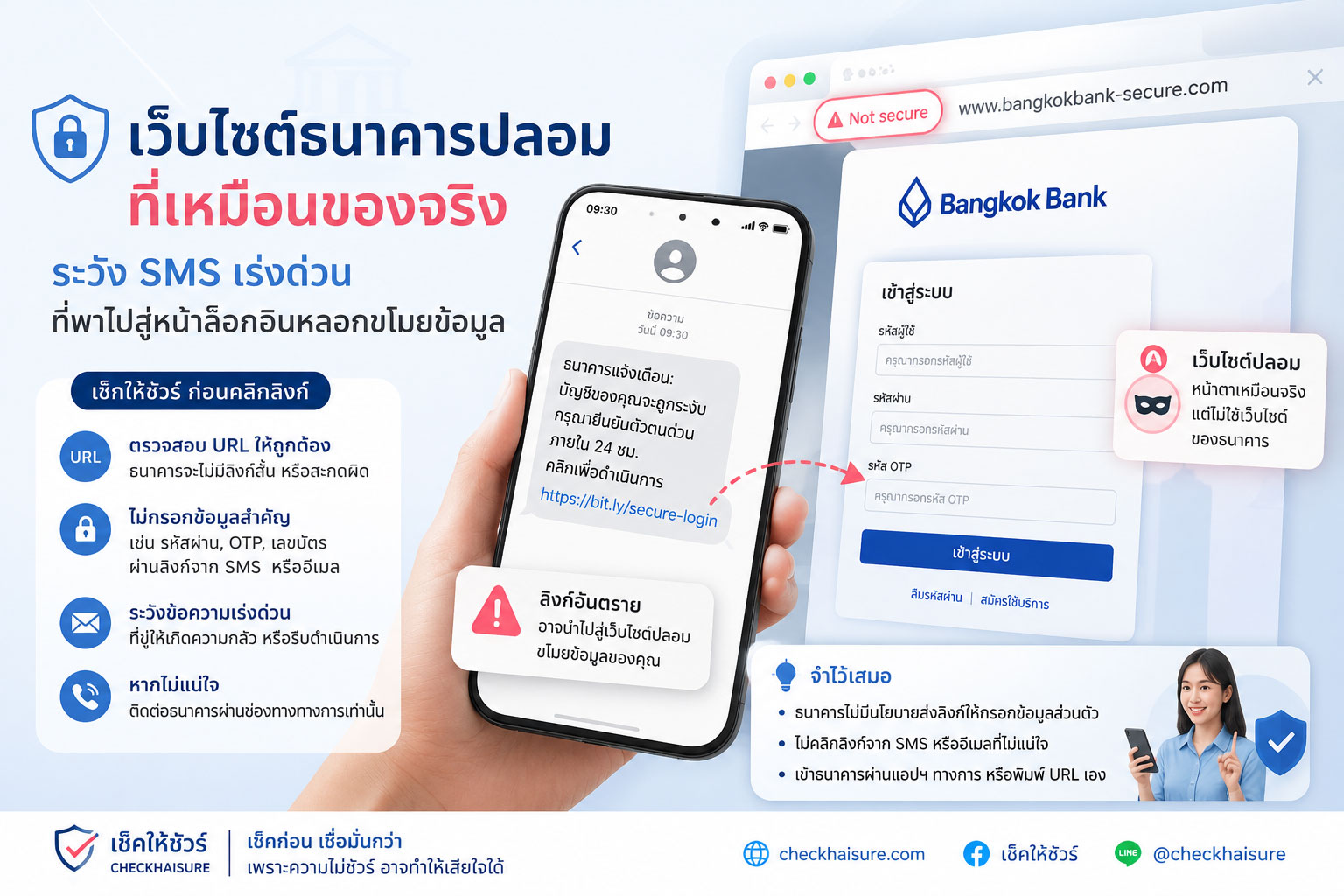
ตรงกันข้าม มันอาจมาในรูปแบบของเว็บไซต์ที่ดูเรียบร้อย สะอาด เป็นมืออาชีพ และคล้ายกับเว็บไซต์ธนาคารจริงมากจนหลายคนแทบแยกไม่ออก
มีโลโก้ธนาคาร
มีสีประจำแบรนด์
มีปุ่มล็อกอิน
มีช่องกรอก Username และ Password
มีหน้าให้กรอก OTP
มีข้อความแจ้งเตือนเหมือนระบบจริง
มีหน้าตาที่ดูเหมือนผ่านการออกแบบมาอย่างดี
แต่สิ่งที่ต่างออกไปคือ “โดเมน” และ “ระบบหลังบ้าน”
หน้าเว็บอาจดูเหมือนธนาคาร
แต่ปลายทางอาจไม่ใช่ธนาคาร
และข้อมูลที่เรากรอกลงไป อาจไม่ได้เข้าสู่ระบบของธนาคารจริง
แต่อาจถูกส่งตรงไปยังมิจฉาชีพ
เว็บปลอมยุคใหม่ไม่ได้หลอกด้วยความหยาบ แต่หลอกด้วยความเหมือนจริง
หลายคนยังคิดว่าเว็บไซต์ปลอมต้องดูแย่ ดูเก่า หรือเต็มไปด้วยความผิดพลาด
แต่ในปัจจุบัน เว็บไซต์ปลอมสามารถถูกทำให้เหมือนของจริงได้มากขึ้นอย่างน่ากังวล
มิจฉาชีพอาจคัดลอกหน้าตาเว็บไซต์จริงมาเกือบทั้งหมด
ใช้โลโก้ สี ฟอนต์ ปุ่ม และโครงสร้างหน้าเว็บที่คล้ายกัน
ทำให้หน้าเว็บดูเหมือนระบบธนาคารออนไลน์จริง
และออกแบบให้ผู้ใช้รู้สึกว่า “น่าจะปลอดภัย”
ความอันตรายอยู่ตรงนี้
เพราะเมื่อหน้าเว็บดูคุ้นตา สมองของเรามักลดการระวังตัวลง
เราอาจไม่ได้ดู URL อย่างละเอียด
ไม่ได้สังเกตชื่อโดเมน
ไม่ได้ตรวจว่าลิงก์มาจากช่องทางใด
และอาจรีบกรอกข้อมูลเพราะคิดว่านี่คือขั้นตอนปกติของธนาคาร
แต่เว็บไซต์ที่เหมือนจริง ไม่ได้แปลว่าเป็นเว็บไซต์จริง
หน้าตาเหมือน
สีเหมือน
ปุ่มเหมือน
ข้อความเหมือน
แต่ถ้าโดเมนไม่ใช่ของธนาคาร และระบบหลังบ้านไม่ได้เชื่อมกับธนาคารจริง นั่นอาจเป็นเพียงฉากหน้าของการขโมยข้อมูล
SMS ปลอมมักเริ่มจากคำว่า “ด่วน” “บัญชีมีปัญหา” หรือ “ต้องยืนยันตอนนี้”
เว็บไซต์ธนาคารปลอมมักไม่ได้อยู่โดดๆ
ส่วนใหญ่จะมาพร้อมกับข้อความ SMS, อีเมล, แชท หรือข้อความจากบัญชีที่แอบอ้างเป็นธนาคาร
เนื้อหามักถูกเขียนให้ดูเร่งด่วน เช่น
“บัญชีของคุณถูกระงับชั่วคราว กรุณายืนยันข้อมูลทันที”
“ตรวจพบรายการผิดปกติ หากไม่ได้ทำรายการ กรุณากดลิงก์เพื่อยกเลิก”
“ระบบต้องการอัปเดตข้อมูลบัญชีภายในวันนี้”
“บัญชีของคุณเสี่ยงถูกปิดใช้งาน”
“กรุณายืนยันตัวตนเพื่อป้องกันการถูกระงับบริการ”
“มีการเข้าสู่ระบบจากอุปกรณ์ใหม่ โปรดตรวจสอบทันที”
ข้อความเหล่านี้ไม่ได้ถูกออกแบบมาเพื่อให้ข้อมูลอย่างเป็นกลาง
แต่ถูกออกแบบมาเพื่อทำให้เรา “กลัว” และ “รีบกด”
ยิ่งข้อความทำให้รู้สึกว่าบัญชีธนาคารกำลังมีปัญหา โอกาสที่เราจะตัดสินใจเร็วโดยไม่ตรวจสอบก็ยิ่งสูงขึ้น
นี่คือกลยุทธ์สำคัญของการหลอกแบบ smishing
เริ่มจาก SMS ที่สร้างความตกใจ
ตามด้วยลิงก์ที่ดูเหมือนของธนาคาร
แล้วปิดท้ายด้วยหน้าเว็บปลอมที่ขอให้เรากรอกข้อมูลสำคัญ
จุดต่างที่สำคัญที่สุดอาจไม่ใช่หน้าตาเว็บ แต่คือชื่อโดเมน
เว็บไซต์ปลอมอาจทำหน้าตาให้เหมือนของจริงได้มาก
แต่สิ่งหนึ่งที่มักแตกต่างคือชื่อโดเมนหรือ URL
มิจฉาชีพอาจใช้โดเมนที่ดูคล้ายของธนาคาร เช่น เพิ่มคำบางคำเข้าไป เปลี่ยนตัวอักษรเล็กน้อย ใช้ขีดกลาง ใช้คำว่า secure, verify, update, online, service, support หรือใช้โดเมนย่อยที่ทำให้ดูน่าเชื่อถือ
ตัวอย่างเช่น เว็บไซต์จริงของธนาคารอาจมีชื่อโดเมนที่สั้น ชัดเจน และเป็นทางการ
แต่เว็บปลอมอาจใช้ชื่อที่ยาวผิดปกติ
มีคำต่อท้ายหลายคำ
มีตัวสะกดใกล้เคียงแต่ไม่เหมือน
มีตัวเลขแทรก
ใช้โดเมนแปลก
หรือใช้ลิงก์ย่อที่ทำให้เรามองไม่เห็นปลายทางจริง
บางครั้งบนหน้าจอมือถือ URL อาจแสดงไม่เต็ม ทำให้ผู้ใช้เห็นแค่ส่วนต้นของลิงก์และเข้าใจผิดว่าเป็นเว็บจริง
นี่คือเหตุผลที่ไม่ควรกดลิงก์ธนาคารจาก SMS โดยตรง
ถ้าต้องเข้าเว็บไซต์ธนาคาร ควรพิมพ์ชื่อเว็บไซต์เองจากแหล่งทางการ หรือเปิดผ่านแอปธนาคารที่ติดตั้งจาก Store ทางการเท่านั้น
แม่กุญแจ HTTPS ไม่ได้แปลว่าเว็บนั้นเป็นของธนาคารเสมอไป
หลายคนเคยได้ยินว่า ถ้าเว็บไซต์มีรูปแม่กุญแจหรือขึ้นต้นด้วย https แปลว่าปลอดภัย
ความจริงคือ https ช่วยบอกว่าการเชื่อมต่อระหว่างผู้ใช้กับเว็บไซต์มีการเข้ารหัสในระดับหนึ่ง
แต่ไม่ได้แปลว่าเว็บไซต์นั้นเป็นของธนาคารจริงเสมอไป
เว็บไซต์ปลอมก็สามารถมี https ได้
เว็บไซต์หลอกก็สามารถมีรูปแม่กุญแจได้
และเว็บที่เข้ารหัสก็ยังสามารถถูกใช้เพื่อขโมยข้อมูลได้ หากเจ้าของเว็บคือมิจฉาชีพ
ดังนั้น อย่าดูแค่แม่กุญแจ
ให้ดูด้วยว่าโดเมนถูกต้องหรือไม่
มาจากช่องทางทางการหรือไม่
ธนาคารเคยแจ้งช่องทางนี้ไว้จริงหรือไม่
และหน้าเว็บกำลังขอข้อมูลที่ไม่ควรขอผ่านลิงก์หรือไม่
แม่กุญแจช่วยเรื่องการเชื่อมต่อ
แต่ไม่ได้รับประกันความจริงใจของคนที่สร้างเว็บไซต์
เว็บไซต์ธนาคารปลอมต้องการข้อมูลอะไรจากเรา
เป้าหมายของเว็บไซต์ปลอมไม่ใช่แค่ทำให้เราคลิก
แต่คือทำให้เรากรอกข้อมูล
ข้อมูลที่มิจฉาชีพมักพยายามขอ ได้แก่
Username หรือ User ID สำหรับ Internet Banking
รหัสผ่าน
PIN
เลขบัตรประชาชน
เลขบัตรเดบิตหรือเครดิต
วันหมดอายุบัตร
CVV
เบอร์โทรศัพท์
วันเดือนปีเกิด
รหัส OTP
ข้อมูลบัญชี
หรือข้อมูลส่วนตัวอื่นๆ ที่ใช้ยืนยันตัวตนได้
บางเว็บอาจเริ่มจากขอข้อมูลธรรมดา เช่น ชื่อ เบอร์โทร หรือเลขบัตรประชาชน
จากนั้นค่อยพาไปหน้าถัดไปเพื่อขอข้อมูลลึกขึ้น เช่น รหัสผ่านหรือ OTP
บางเว็บอาจทำหน้าจอหมุนรอ หรือแสดงข้อความว่า “กำลังตรวจสอบ” เพื่อถ่วงเวลา ในขณะที่มิจฉาชีพนำข้อมูลที่ได้ไปใช้กับระบบจริง
บางกรณีอาจมีคนโทรเข้ามาในเวลาใกล้เคียงกัน อ้างว่าเป็นเจ้าหน้าที่ธนาคาร เพื่อขอ OTP หรือให้เราทำตามขั้นตอนเพิ่มเติม
ถ้าเว็บไซต์ใดที่มาจากลิงก์ใน SMS แล้วขอให้กรอกรหัสผ่านหรือ OTP ให้ถือเป็นสัญญาณอันตรายทันที
ธนาคารจริงมักไม่ขอให้คุณกรอกรหัสผ่านหรือ OTP ผ่านลิงก์ SMS
หลักที่ควรจำคือ ธนาคารและหน่วยงานการเงินที่น่าเชื่อถือโดยทั่วไปไม่ควรขอข้อมูลลับผ่านลิงก์ใน SMS
โดยเฉพาะข้อมูลอย่างรหัสผ่าน, PIN, OTP, เลขหลังบัตร หรือข้อมูลที่ใช้เข้าถึงบัญชี
ถ้าข้อความบอกว่าเป็นธนาคาร แต่ขอให้คุณกดลิงก์เพื่อกรอกข้อมูลสำคัญ ให้หยุดก่อน
ถ้าข้อความบอกว่าบัญชีมีปัญหา ให้เปิดแอปธนาคารด้วยตัวเอง หรือโทรหา call center จากเบอร์บนเว็บไซต์ทางการหรือหลังบัตร ไม่ใช่โทรกลับไปยังเบอร์ที่อยู่ใน SMS
ถ้าข้อความบอกว่าต้องทำทันทีภายในไม่กี่นาที ให้ยิ่งต้องระวัง
เรื่องเงินไม่ควรถูกตัดสินใจจากความตกใจ
และธนาคารจริงควรมีช่องทางทางการให้ตรวจสอบได้โดยไม่ต้องกดลิงก์แปลกๆ
สัญญาณเตือนของเว็บไซต์ธนาคารปลอม
ก่อนกรอกข้อมูลบนเว็บไซต์ใดๆ ที่อ้างว่าเป็นธนาคาร ให้สังเกตสัญญาณเหล่านี้
ลิงก์มาจาก SMS, แชท, อีเมล หรือข้อความที่คุณไม่ได้ร้องขอ
ข้อความมีความเร่งด่วนผิดปกติ เช่น บัญชีจะถูกปิด บัตรจะถูกระงับ หรือมีรายการผิดปกติ
URL ดูคล้ายธนาคารแต่ไม่ตรงกับโดเมนจริง
ชื่อโดเมนยาวผิดปกติ มีคำเสริมจำนวนมาก หรือใช้ตัวสะกดที่คล้ายแต่ไม่เหมือน
ลิงก์ถูกย่อจนมองไม่เห็นปลายทางจริง
หน้าเว็บขอรหัสผ่าน, PIN, OTP, เลขบัตร หรือข้อมูลส่วนตัวผ่านลิงก์
หน้าเว็บมีโลโก้และสีเหมือนจริง แต่เมนูบางส่วนกดไม่ได้ หรือเปิดไปหน้าเดิมซ้ำๆ
มีข้อความให้รีบทำรายการภายในเวลาจำกัด
มีคนโทรมาประกอบหลังจากคุณกดลิงก์หรือกรอกข้อมูล
เว็บไซต์ขอให้ดาวน์โหลดแอปเพิ่มเติมหรือติดตั้งไฟล์นอก Store
มีการสะกดคำแปลกๆ หรือภาษาไม่เป็นธรรมชาติ แม้หน้าตาเว็บจะดูดี
ถ้าเจอสัญญาณเหล่านี้ อย่ากรอกข้อมูลต่อ
ให้ปิดหน้าเว็บทันที และตรวจสอบผ่านช่องทางทางการของธนาคาร
วิธีตรวจสอบก่อนกดลิงก์ธนาคาร
วิธีที่ปลอดภัยที่สุดคือ ไม่กดลิงก์ธนาคารจาก SMS เลย
ถ้าข้อความบอกว่าบัญชีมีปัญหา ให้เปิดแอปธนาคารที่คุณใช้อยู่ด้วยตัวเอง
ถ้าต้องเข้าเว็บไซต์ ให้พิมพ์ชื่อเว็บไซต์จากแหล่งทางการด้วยตัวเอง หรือค้นหาจากแหล่งที่เชื่อถือได้ แล้วตรวจสอบโดเมนให้ถูกต้อง
ถ้าต้องโทรหา Call Center ให้ใช้เบอร์จากเว็บไซต์ทางการของธนาคาร หลังบัตร หรือแอปธนาคาร ไม่ใช้เบอร์ที่ส่งมาใน SMS
ถ้าไม่แน่ใจ ให้ติดต่อสาขาหรือช่องทางบริการลูกค้าทางการ
ถ้าได้รับข้อความน่าสงสัย ให้จับภาพหน้าจอ เก็บเบอร์ผู้ส่ง เก็บลิงก์ และตรวจสอบก่อนตอบกลับ
อย่าส่งต่อข้อมูลให้ใครเพียงเพราะเขาอ้างว่าเป็นเจ้าหน้าที่
และอย่าให้ OTP กับใคร ไม่ว่าจะอ้างเหตุผลใดก็ตาม
ถ้าเผลอกดลิงก์แล้ว ควรทำอย่างไร
ถ้าคุณกดลิงก์แล้ว แต่ยังไม่ได้กรอกข้อมูล ให้ปิดหน้าเว็บทันที
อย่ากรอกข้อมูล อย่าดาวน์โหลดไฟล์ และอย่ากดอนุญาตอะไรเพิ่มเติม
ถ้าคุณกรอกข้อมูลไปแล้ว เช่น Username, Password, PIN, เลขบัตร หรือ OTP ให้รีบติดต่อธนาคารทันทีผ่านช่องทางทางการ
ขอให้ธนาคารช่วยตรวจสอบบัญชี ระงับบริการที่เสี่ยง เปลี่ยนรหัสผ่าน หรือดำเนินการตามขั้นตอนความปลอดภัย
เปลี่ยนรหัสผ่านบัญชีที่เกี่ยวข้องทันที โดยเฉพาะถ้าใช้รหัสผ่านเดียวกันในหลายบริการ
ตรวจสอบรายการเคลื่อนไหวในบัญชีและบัตร
หากมีธุรกรรมผิดปกติ ให้แจ้งธนาคารและดำเนินการตามช่องทางที่เกี่ยวข้องโดยเร็ว
หากมีการติดตั้งแอปหรือไฟล์หลังจากกดลิงก์ ให้ตรวจสอบอุปกรณ์ ลบแอปที่ไม่รู้จัก และพิจารณาขอความช่วยเหลือจากผู้เชี่ยวชาญหรือศูนย์บริการที่เชื่อถือได้
อย่าโทษตัวเองจนไม่กล้าขอความช่วยเหลือ
มิจฉาชีพออกแบบเว็บและข้อความมาเพื่อให้คนตกใจและรีบทำตาม การหยุดและรีบแจ้งธนาคารคือสิ่งที่ควรทำทันที
ทำไมเว็บปลอมแบบนี้ถึงอันตรายกว่าที่คิด
เว็บไซต์ธนาคารปลอมไม่ได้ขโมยแค่รหัสผ่าน
แต่ข้อมูลที่ได้อาจถูกนำไปใช้ต่อในหลายทาง
มิจฉาชีพอาจใช้เข้าสู่ระบบบัญชีจริง
ใช้เปลี่ยนรหัสผ่าน
ใช้ผูกอุปกรณ์ใหม่
ใช้ทำธุรกรรม
ใช้สมัครบริการอื่น
ใช้โทรหลอกซ้ำโดยอ้างข้อมูลจริงของเรา
หรือขายข้อมูลต่อให้กลุ่มมิจฉาชีพอื่น
ยิ่งข้อมูลที่เรากรอกครบมากเท่าไร ความเสี่ยงก็ยิ่งสูงขึ้นเท่านั้น
บางคนอาจคิดว่า กรอกไปแค่เบอร์โทรหรือเลขบัตรประชาชนคงไม่เป็นไร
แต่สำหรับมิจฉาชีพ ข้อมูลเล็กๆ หลายชิ้นสามารถนำมาต่อกันจนกลายเป็นข้อมูลสำคัญได้
นี่คือเหตุผลที่ควรระวังตั้งแต่ขั้นแรก ไม่ใช่รอจนเงินหายแล้วค่อยเริ่มตรวจสอบ
ประโยคที่ควรจำ: เว็บเหมือนจริง ไม่ได้แปลว่าเป็นเว็บจริง
ในยุคที่หน้าเว็บสามารถถูกคัดลอกได้ง่าย การดูจากหน้าตาอย่างเดียวไม่พออีกต่อไป
โลโก้อาจเหมือน
สีอาจเหมือน
ปุ่มอาจเหมือน
ข้อความอาจเหมือน
หน้าล็อกอินอาจเหมือน
แม้แต่คำเตือนความปลอดภัยก็อาจถูกเขียนให้เหมือนจริง
แต่ของจริงต้องตรวจสอบได้จากโดเมน ช่องทางที่มา และพฤติกรรมของระบบ
ถ้าเว็บมาจากลิงก์ใน SMS ที่เร่งให้กรอกข้อมูล
ถ้าโดเมนไม่ตรงกับของธนาคาร
ถ้าขอรหัสผ่านหรือ OTP ผ่านลิงก์
ถ้าทำให้เรากลัวจนรีบตัดสินใจ
ให้หยุดทันที
เพราะในโลกออนไลน์ ความเหมือนไม่ใช่หลักฐานของความจริง
สรุป: อย่าให้ SMS ด่วนพาเราเข้าหน้าเว็บปลอม
เว็บไซต์ธนาคารปลอมอาจดูเหมือนของจริงมากขึ้นเรื่อยๆ
แต่กลโกงหลักยังเหมือนเดิม คือทำให้เราตกใจ กดลิงก์ กรอกข้อมูล และเปิดทางให้มิจฉาชีพเข้าถึงบัญชีหรือข้อมูลส่วนตัว
สิ่งที่ควรทำทุกครั้งเมื่อได้รับ SMS ที่อ้างว่าเป็นธนาคารคือ
หยุดก่อน
อย่ากดลิงก์ทันที
อย่าโทรกลับเบอร์ในข้อความ
อย่ากรอกรหัสผ่านหรือ OTP
เปิดแอปธนาคารเอง
ตรวจสอบโดเมนจากช่องทางทางการ
และติดต่อธนาคารผ่านเบอร์ที่ยืนยันได้เท่านั้น
จำไว้ว่า ธนาคารจริงควรให้คุณตรวจสอบผ่านช่องทางทางการได้ โดยไม่ต้องกดลิงก์แปลกๆ จาก SMS
และถ้าไม่แน่ใจ ให้เลือกหยุดก่อนเสมอ
เพราะการเสียเวลาเช็กเพิ่มอีกหนึ่งนาที อาจช่วยป้องกันการเสียเงิน ข้อมูล และความปลอดภัยของบัญชีได้มากกว่าที่คิด
Fake Banking Websites That Look Real: Beware of Urgent SMS Messages Leading to Fake Login Pages That Steal Your Information
Online threats do not always appear in a scary form.
They may not be full of spelling mistakes.
They may not use poor-quality images.
They may not look obviously untrustworthy.
And they may not look like a scam website at first glance.
On the contrary, they may appear as clean, professional-looking websites that look so similar to real banking websites that many people can hardly tell the difference.
They may have the bank’s logo.
They may use the bank’s brand colors.
They may have a login button.
They may show fields for username and password.
They may have a page asking for an OTP.
They may display system-like warning messages.
They may look like they were carefully designed.
But what is different is the “domain name” and the “backend system.”
The webpage may look like a bank.
But the destination may not be the bank.
And the information you enter may not go into the real banking system.
It may be sent directly to scammers.
Modern Fake Websites Do Not Rely on Poor Design. They Rely on Looking Real
Many people still think fake websites must look bad, outdated, or full of obvious mistakes.
But today, fake websites can be made to look worryingly similar to real ones.
Scammers may copy almost the entire appearance of a real website.
They may use similar logos, colors, fonts, buttons, and page layouts.
They may make the page look like a real online banking system.
And they may design it to make users feel that it is probably safe.
This is where the danger begins.
When a website looks familiar, our brain often becomes less cautious.
We may not look carefully at the URL.
We may not notice the domain name.
We may not check where the link came from.
And we may quickly enter our information because we think it is a normal banking step.
But a website that looks real is not always a real website.
The appearance may be the same.
The colors may be the same.
The buttons may be the same.
The wording may be the same.
But if the domain does not belong to the bank, and the backend system is not connected to the real bank, it may simply be a front designed to steal information.
Fake SMS Messages Often Begin with “Urgent,” “Account Problem,” or “Verify Now”
Fake banking websites usually do not appear on their own.
They often come together with SMS messages, emails, chats, or accounts pretending to be from a bank.
The message is usually written to create urgency, such as:
“Your account has been temporarily suspended. Please verify your information immediately.”
“Unusual activity has been detected. If this was not you, click the link to cancel.”
“Your account information must be updated today.”
“Your account may be deactivated.”
“Please verify your identity to prevent service suspension.”
“A login from a new device has been detected. Please check immediately.”
These messages are not designed to provide neutral information.
They are designed to make you feel afraid and rush to click.
The more the message makes you feel that your bank account is in trouble, the more likely you may act quickly without checking.
This is a key tactic in smishing.
It starts with an SMS that creates panic.
Then comes a link that looks like it belongs to the bank.
And finally, it leads to a fake webpage asking you to enter sensitive information.
The Most Important Difference May Not Be the Website Design, but the Domain Name
A fake website may look very similar to the real one.
But one thing is often different: the domain name or URL.
Scammers may use domains that look similar to a bank’s real domain. They may add extra words, change one or two letters, use hyphens, include words like secure, verify, update, online, service, or support, or use subdomains that appear trustworthy.
A real bank website usually has a short, clear, and official domain name.
But a fake website may use a domain that is unusually long.
It may contain many extra words.
It may have spelling that is close but not exact.
It may include numbers.
It may use an unusual domain extension.
Or it may use a shortened link that hides the real destination.
On a mobile screen, the full URL may not be visible, causing users to see only the beginning of the link and mistakenly believe it is real.
This is why you should avoid clicking banking links directly from SMS messages.
If you need to access your bank’s website, type the website address yourself using information from official sources, or use the official banking app installed from a trusted app store.
A Padlock or HTTPS Does Not Always Mean the Website Belongs to the Bank
Many people have heard that if a website has a padlock icon or starts with HTTPS, it is safe.
The truth is that HTTPS only means the connection between you and the website is encrypted to some degree.
It does not always mean the website belongs to the real bank.
Fake websites can also use HTTPS.
Scam websites can also show a padlock icon.
And an encrypted website can still be used to steal information if the website owner is a scammer.
So do not look only at the padlock.
Also check whether the domain is correct.
Check whether the link came from an official channel.
Check whether the bank has officially announced that channel.
And check whether the website is asking for information that should not be requested through a link.
A padlock helps protect the connection.
It does not guarantee the honesty of the person who created the website.
What Information Do Fake Banking Websites Want from You?
The goal of a fake website is not only to make you click.
It is to make you enter information.
Scammers may try to collect:
Username or User ID for internet banking
Password
PIN
National ID number
Debit or credit card number
Card expiry date
CVV
Phone number
Date of birth
OTP
Bank account information
Or other personal information that can be used for identity verification
Some websites may begin by asking for basic information, such as your name, phone number, or ID number.
Then they may lead you to the next page to ask for more sensitive information, such as your password or OTP.
Some fake websites may show a loading screen or a message saying “verifying” to buy time while scammers use the information on the real system.
In some cases, someone may call you around the same time, pretending to be a bank officer, asking for your OTP or telling you to follow additional steps.
If any website reached through an SMS link asks for your password or OTP, treat it as a serious warning sign immediately.
Real Banks Generally Do Not Ask You to Enter Passwords or OTPs Through SMS Links
A key rule to remember is that trusted banks and financial institutions generally should not ask for secret information through links in SMS messages.
This is especially true for passwords, PINs, OTPs, the security code on the back of a card, or information that can be used to access your account.
If a message claims to be from a bank and asks you to click a link to enter sensitive information, stop first.
If the message says your account has a problem, open your banking app yourself or call the official call center using a number from the bank’s official website or the back of your card. Do not call back the number shown in the SMS.
If the message says you must act within a few minutes, be even more cautious.
Money decisions should not be made out of panic.
A real bank should provide official channels where you can verify the issue without clicking suspicious links.
Warning Signs of a Fake Banking Website
Before entering information on any website claiming to be a bank, watch for these warning signs:
The link comes from an SMS, chat, email, or message you did not request.
The message is unusually urgent, such as claiming your account will be closed, your card will be suspended, or there is an abnormal transaction.
The URL looks similar to the bank’s website but does not match the real domain.
The domain name is unusually long, contains many extra words, or uses spelling that is similar but not exact.
The link is shortened, hiding the real destination.
The webpage asks for your password, PIN, OTP, card number, or personal information through a link.
The webpage has realistic logos and colors, but some menus do not work or repeatedly return to the same page.
There is a countdown or message pushing you to complete the action within a short time.
Someone calls you after you click the link or enter information.
The website asks you to download another app or install a file outside the official app store.
There are strange spelling mistakes or unnatural language, even though the page looks professional.
If you see these signs, do not continue entering information.
Close the webpage immediately and verify through the bank’s official channels.
How to Check Before Clicking a Banking Link
The safest method is simple: do not click banking links from SMS messages.
If a message says your account has a problem, open your banking app yourself.
If you need to visit the website, type the official website address yourself from a trusted source, or search through a reliable source and carefully check the domain.
If you need to call the bank’s call center, use the number from the bank’s official website, the back of your card, or the official banking app. Do not use the number sent in the SMS.
If you are unsure, contact the bank branch or official customer service channel.
If you receive a suspicious message, take a screenshot, save the sender’s number, save the link, and check before replying.
Do not share information just because someone claims to be an officer.
And never give your OTP to anyone, no matter what reason they give.
What to Do If You Already Clicked the Link
If you clicked the link but have not entered any information, close the webpage immediately.
Do not enter information.
Do not download any files.
Do not allow any additional permissions.
If you have already entered information such as your username, password, PIN, card number, or OTP, contact your bank immediately through official channels.
Ask the bank to check your account, suspend risky services, help change passwords, or follow the necessary security steps.
Change related passwords immediately, especially if you use the same password across multiple services.
Check your account and card transaction history.
If you notice any suspicious transaction, report it to your bank and proceed through the appropriate channels as quickly as possible.
If you installed an app or file after clicking the link, check your device, remove unknown apps, and consider seeking help from a trusted service center or security professional.
Do not blame yourself to the point that you delay getting help.
Scammers design websites and messages to make people panic and act quickly. Stopping and contacting the bank immediately is the right thing to do.
Why Fake Banking Websites Are More Dangerous Than They May Seem
Fake banking websites do not only steal passwords.
The information collected may be used in many ways.
Scammers may use it to log in to your real account.
They may use it to change passwords.
They may link a new device.
They may make transactions.
They may register for other services.
They may call again and use your real information to sound more convincing.
Or they may sell your data to other scam groups.
The more complete the information you enter, the higher the risk becomes.
Some people may think that entering only a phone number or ID number is not a big issue.
But for scammers, several small pieces of information can be combined into something very valuable.
This is why it is important to be careful from the first step, instead of waiting until money is gone before starting to check.
A Sentence to Remember: A Website That Looks Real Is Not Always Real
In an age where webpages can be copied easily, appearance alone is no longer enough.
The logo may look the same.
The color may look the same.
The buttons may look the same.
The wording may look the same.
The login page may look the same.
Even the security warning may look real.
But the real thing must be verified through the domain, the source of the link, and the behavior of the system.
If the website comes from an SMS link that pressures you to enter information,
if the domain does not match the bank’s real domain,
if it asks for a password or OTP through a link,
or if it makes you panic and rush,
stop immediately.
In the online world, similarity is not proof of authenticity.
Conclusion: Do Not Let an Urgent SMS Lead You to a Fake Website
Fake banking websites are becoming more realistic.
But the core scam remains the same: make you panic, make you click, make you enter information, and open the door for scammers to access your account or personal data.
Every time you receive an SMS claiming to be from a bank, remember to:
Pause first.
Do not click the link immediately.
Do not call back the number in the message.
Do not enter passwords or OTPs.
Open the banking app yourself.
Check the domain through official channels.
And contact the bank only through a verified number.
Remember, a real bank should allow you to check through official channels without forcing you to click suspicious links from SMS messages.
And if you are unsure, choose to pause first.
Spending one extra minute to check may help protect your money, your information, and the safety of your bank account.

Leave a Reply
You must be logged in to post a comment.